In this article we describe how to read data from Siemens RVD25x and RVD26x heating controllers via M-Bus. These controllers are commonly used in building automation for district heating substations and HVAC systems.
¶ 1 M-Bus Configuration
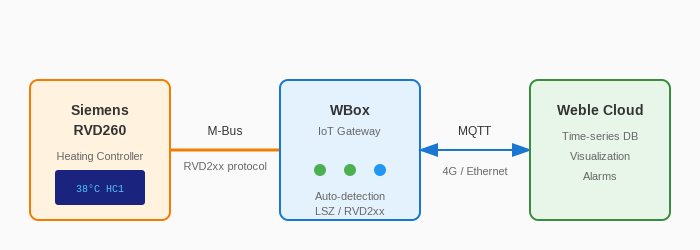
The RVD25x/RVD26x controllers communicate via standard M-Bus physical layer but use a proprietary multi-block data structure. The Weble IoT universal gateway automatically detects these controllers by their manufacturer code (LSZ - Landis+Staefa/Siemens) and activates the extended reading mode.
In the M-Bus gateway form, leave Legacy driver unchecked: only the current driver reads the RVD2xx blocks (on Linux, gateways created before this option run the legacy driver until you uncheck it and save). Then add the controller as an address %mbus:<primary address> (0-255) or %mbus:<secondary address> (16 hexadecimal characters), or create it with the primary or secondary address scan of the gateway. Once the controller answers, the gateway reads the blocks one after the other and creates one address per record, %mbus:<address>/<record id>.
¶ 2 Multi-Block Architecture
Unlike standard M-Bus devices that transmit all data at once, RVD2xx controllers organize data into 13 separate blocks. Only one block can be read at a time. The Weble gateway automatically cycles through the most useful blocks for monitoring:
| Block | Content |
|---|---|
| Device ID | Model identification, error codes, diagnostics |
| Setpoints | Temperature setpoints for heating circuits and DHW |
| Plant I/O | Actual temperatures, pump states, valve positions |
The other blocks (GlobalConfig, DeviceConfig, HeatCircuits, DHW, ConnectionSettings, LoadManagement, SwitchingHC1, SwitchingHC2, SwitchingDHW, Service) are not read by default. To read them, select the controller row (%mbus:<address>), click Update addresses and choose the blocks in RVD2xx blocks (the field appears once the gateway has detected the controller): this is the complete list of blocks to read. Extra blocks are read after the three default blocks.
¶ 2.1 Writing values
Writing is disabled by default. Check Write enabled in the same form. You can then write a record address %mbus:<address>/<record id> (or %mbus:<address>/<record id>/value when the gateway option Only values is unchecked): the gateway selects the block, writes the value and reads the block back to confirm it. Without Write enabled, the write fails with read only. If the controller refuses the value, the write fails with not applied: controller reads back .... Block selection, bus address and identification records are never written. Writing needs the current driver (Legacy driver unchecked).
¶ 3 Data Structure
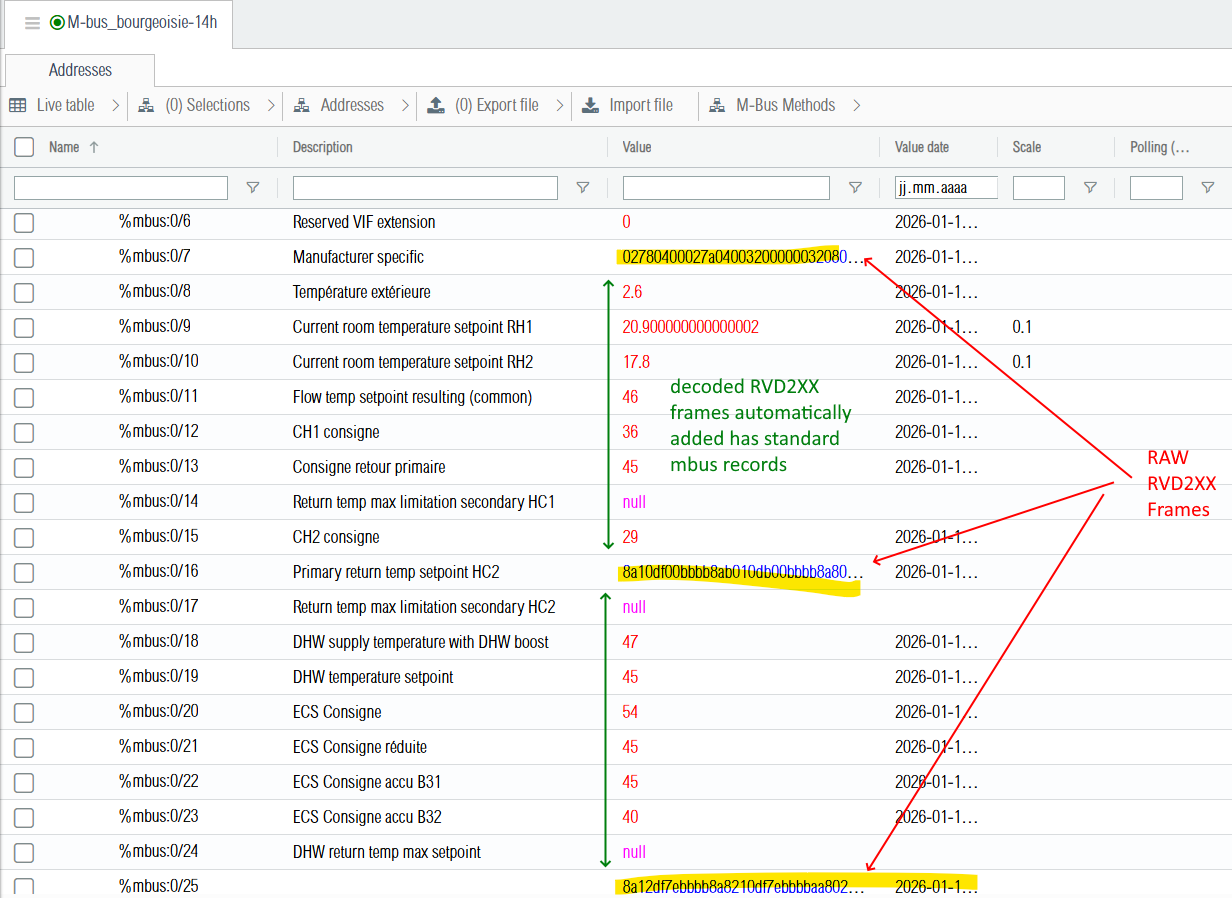
The gateway reads the 3 blocks sequentially and concatenates all records into a single stable M-Bus response. Each record keeps its id from one reading to the next. Ids are given in reading order: the standard records of DeviceID, Setpoints and PlantIO, then the values decoded from their manufacturer data, then the extra blocks. The ranges below are an example:
| ID Range | Block | Content |
|---|---|---|
| 0-7 | Device ID | Raw M-Bus records (identification) |
| 8-25 | Setpoints | Raw M-Bus records (temperature setpoints) |
| 26-42 | Plant I/O | Raw M-Bus records (actual values) |
| 43-63 | Device ID | Parsed manufacturer data (errors, diagnostics) |
| 64-66 | Setpoints | Parsed manufacturer data (differentials, pressure) |
| 67-83 | Plant I/O | Parsed manufacturer data (pumps, valves, outputs) |
Another model or firmware can return a different number of records, so check the ids on your controller: the description of each /N address shows the Siemens label and the block, for example Flow temp actual HC1 [PlantIO]. Removing a default block shifts all the following ids.
Each record includes a RVD2xxBlock field indicating the source block and a RVD2xxLabel field with the Siemens description.
¶ 3.1 Example Response (partial)
{
  "Id": 2375,
  "Manufacturer": "LSZ",
  "Medium": "Breaker: Electricity",
  "Meters": [
    {
      "id": 2,
      "Unit": "Parameter set identification",
      "Value": "RVD260",
      "RVD2xxBlock": "DeviceID",
      "RVD2xxLabel": "Parameter set identification (model)"
    },
    {
      "id": 29,
      "Unit": "Flow temperature (deg C)",
      "Tariff": 3,
      "Value": 38,
      "RVD2xxBlock": "PlantIO",
      "RVD2xxLabel": "Flow temp actual HC1"
    },
    {
      "id": 72,
      "Unit": "Stroke model HC1 (%)",
      "Value": 17,
      "RVD2xxBlock": "PlantIO",
      "RVD2xxLabel": "Stroke model HC1"
    },
    {
      "id": 77,
      "Unit": "Heat circuit pump speed HC1 (%)",
      "Value": 100,
      "RVD2xxBlock": "PlantIO",
      "RVD2xxLabel": "Heat circuit pump speed HC1"
    }
  ]
}
¶ 4 Transmitted Data
¶ 4.1 Temperatures
| Data Point | Description |
|---|---|
| Outside temp B9 | Outside temperature sensor |
| Flow temp HC1/HC2 | Flow temperature per heating circuit |
| Return temp HC1/HC2 | Return temperature per heating circuit |
| Room temp HC1/HC2 | Room temperature per heating circuit |
| DHW temp | Domestic hot water temperature |
¶ 4.2 Equipment Status
| Data Point | Description |
|---|---|
| Stroke model HC1/HC2/DHW | Valve position (0-100%) |
| Heat circuit pump HC1/HC2 | Pump speed (0-100%) |
| DHW charging pump | DHW pump speed (0-100%) |
| Collector pump | Solar collector pump (if installed) |
¶ 4.3 Diagnostics
| Data Point | Description |
|---|---|
| Disturbance 1/2 | Error registers (bitmask) |
| Device error system | System error code |
| M-Bus error codes | Communication error history (5 slots) |
| Operating mode | Current mode per circuit (Protection/Reduced/Comfort/Auto) |
| Active limitation | Current limitation status |
¶ 5 Applications
Once the heating data is retrieved on the Weble IoT Gateway, it can be used for various applications:
- Building monitoring: Track temperatures and equipment status in real-time
- Alarm management: Detect sensor failures or abnormal conditions via disturbance registers
- Energy optimization: Log valve positions and pump states to analyze system efficiency
- Remote supervision: Send data to cloud platforms via MQTT for centralized building management
- Historical logging: Export data as CSV files for analysis or regulatory compliance
¶ 6 Supported Models
| Model | Description |
|---|---|
| RVD250 | Basic heating controller |
| RVD255 | Heating controller with extended features |
| RVD260 | Advanced heating controller, 2 heating circuits |
| RVD265 | Advanced heating controller with solar support |
¶ 7 Notes
- The controller uses manufacturer code LSZ (Landis+Staefa, now Siemens)
- Medium is reported as "Breaker: Electricity" which is unusual for a heating controller
- Values of
nullindicate disconnected sensors or unused features - Reading all 3 blocks takes approximately 6 seconds due to M-Bus timing requirements
- Record IDs stay the same from one reading to the next and can be used for addressing (e.g.,
%mbus:0/72for Stroke model HC1 in the example above; check the ids on your controller, see section 3)