The API driver is an advanced driver that permits to make API calls to the IoT Universal Gateway modules using JSON formatted messages. With the help of routing functions, those API calls can be initiated from standard protocols such as HTTP(S), MQTT, Bacnet, etc... making the IoT universal gateway API methods interfacable with any supported protocols.
The Getting started first section of this document explains with basic examples how to use the API driver.
The following sections are more technical explain the modules of the driver. At the moment of this article, the API driver exposes the following IoT gateway modules
- Gateways. Used to get and configure other gateway drivers, their addresses, and routes.
- Loggers. Used to configure data acquisition on addresses values and their retrieval of the historical data stored on a local or cloud timeserie database.
Each API module has its own methods, hence there is a two level structure for API calls (level 1 is the module to use, and the second level is the method to call). API calls can be customized or limited for security reasons inside routing functions.
Although the applications are numerous, one potential use case is to receive API calls from the MQTT protocol has shown in the schema below.
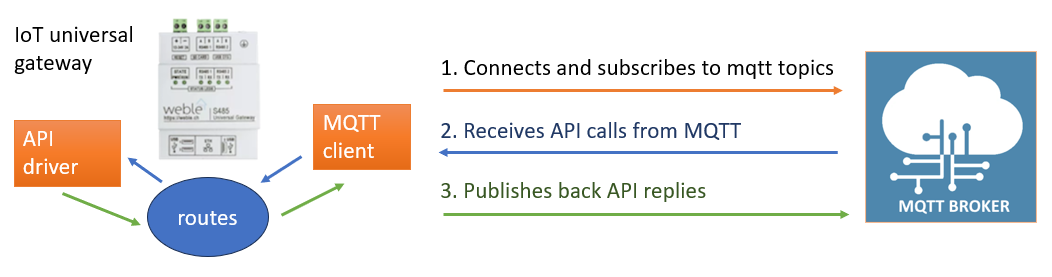
The last section of this article, Azure example, describes in details such an application. This example is taken from a project of an integration between the Azure IoT Hub and the API driver. It uses advanced routing functions and mechanisms.
¶ 1 Getting started
The API gateway is listed in the System gateways category (when clicking on the "Insert gateway" button).
This section explains
- the configuration of the gateway and its parameters
- how to do build and send requests to the API
- how to get and process the replies
- compact requests, which is a simplified way of sending some API requests
- multi requests, which merges multiple API calls in a single request.
¶ 1.1 Configuration
The API gateway has few options
- Segmentation : defines a maximum text size for JSON replies. If that size is exceeded, segments the reply in multiple segmented messages such as first segment
{"id" : "myCallId", "segment" : 1,"total" : 10, "value" : "{..start of reply.."}second segment{"id" : "myCallId", "segment" : 2,"total" : 10, "value" : "...json text segment..."},..., last segment{"id" : "myCallId", "segment" : 10,"total" : 10, "value" : "...end of reply...}"}. By concactenating all segmented messages one can reconstruct the full message. That option can be useful when working with protocols having size limitations on messages. - Reply with module : includes or not the module in the JSON reply.
- Reply with method : includes or not the method in the JSON reply.
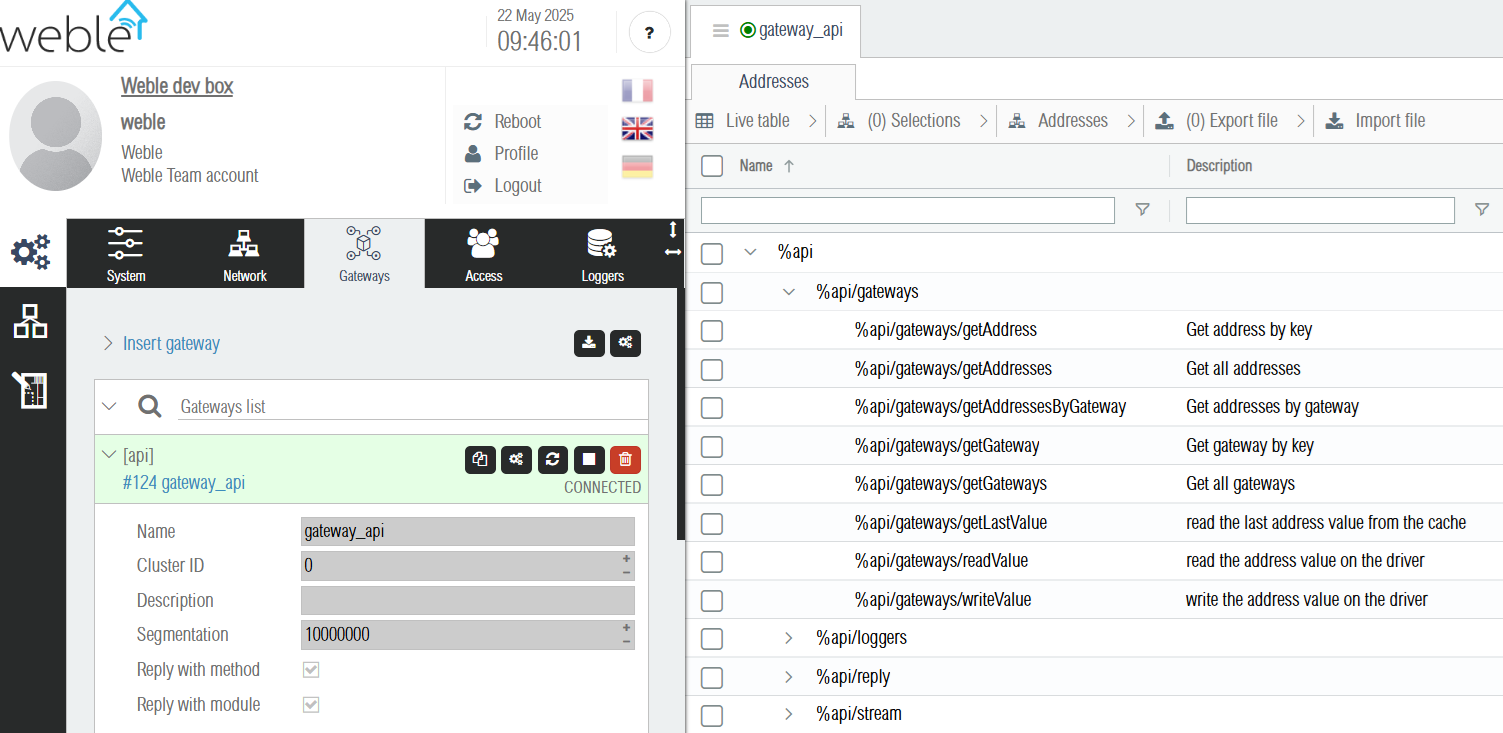
After inserting the gateway, it automatically creates addresses for its available API modules and their methods along with their description, as shown below.
¶ 1.2 Requests
For sending requests there is 3 level of addresses
- the root address
%api - the modules addresses, such as
%api/gatewaysand%api/loggers - the method addresses, such as
%api/gateways/getAddress,%api/gateways/readValue
Requests are JSON objects formatted as follow
{
    "id" : "xyzIdCreatedByTheAPIuser", // optional but recommended to match replies with their requests.
    "module" : "", // mandatory when writing on the root address "%api".
    "method" : "", // mandatory when writing on the root address "%api",
                                //  and on the modules addresses such as  "%api/gateways" and "%api/loggers".
    // "noreply" : true,  optional parameter to not get any responses from the API after the request call.

    // potential additional method specific parameters (depends on the method).
    // .
    // .
    // .
}
Note that the module and method parameters are not needed when sending the request directy to a method address such as %api/gateways/readValue.
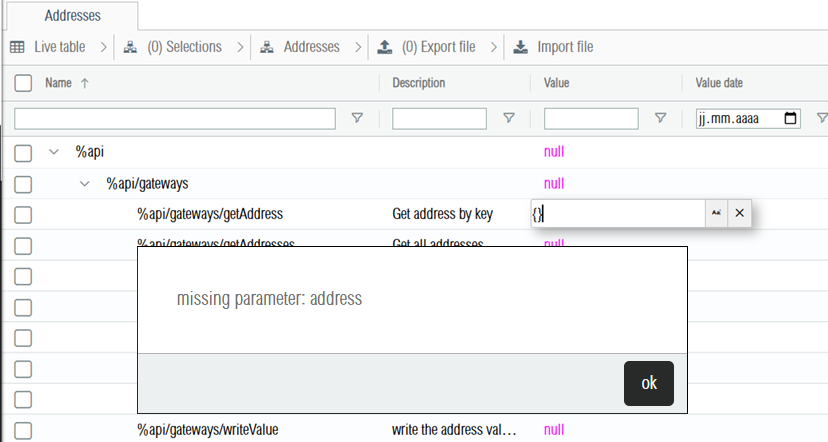
If the request is invalid, then an error is returned when writing it, and the request is not sent. As shown below writing an empty request to the method getAddress fails with the error "missing parameter: address".
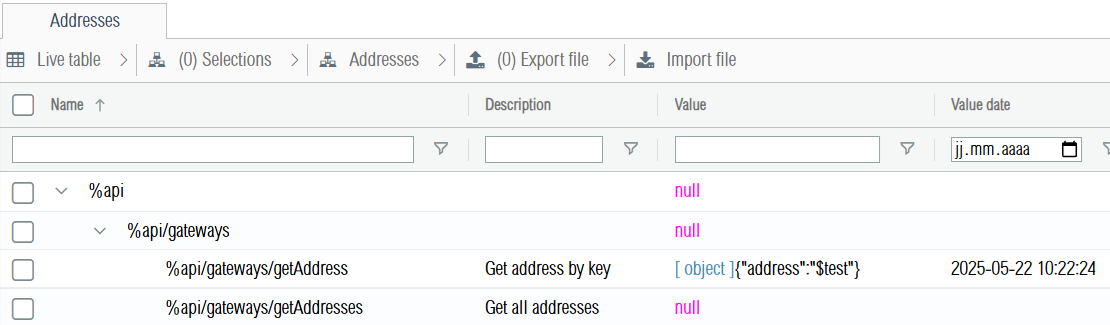
For the getAddress method, a correct query must include the "address" parameter. When the query is successfully sent, the request address takes the value of its last request as shown below.
¶ 1.3 Replies
Using the same example on the getAddress method, after sending the request {"address" : "$test"} on the %api/gateways/getAddress method address, the request is sent to the gateway API and the reply is communicated on another address, the %api/reply address.
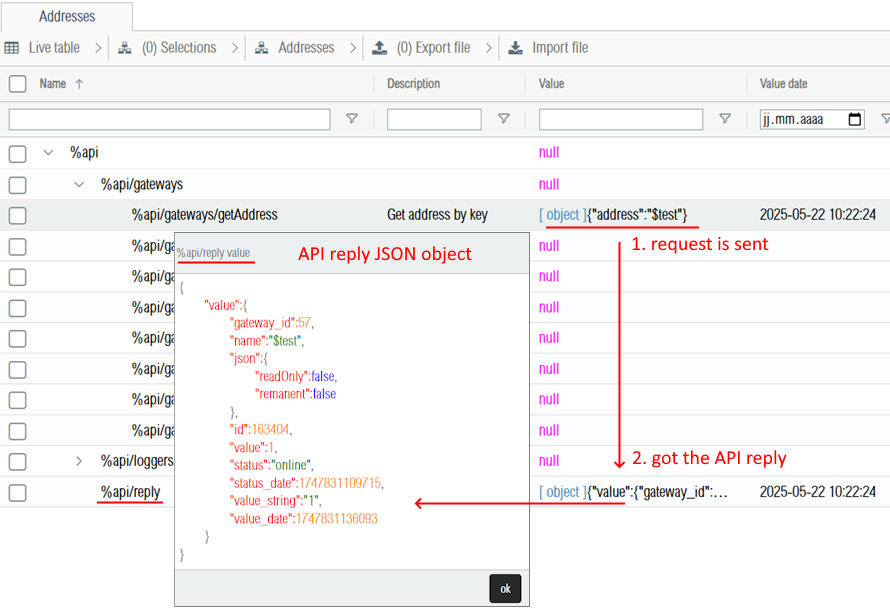
The API replie are always JSON objects structured as follows :
{
    "id" : "xyzIdCreatedByTheAPIuser", // equals to the request "id" parameter if it was defined.
    "module" : "gateways", // only defined if the gateway parameter "Reply with module" is set.
    "method" : "getAddress",  // only defined if the gateway parameter "Reply with method" is set.
    "error" : "invalid address", // defined if the request API call ends with an error.
    "value" : { // result of the request if it was successful.
        "gateway_id":57,
        "name":"$test",
        "json":{
            "readOnly":false,
            "remanent":false
        },
        "id":163404,
        "value":1,
        "status":"online",
        "status_date":1747831109715,
        "value_string":"1",
        "value_date":1747831136093
    }
}
Using the id parameter to match replies with their request is important if the API gateway is used by multiple users or in general when parallel requests are made to the API. In case of parallel requets, the order of replies is not guarenteed, i.e. the first request could get its reply after other subsequent requests. Some API methods take more time than others to reply.
¶ 1.4 Compact requests
Compact requests only applies to methods addresses (their name contains two / ).
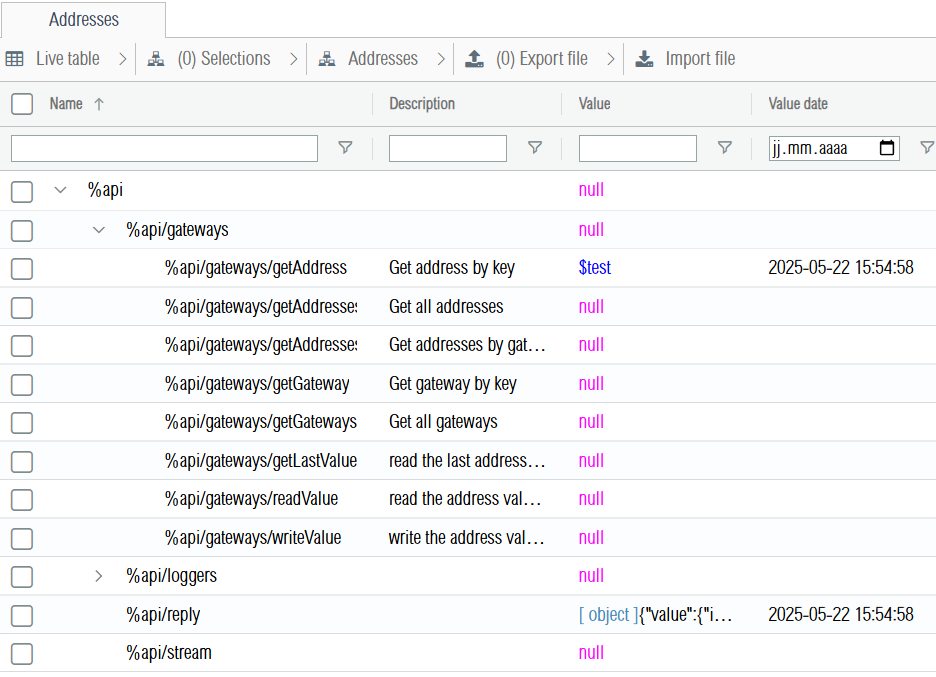
If the method has a single argument, or if the other arguments are optional, it is possible to pass the argument directly to the method. The example below shows the results when we write $test (the name of the address) to the %api/gateways/getAddress method address.
If the method has multiple arguments, those can be passed using an array of arguments.
The request id can be passed as first argument using the following notation [{id:"xyzId"}, "$test"]
¶ 1.3 Multi requests
It is possible to merge multiple requests that will be executed at once :
{
    "id" : "xyz",
    "requests" : [
        {
            "module":"gateways",
            "method":"writeValue",
            "address" : "$test",
            "value" : 12
        },{
            "module" : "gateways",
            "method" : "readValue",
            "address" : "$test"
        }
    ]
}
Here is the response if it succeeded :
[
    {
        "id":"xyz"
    },
    {
        "id":"xyz",
        "value":12
    }
]
¶ 2 Gateways module
The gateways module is the hearth of the Universal IoT Gateway has it permits to configure gateways (drivers), configure addresses (data points), and to define mappings / routes between the addresses.
¶ 2.1 Gateways
Gateways are the drivers that communicates on the field buses. There is different types of gateway, each protocol has its own gateway type. Mostly encountered protocols are bacnet, modbus, KNX, m-bus, MQTT, etc.. The type of a gateway is defined in its "driver" property.
Common properties between all gateways are the "id", "name", "description" parameters, but the "json" property will contain an object that varies depending on the gateway "driver" property.
Gateways can be inserted, updated, or deleted. Once a gateway is inserted, it is possible to start or stop it. Once a gateway is started, it will try to connect.
¶ 2.2 Addresses
Each gateway has multiples addresses. The most important address properties are its "value" which contains the decoded address value, the "value_string" which contains the text encoded value (the encoding varies depending on the protocol), and "value_date" which contains the unix timestamp in milliseconds indicating when the value was emitted by the driver.
Other common properties of addresses are the "id" (address unique numerical id), the "name" (unique within its gateway), "description", "gateway_id" (contains the unique numerical of the address gateway), and "log" which indicates the default acquisition for the default subscription (only applicable if time series logging is activated on the device).
Each address object has also a "json" property that will vary depending on the gateway protocol. It can even vary inside the protocol depending on the address name (each protocol can have different types or levels of addresses).
¶ 2.3 Methods
Description and examples of the gateways module methods.
¶ getGateways
Gets all gateways.
{
    "id": "myCallId",
    "module": "gateways",
    "method": "getGateways"
}
Reply example
JSON ...
{
  "id": "myCallId",
  "module": "gateways",
  "method": "getGateways",
  "value": {
    "55": {
      "id": 55,
      "name": "testbacnet",
      "description": "",
      "driver": "bacnet",
      "active": 1,
      "internal": 0,
      "cluster": 0,
      "state": "connected",
      "json": {
        "vendorId": 80,
        "vendorName": "Weble",
        "modelName": "EY-GTW103S",
        "id": 700,
        "bacnetDriver": "CSharp",
        "covLifetime": 10,
        "manageStatusFlags": [
          1,
          1,
          1,
          1
        ],
        "sendIamAtStart": false,
        "defaultPriority": 16,
        "onErrorValue": "",
        "errorRetries": 0,
        "objectValue": "all properties",
        "ip": [
          {
            "interface": "192.168.178.67/24",
            "port": 47808,
            "networkNumber": 0,
            "timeSyncBroadcastMs": "",
            "bbmds": [],
            "foreignRegistrations": []
          }
        ],
        "mstp": []
      },
      "private_json": {}
    },
    "57": {
      "id": 57,
      "name": "internal",
      "description": "",
      "driver": "virtual",
      "active": 1,
      "internal": 0,
      "cluster": 0,
      "state": "connected",
      "json": {},
      "private_json": {}
    },
    "66": {
      "id": 66,
      "name": "MBUS Signature energetique",
      "description": "",
      "driver": "remote",
      "active": 1,
      "internal": 0,
      "cluster": 0,
      "state": "connected",
      "json": {
        "url": "192.168.178.99",
        "username": "weble",
        "password": "...",
        "gateway": 18,
        "pushInitialValues": false,
        "ignoreInitialValues": false
      },
      "private_json": {
        "id": 18,
        "name": "mbus",
        "description": "",
        "driver": "mbus",
        "active": 1,
        "internal": 0,
        "cluster": 0,
        "state": "connected",
        "json": {
          "type": "serial",
          "host": "192.168.1.1",
          "port": 10001,
          "serialPort": "/dev/ttyS1",
          "serialBaudRate": 2400,
          "onlyValues": true,
          "emitOnlyChanges": "eachCycles",
          "polling": 1000,
          "tcpServer": false,
          "tcpServerPort": 8222,
          "requestTimeout": 5000,
          "idleTimeout": 100,
          "retry": 0,
          "applyUnitFactor": true,
          "legacyDriver": false
        },
        "private_json": {}
      }
    },
    "67": {
      "id": 67,
      "name": "Meteo",
      "description": "",
      "driver": "previsionMeteo",
      "active": 1,
      "internal": 0,
      "cluster": 0,
      "state": "connected",
      "json": {
        "locality": "yens"
      },
      "private_json": {}
    },
    "76": {
      "id": 76,
      "name": "testmodbus",
      "description": "",
      "driver": "modbus",
      "active": 1,
      "internal": 0,
      "cluster": 0,
      "state": "connected",
      "json": {
        "type": "tcpSlave",
        "ascii": false,
        "host": "192.168.1.99",
        "port": 502,
        "unitId": 1,
        "registerOffset": -1,
        "serialPort": "",
        "requestTimeout": 3000,
        "idleTimeout": 20,
        "baudRate": 19200,
        "parity": "N",
        "stopBit": 1,
        "ignoreFirstValuesMs": 0,
        "onErrorValue": "",
        "optimizeRead": false,
        "errorRetries": 2,
        "fillWithZeros": false,
        "mode": "local slave",
        "forwardSerial": "",
        "forwardBaudRate": 19200,
        "forwardStopBit": 1,
        "forwardHost": "",
        "forwardPort": "",
        "forwardRequestTimeout": 500,
        "forwardIdleTimeout": 0
      },
      "private_json": {}
    },
    "114": {
      "id": 114,
      "name": "apitest_internal",
      "description": "",
      "driver": "virtual",
      "active": 1,
      "internal": 0,
      "cluster": 0,
      "state": "connected",
      "json": {},
      "private_json": {}
    },
    "115": {
      "id": 115,
      "name": "testbacnet (1)",
      "description": "",
      "driver": "bacnet",
      "active": 1,
      "internal": 0,
      "cluster": 0,
      "state": "connected",
      "json": {
        "vendorId": 80,
        "vendorName": "Weble",
        "modelName": "EY-GTW103S",
        "id": 7444,
        "bacnetDriver": "CSharp",
        "covLifetime": 10,
        "manageStatusFlags": [
          1,
          1,
          1,
          1
        ],
        "sendIamAtStart": false,
        "defaultPriority": 16,
        "onErrorValue": "",
        "errorRetries": 0,
        "objectValue": "all properties",
        "ip": [
          {
            "interface": "192.168.178.67/24",
            "port": 47809,
            "networkNumber": 0,
            "timeSyncBroadcastMs": "",
            "bbmds": [],
            "foreignRegistrations": []
          }
        ],
        "mstp": []
      },
      "private_json": {}
    },
    "121": {
      "id": 121,
      "name": "fsdfdsfsd",
      "description": "",
      "driver": "knx",
      "active": 1,
      "internal": 0,
      "cluster": 0,
      "state": "connected",
      "json": {
        "mode": "ips",
        "host": "192.168.1.99",
        "multicastHost": "224.0.23.12",
        "port": 3671,
        "writeDelay": 200,
        "groupFormat": "3-level",
        "autoInsertAddress": true,
        "autoInsertDevice": true,
        "address": "15.15.250",
        "clientAddresses": "15.15.251:4",
        "ipsServerETS": 0,
        "filter": true,
        "server": 0,
        "serverPort": 3671,
        "serverETS": 0,
        "serverMulticast": 0,
        "serverMulticastAddress": "224.0.23.12"
      },
      "private_json": {}
    },
    "123": {
      "id": 123,
      "name": "sauter_cloud_azure",
      "description": "",
      "driver": "azure",
      "active": 1,
      "internal": 0,
      "cluster": 0,
      "state": "connected",
      "json": {
        "connectionString": "...",
        "protocol": "mqtt"
      },
      "private_json": {}
    },
    "124": {
      "id": 124,
      "name": "gateway_api",
      "description": "",
      "driver": "api",
      "active": 1,
      "internal": 0,
      "cluster": 0,
      "state": "connected",
      "json": {
        "segmentation": 10000,
        "replyWithMethod": true,
        "replyWithModule": true
      },
      "private_json": {}
    },
    "143": {
      "id": 143,
      "name": "sssasa",
      "description": "",
      "driver": "modbus",
      "active": 0,
      "internal": 0,
      "cluster": 0,
      "state": "disconnected",
      "json": {
        "type": "tcpMaster",
        "ascii": false,
        "host": "192.168.1.99",
        "port": 502,
        "unitId": 1,
        "registerOffset": -1,
        "serialPort": "",
        "requestTimeout": 3000,
        "idleTimeout": 20,
        "baudRate": 19200,
        "parity": "N",
        "stopBit": 1,
        "ignoreFirstValuesMs": 0,
        "onErrorValue": "",
        "optimizeRead": false,
        "errorRetries": 2,
        "fillWithZeros": false,
        "mode": "local slave",
        "forwardSerial": "",
        "forwardBaudRate": 19200,
        "forwardStopBit": 1,
        "forwardHost": "",
        "forwardPort": "",
        "forwardRequestTimeout": 500,
        "forwardIdleTimeout": 0
      },
      "private_json": {}
    }
  }
}
The gateways to retrieve can optionnaly be filtered with the filter parameter. The request below gets only bacnet gateways.
{
    "id": "myCallId",
    "module": "gateways",
    "method": "getGateways",
    "filter": {
        "driver": [
            "bacnet"
        ]
    }
}
Reply example
JSON ...
{
  "id": "myCallId",
  "module": "gateways",
  "method": "getGateways",
  "value": {
    "55": {
      "id": 55,
      "name": "testbacnet",
      "description": "",
      "driver": "bacnet",
      "active": 1,
      "internal": 0,
      "cluster": 0,
      "state": "connected",
      "json": {
        "vendorId": 80,
        "vendorName": "Weble",
        "modelName": "EY-GTW103S",
        "id": 700,
        "bacnetDriver": "CSharp",
        "covLifetime": 10,
        "manageStatusFlags": [
          1,
          1,
          1,
          1
        ],
        "sendIamAtStart": false,
        "defaultPriority": 16,
        "onErrorValue": "",
        "errorRetries": 0,
        "objectValue": "all properties",
        "ip": [
          {
            "interface": "192.168.178.67/24",
            "port": 47808,
            "networkNumber": 0,
            "timeSyncBroadcastMs": "",
            "bbmds": [],
            "foreignRegistrations": []
          }
        ],
        "mstp": []
      },
      "private_json": {}
    },
    "115": {
      "id": 115,
      "name": "testbacnet (1)",
      "description": "",
      "driver": "bacnet",
      "active": 1,
      "internal": 0,
      "cluster": 0,
      "state": "connected",
      "json": {
        "vendorId": 80,
        "vendorName": "Weble",
        "modelName": "EY-GTW103S",
        "id": 7444,
        "bacnetDriver": "CSharp",
        "covLifetime": 10,
        "manageStatusFlags": [
          1,
          1,
          1,
          1
        ],
        "sendIamAtStart": false,
        "defaultPriority": 16,
        "onErrorValue": "",
        "errorRetries": 0,
        "objectValue": "all properties",
        "ip": [
          {
            "interface": "192.168.178.67/24",
            "port": 47809,
            "networkNumber": 0,
            "timeSyncBroadcastMs": "",
            "bbmds": [],
            "foreignRegistrations": []
          }
        ],
        "mstp": []
      },
      "private_json": {}
    }
  }
}
¶ getGateway
Gets one specified gateway. The gateway parameter can either be its unique numerical id or the name of the gateway.
{
    "id": "myCallId2",
    "module": "gateways",
    "method": "getGateway",
    "gateway": 55
}
{
    "id": "myCallId2",
    "module": "gateways",
    "method": "getGateway",
    "gateway": "testbacnet"
}
Reply example
JSON ...
{
  "id": "myCallId2",
  "module": "gateways",
  "method": "getGateway",
  "value": {
    "id": 55,
    "name": "testbacnet",
    "description": "",
    "driver": "bacnet",
    "active": 1,
    "internal": 0,
    "cluster": 0,
    "state": "connected",
    "json": {
      "vendorId": 80,
      "vendorName": "Weble",
      "modelName": "EY-GTW103S",
      "id": 700,
      "bacnetDriver": "CSharp",
      "covLifetime": 10,
      "manageStatusFlags": [
        1,
        1,
        1,
        1
      ],
      "sendIamAtStart": false,
      "defaultPriority": 16,
      "onErrorValue": "",
      "errorRetries": 0,
      "objectValue": "all properties",
      "ip": [
        {
          "interface": "192.168.178.67/24",
          "port": 47808,
          "networkNumber": 0,
          "timeSyncBroadcastMs": "",
          "bbmds": [],
          "foreignRegistrations": []
        }
      ],
      "mstp": []
    },
    "private_json": {}
  }
}
¶ getAddresses
Gets all addresses of the system.
{
    "id": "call1234",
    "module": "gateways",
    "method": "getAddresses"
}
As for gateways, it is possible to filter the addresses by their properties. Here is an example of how a request to get only bacnet addresses.
{
    "id": "call1234",
    "module": "gateways",
    "method": "getAddresses",
    "filter": {
        "gateway.driver": [
            "bacnet"
        ]
    }
}
Reply example
JSON ...
{
  "id": "call1234",
  "module": "gateways",
  "method": "getAddresses",
  "value": {
    "111644": {
      "id": 111644,
      "alias": null,
      "name": "%bac:local/analogValue:1",
      "description": "aaaaa ||| CO2 from Airthings device 2950010267",
      "log": "none",
      "json": {
        "remanent": null,
        "defaultPriority": ""
      },
      "gateway_id": 55,
      "value": {
        "objectName": "aaaaa",
        "description": "CO2 from Airthings device 2950010267",
        "reliability": 0,
        "covIncrement": 0.001,
        "units": "partsPerMillion",
        "priorityArray": [
          null,
          null,
          null,
          null,
          null,
          null,
          null,
          null,
          null,
          null,
          null,
          null,
          null,
          null,
          null,
          null
        ],
        "relinquishDefault": 0,
        "statusFlags": [
          0,
          0,
          0,
          0
        ],
        "presentValue": 0
      },
      "value_string": "{\"objectName\":\"aaaaa\",\"description\":\"CO2 from Airthings device 2950010267\",\"reliability\":0,\"covIncrement\":0.001,\"units\":\"partsPerMillion\",\"priorityArray\":[null,null,null,null,null,null,null,null,null,null,null,null,null,null,null,null],\"relinquishDefault\":0,\"statusFlags\":[0,0,0,0],\"presentValue\":0}",
      "value_date": 1746429395235,
      "status": "online",
      "status_date": 1746429396195
    },
    "111645": {
      "id": 111645,
      "alias": null,
      "name": "%bac:local/analogValue:2",
      "description": "analogValue:2 ||| description of analogValue:2",
      "log": "none",
      "json": {
        "remanent": null,
        "defaultPriority": ""
      },
      "gateway_id": 55,
      "value": {
        "objectName": "analogValue:2",
        "description": "description of analogValue:2",
        "reliability": 0,
        "covIncrement": 0.001,
        "units": "noUnits",
        "priorityArray": [
          null,
          null,
          null,
          null,
          null,
          null,
          null,
          null,
          null,
          null,
          null,
          null,
          null,
          null,
          null,
          null
        ],
        "relinquishDefault": 0,
        "statusFlags": [
          0,
          0,
          0,
          0
        ],
        "presentValue": 0
      },
      "value_string": "{\"objectName\":\"analogValue:2\",\"description\":\"description of analogValue:2\",\"reliability\":0,\"covIncrement\":0.001,\"units\":\"noUnits\",\"priorityArray\":[null,null,null,null,null,null,null,null,null,null,null,null,null,null,null,null],\"relinquishDefault\":0,\"statusFlags\":[0,0,0,0],\"presentValue\":0}",
      "value_date": 1746429394695,
      "status": "online",
      "status_date": 1746429396195
    },
    "111646": {
      "id": 111646,
      "alias": null,
      "name": "%bac:local",
      "description": null,
      "log": null,
      "json": {},
      "gateway_id": 55,
      "value": {
        "name": "testbacnet",
        "id": 700,
        "description": "testbacnet",
        "segmentationSupported": "segmentedBoth",
        "maxApduLengthAccepted": 1476,
        "vendorIdentifier": 80,
        "vendorName": "Weble",
        "modelName": "EY-GTW103S",
        "ip": [
          {
            "address": "192.168.178.67/24:47808",
            "router": 0,
            "networkNumber": 0,
            "timeSyncMode": "none",
            "timeSyncBroadcastMs": 2000,
            "timeSyncUtc": 0,
            "bbmds": [],
            "foreignRegistrations": []
          }
        ],
        "mstp": [],
        "covLifetime": 10
      },
      "value_string": "{\"name\":\"testbacnet\",\"id\":700,\"description\":\"testbacnet\",\"segmentationSupported\":\"segmentedBoth\",\"maxApduLengthAccepted\":1476,\"vendorIdentifier\":80,\"vendorName\":\"Weble\",\"modelName\":\"EY-GTW103S\",\"ip\":[{\"address\":\"192.168.178.67/24:47808\",\"router\":0,\"networkNumber\":0,\"timeSyncMode\":\"none\",\"timeSyncBroadcastMs\":2000,\"timeSyncUtc\":0,\"bbmds\":[],\"foreignRegistrations\":[]}],\"mstp\":[],\"covLifetime\":10}",
      "value_date": 1746429394954,
      "status": "online",
      "status_date": 1746429396195
    }
  },
  // ... and many other addresses.
}
¶ getAddressesByGateway
Gets all addresses of one given gateway. The "gateway" parameter can be either the numerical id (here 55) or the gateway name (here "testbacnet")
{
    "id"  : "call12346",
    "module" : "gateways",
    "method" : "getAddressesByGateway"
  "gateway" : 55
}
{
    "id": "call12346",
    "module": "gateways",
    "method": "getAddressesByGateway",
    "gateway": "testbacnet"
}
Reply example ( here all addresses must have their "gateway_id" property equal to 55)
JSON ...
{
  "id": "call12346",
  "module": "gateways",
  "method": "getAddresses",
  "value": {
    "111644": {
      "id": 111644,
      "alias": null,
      "name": "%bac:local/analogValue:1",
      "description": "aaaaa ||| CO2 from Airthings device 2950010267",
      "log": "none",
      "json": {
        "remanent": null,
        "defaultPriority": ""
      },
      "gateway_id": 55,
      "value": {
        "objectName": "aaaaa",
        "description": "CO2 from Airthings device 2950010267",
        "reliability": 0,
        "covIncrement": 0.001,
        "units": "partsPerMillion",
        "priorityArray": [
          null,
          null,
          null,
          null,
          null,
          null,
          null,
          null,
          null,
          null,
          null,
          null,
          null,
          null,
          null,
          null
        ],
        "relinquishDefault": 0,
        "statusFlags": [
          0,
          0,
          0,
          0
        ],
        "presentValue": 0
      },
      "value_string": "{\"objectName\":\"aaaaa\",\"description\":\"CO2 from Airthings device 2950010267\",\"reliability\":0,\"covIncrement\":0.001,\"units\":\"partsPerMillion\",\"priorityArray\":[null,null,null,null,null,null,null,null,null,null,null,null,null,null,null,null],\"relinquishDefault\":0,\"statusFlags\":[0,0,0,0],\"presentValue\":0}",
      "value_date": 1746429395235,
      "status": "online",
      "status_date": 1746429396195
    },
    "111645": {
      "id": 111645,
      "alias": null,
      "name": "%bac:local/analogValue:2",
      "description": "analogValue:2 ||| description of analogValue:2",
      "log": "none",
      "json": {
        "remanent": null,
        "defaultPriority": ""
      },
      "gateway_id": 55,
      "value": {
        "objectName": "analogValue:2",
        "description": "description of analogValue:2",
        "reliability": 0,
        "covIncrement": 0.001,
        "units": "noUnits",
        "priorityArray": [
          null,
          null,
          null,
          null,
          null,
          null,
          null,
          null,
          null,
          null,
          null,
          null,
          null,
          null,
          null,
          null
        ],
        "relinquishDefault": 0,
        "statusFlags": [
          0,
          0,
          0,
          0
        ],
        "presentValue": 0
      },
      "value_string": "{\"objectName\":\"analogValue:2\",\"description\":\"description of analogValue:2\",\"reliability\":0,\"covIncrement\":0.001,\"units\":\"noUnits\",\"priorityArray\":[null,null,null,null,null,null,null,null,null,null,null,null,null,null,null,null],\"relinquishDefault\":0,\"statusFlags\":[0,0,0,0],\"presentValue\":0}",
      "value_date": 1746429394695,
      "status": "online",
      "status_date": 1746429396195
    },
    "111646": {
      "id": 111646,
      "alias": null,
      "name": "%bac:local",
      "description": null,
      "log": null,
      "json": {},
      "gateway_id": 55,
      "value": {
        "name": "testbacnet",
        "id": 700,
        "description": "testbacnet",
        "segmentationSupported": "segmentedBoth",
        "maxApduLengthAccepted": 1476,
        "vendorIdentifier": 80,
        "vendorName": "Weble",
        "modelName": "EY-GTW103S",
        "ip": [
          {
            "address": "192.168.178.67/24:47808",
            "router": 0,
            "networkNumber": 0,
            "timeSyncMode": "none",
            "timeSyncBroadcastMs": 2000,
            "timeSyncUtc": 0,
            "bbmds": [],
            "foreignRegistrations": []
          }
        ],
        "mstp": [],
        "covLifetime": 10
      },
      "value_string": "{\"name\":\"testbacnet\",\"id\":700,\"description\":\"testbacnet\",\"segmentationSupported\":\"segmentedBoth\",\"maxApduLengthAccepted\":1476,\"vendorIdentifier\":80,\"vendorName\":\"Weble\",\"modelName\":\"EY-GTW103S\",\"ip\":[{\"address\":\"192.168.178.67/24:47808\",\"router\":0,\"networkNumber\":0,\"timeSyncMode\":\"none\",\"timeSyncBroadcastMs\":2000,\"timeSyncUtc\":0,\"bbmds\":[],\"foreignRegistrations\":[]}],\"mstp\":[],\"covLifetime\":10}",
      "value_date": 1746429394954,
      "status": "online",
      "status_date": 1746429396195
    }
  },
  // ... and many other addresses.
}
¶ getAddress
Gets a single address by address key. The "address" parameter can be the address numerical id (111899)
{
    "id": "api_call_id_123",
    "module": "gateways",
    "method": "getAddress",
    "address": 111899
}
It is also possible to get the address by its name ("%bac:local/analogInput:1"). As the address names are not necessarly unique (e.g. 2 or more gateways of the same type), it is recommended to prefix the key with the gateway id ("55¬%bac:local/analogInput:1") or gateway name ("testbacnet¬%bac:local/analogInput:1").
{
    "id": "api_call_id_123",
    "module": "gateways",
    "method": "getAddress",
    "address": "testbacnet\u00ac%bac:local/analogInput:1"
}
To specify the gateway, the object notation {"gateway" : 55, "name" : "%bac:local/analogInput:1"} is also working.
{
    "id": "api_call_id_123",
    "module": "gateways",
    "method": "getAddress",
    "address": {
        "gateway": 55,
        "name": "%bac:local/analogInput:1"
    }
}
Reply example
JSON ...
{
  "id": "api_call_id_123",
  "module": "gateways",
  "method": "getAddress",
  "value": {
    "id": 111899,
    "alias": null,
    "name": "%bac:local/analogInput:1",
    "description": "test2 ||| fd",
    "log": "none",
    "json": {
      "remanent": null,
      "defaultPriority": ""
    },
    "gateway_id": 55,
    "value": {
      "objectName": "test2",
      "description": "fd",
      "reliability": 0,
      "covIncrement": 0.001,
      "units": "noUnits",
      "statusFlags": [
        0,
        0,
        0,
        0
      ],
      "presentValue": 0
    },
    "value_string": "{\"objectName\":\"test2\",\"description\":\"fd\",\"reliability\":0,\"covIncrement\":0.001,\"units\":\"noUnits\",\"statusFlags\":[0,0,0,0],\"presentValue\":0}",
    "value_date": 1746429395386,
    "status": "online",
    "status_date": 1746429396195
  }
}
{
    "id": "api_call_id_14",
    "module": "gateways",
    "method": "getAddress",
    "address": [
        111899,
        {
            "gateway": 55,
            "name": "%bac:local/analogInput:1"
        }
    ]
}
¶ getLastValue
Gets the last known value of an address by address key. The address parameter behaves the same as for the getAddress method. (By providing the property parameter an array, you can retrieve multiple values at once.)
{
    "id": "myCallId",
    "module": "gateways",
    "method": "getLastValue",
    "address": "testbacnet\u00ac%bac:local/analogInput:1"
}
Reply example
JSON ...
{
	"id": "myCallId",
  "module": "gateways",
  "method": "getLastValue",
  "value": {
    "objectName": "test2",
    "description": "fd",
    "reliability": 0,
    "covIncrement": 0.001,
    "units": "noUnits",
    "statusFlags": [
      0,
      0,
      0,
      0
    ],
    "presentValue": 0
  },
  "value_string": "{\"objectName\":\"test2\",\"description\":\"fd\",\"reliability\":0,\"covIncrement\":0.001,\"units\":\"noUnits\",\"statusFlags\":[0,0,0,0],\"presentValue\":0}",
  "value_date": 1746429395386
}
¶ readValue
Reads the address value on the driver. This query will usually write some packets on the field bus of the protocol. For example reading a modbus RTU register will write the modbus request packets on the RS485 twisted pair bus and wait for the response. This method should be used scarcely as it could impact performances of field buses.
{
    "id": "myCallId_read123",
    "module": "gateways",
    "method": "readValue",
    "address": "testbacnet\u00ac%bac:local/analogInput:1/presentValue"
}
Reply example
JSON ...
{
	"id":"myCallId_read123",
	"module":"gateways",
	"method":"readValue",
	"value":12
}
¶ writeValue
Writes the address value on the driver. This method should be used scarcely as it could impact performances of field buses.
{
    "id": "6c3a738c-266d-4de3-b248-8b7bae0021a6",
    "module": "gateways",
    "method": "writeValue",
    "value": 13,
    "address": "testbacnet\u00ac%bac:local/analogInput:1/presentValue"
}
Reply example
JSON ...
{
	"id" : "6c3a738c-266d-4de3-b248-8b7bae0021a6",
	"module" : "gateways",
	"method" : "writeValue"
}
In case of errors, as for other all API methods the error is returned in the "error" property. In this example we try to write the text "BONJOUR" into an analog bacnet object, which only accepts numerical values.
{
    "id": "6c3a738c-266d-4de3-b248-8b7bae0021a6",
    "module": "gateways",
    "method": "writeValue",
    "value": "BONJOUR",
    "address": "testbacnet\u00ac%bac:local/analogInput:1/presentValue"
}
And we get as result the "invalid value" error message in the reply JSON.
JSON ...
{
	"error":"invalid value",
	"id":"6c3a738c-266d-4de3-b248-8b7bae0021a6",
	"module":"gateways",
	"method":"writeValue"
}
¶ 3 Loggers module
The API for subscriptions and loggers is designed to record the data and send the data records to the loggers. The data is recorded by subscriptions, and loggers are subscribed to those to receive their data. The schema below describes the data flow coming from any protocols (bacnet,knx,modbus,m-bus, ...), then filtered / recorded by subscriptions, and forwarded to their subscribers (i.e. the historical data loggers). Once the data is stored into their loggers storage (cloud, timeserie database, etc..) it can be retrieved by an application (web interface or other) for energy monitoring, installation troubleshooting, or any other use cases. This architecture is highly versatile and configurable.
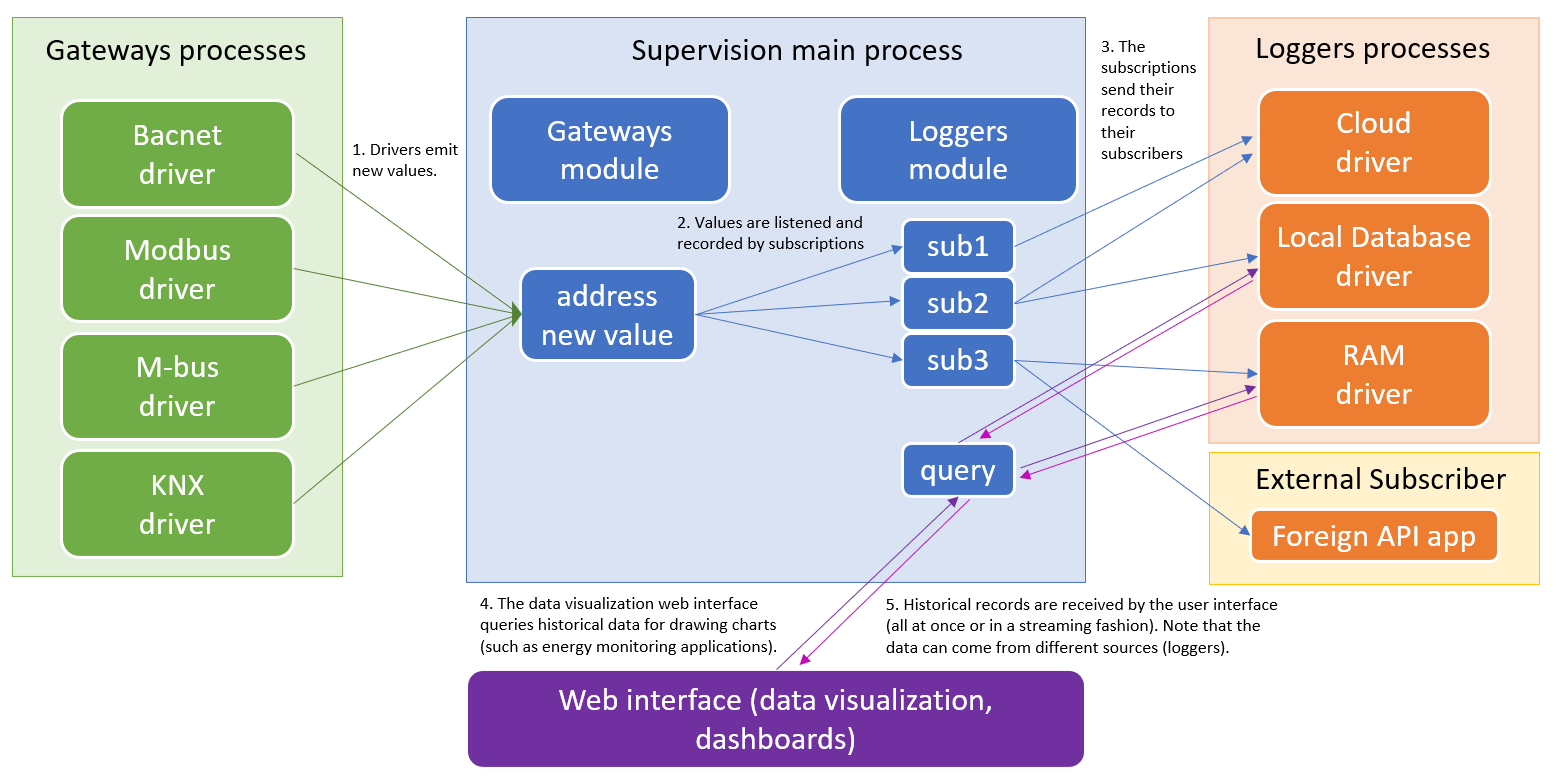
- Section 2.1 describes the general structure and principles of subscriptions (points 2 and 3 in the schema above).
- Section 2.2 discusses historical queries (points 4 and 5 in the schema above).
- Section 2.3 finally shows in details the API driver loggers module methods calls, and examples of replies.
¶ 2.1 Subscriptions
Subscriptions are used to acquire data from the addresses values. Each time a new value is emitted by a driver, its value can be recorded and buffered into the subscription. The addresses to record are also configurable in the subscription.
- Short term buffer designed to send the data to loggers for long term storage and historical data applications. In case of connection issues with the database / cloud, the buffer can be
- Securing the records to the DISK for later retrieval in case of temporary connection issues with database(s).
- Display of live values for widgets / dashboards with parameters (such as COV) to limit the traffic.
The subscriptions are made of two levels
- Subscriptions : responsible for all the recording parameters as described in the following section.
- Subscribers : different subscribers can consume the same data records sent by a subscription. The subscription keeps one buffer of records for each subscriber. Each subscriber can define some subscribe options when subscribing to a subscription, those options are saved in the subscriber object.
¶ Subscription properties
Subscriptions can have multiple subscribers. A subscription keeps one buffer for each of its subscribers. In this way it can re-send its recorded values to a subscriber if the connection fails. Buffers are flushed (sent) to subscriber(s) based on configurable conditions (such as the buffer size / time intervals).
Subscription properties:
- id : the name id of the subscription. It is a string (text) without special caracters and spaces that can contains slashes (/) (but no two consecutive slashes and not at the start or end of the string) . It must satisfy the following regular expression
/^(?!\/)(?!.*\/\/)(?!.*\/$)[\.\-a-zA-Z_0-9\/]+$/. - acquisition : The acquisition is a text field that defines when to record (or not record) a value. The acquisition can be a time interval in milliseconds (
"900000"will record at times hh:00, hh:15, hh:30, hh:45), or a CRON expression ("*/15 * * * *"will also record every 15 minutes). The acquisition can also be triggered by change of value events. If set to"always"it will record at each new value (even if the new value is strictly equal to the previous value). If set to"on_update"it will record a new value only if the previous value is different from the new value. It is also possible to record new values based on the change of value (the minimum difference between the new value and the last recorded value). This is done by setting the acquisition to"on_cov [minimumDiff]"such as"on_cov 1","on_cov 0.01","on_cov 0"(equivalent to"always"), etc... The on_cov notation also supports optional timing parameters: min, max, and maxdiff. The min parameter can introduce a minimum delay (ms) between each records. The max parameter will force the acquisition of a new record after the max delay (ms), even if the value didn't change. Finally the maxdiff parameter will force the acquisition of a new record after the maxdiff delay (ms), but only if the value changed (i.e. if the last recorded value is not strictly equal to the current value). For example"on_cov 0.1 maxdiff 60000"will record a change of value after 60 seconds even if the difference between the last recorded value and the current value is less than 0.1."on_cov 0.1 min 10000"will limit the number of recorded values to a maximum of 1 record every 10 second."on_cov 0.1 max 900000"will force new records every 15 minutes if the current value doesn't change enough (here a difference of 0.1) to trigger new records. Those options can be mixed together:"on_cov 0.1 min 10000 maxdiff 60000 max 900000"will not permit more than 1 record every 10 seconds, send a new record after 1 minute if the value changed without meeting the change of value condition, and force a new record every 15 minutes if the current value didn't change at all. Note that all the acquisition methods described above can be mixed together by seperating them with theorkeyword:"0 13 1 * * or 0 0 * * * or on_cov 0.1"adds a new record the first day of each month at 1 pm, every day at midnight, and whenever the value changes by a variation higher or equal to 0.1. The acquisition can also be taken dynamically in each recorded address log property by setting the acquisition to"adr.log". - addresses : The addresses taken into account for the creation of the records. It can be an array of precise addresses such as
"addresses" : [1223,2155,5122](here an array of addresses ids). If there is only one addresses it can be defined directly (as an address id or address name) without an array such as"addresses" : 1223. There are special cases such asaddresses : "all"(consider all addresses) andaddresses : "gateway_id=4"(consider only addresses of the gateway which has id4). Custom acquisitions can be defined individually by address such as"addresses" : [{"address" : 1223, "acquisition" : "0 0 * * *"},{"address" : 2155, "acquisition" : "adr.log"}, 5122]. In this example the address 1223 will be recorded every day at midnight, the address 2155 acquisition will be taken from its"log"address property, and the address 5122 will take the acquisition defined in the subscription"acquisition"property (i.e. the default subscription acquisition). - maxEntries : the total maximal number of value records kept in each subscriber's buffer. If the buffer exceeds its maximum number of entries, then oldest records are lost.
- maxBytes : the total maximal number of bytes in each subscriber's buffer (i.e. more precisely the size in bytes of the buffer JSON string). If the buffer bytes exceeds this value, then oldest records are lost.
- encoding : an object describing the encoding format of the records. The encoding is a javascript array, whose first item is the timestamp (unix timestamp in milliseconds), the second item is the address, and last item(s) is the value as following :
- address : the address field, if left empty it uses by default the address numerical id. The address can also be stored as a string include the address name and gateway_id. The string can be formated with address properties using jokers:
$id,$name,$gateway_id,$description,$json.xyz.abc ...For example setting"$gateway_id¬$name"would result in something like"55¬%bacnet/%bac:local/analogInput:1". Otherwise predefined patterns are"id"which is the address id (same as"$id"), and"logger", which is the format for loggers and equivalent to$gateway_id|$id. - value : The decoded value. The decoded value is usually a numerical value. If only numerical values are expected, this parameter should be set to
"numerical". If set to"json", then the records can contain JSON objects (including numerical values). It can also be set to"none". - value_string : optionaly the record can also contain the encoded text representing the value. This encoding can be the one of the gateway driver (can be specific to the protocol) by setting this property to
"driver". The encoded value string can contain more information than the decoded value. In modbus it is the raw packets bytes (without considering the address parameters (datatype, scale, and offset) used to compute the decoded value). In KNX the encoded group address value string also contains the participant/device address that wrote the packet to the group address.
- address : the address field, if left empty it uses by default the address numerical id. The address can also be stored as a string include the address name and gateway_id. The string can be formated with address properties using jokers:
-
flush : this object describes when to flush / send the buffered records to the subscriber(s). It also defines the minimum / maximum frequency between flushes, and the maximum size of each flush.
- maxEntries : the maximum number of records per flush.
- maxBytes : the maximum number of bytes per flush.
- onEntries : triggers automatically the flush once the buffer has this number of entries.
- onBytes : triggers automatically the flush once the number of bytes in the buffer reaches this threshold.
- onInterval : triggeres automatically the flush at times defined by the given cron expression. Can also take a number of milliseconds, like
10000to flush every 10 seconds. - minDelay : minimum delay in milliseconds between each consecutive flush. - maxDelay : maximum delay in milliseconds between each flush (only if there is still some records to flush).
- parallel : if the subscriber takes a long amount of time before acknowledging the received records, then it may possible to have multiple set of records waiting to be acknowledged by the subscriber. That parameter defines the maximum number of not yet ackwoledged parallel flushes that can be sent to the subscriber.
-
store : normally subscriptions keep their data records into the RAM memory, but those can be lost upon an unexpected reboot of the system. This parameter defines when to secure the records to the disk. Transitions between RAM and disk are automatic based on the configured thresholds.
- disk : defines which disk to use, either the default device
"system"disk, or some attached usb disks. - onEntries : triggers the storage of records to disk when the buffer number of records reaches this threshold.
- onAckTimeouts : triggers the storage of records to disk after this number of consecutive acknowledgment timeouts from the subscriber. For example, a value of
3means after 3 consecutive failed flushes, all records are persisted to disk. The counter resets on successful acknowledgment. Note: timeouts that occur while the subscription is paused (e.g., driver stopped) are ignored and do not count toward this threshold. - onPausedDelay : delay in milliseconds before storing records to disk when the subscription is paused. Default is
300000(5 minutes). If the subscription is from a driver, stop and crash/restarts of the driver automatically triggers a pause/resume of the subscription. This ensures data is persisted to disk if the driver remains stopped for an extended period. - onRamOverflow :
trueorfalse. If set totrue, when system RAM usage exceeds 90%, records are automatically stored to disk to free memory instead of being deleted. - maxEntries : defines the maximum number of records written to the disk (to preserve SD card).
- maxDuration : defines a maximum duration (in milliseconds) for keeping records on disk. After this duration, a warning is logged. This helps preserve SD cards on embedded devices.
- disk : defines which disk to use, either the default device
-
subscribers. an object whose keys are the subscribers names and values are subscriber objects as defined in the next section. This property cannot be updated directly has it is the result of subscribers subscribing and unsubscribing (by calling the subscribe / unsubscribe methods).
There is always at least one subscription in the system, the default subscription. That subscription is created automatically by the system and cannot be deleted. The default subscription is typically used by the loggers. If a logger is not subscribed to any subscriptions, it gets automatically subscribed to the default subscription. The default subscription parameters can be modified.
Example of the default subscription :
{
    "id" : "default", // The default subscription id (never changes).
    "acquisition" : "adr.log", // uses the addresses log property (can be different for each address).
    "addresses" : "all",  // consider all addresses of the universal IoT gateway.
    "maxEntries" : 1000000, // number of maximum entries in the buffer (per subscriber).
  //"maxBytes" :  100000000, // number of maximum bytes in the buffer (here 100 mb).
    "encoding" : { // encoding of the records
        "value" : "numerical",    // records include the decoded numerical value.
        "value_string" : "driver" // records also include the textual value encoded by the driver.
    },
    "flush" : {
        "maxEntries" : 100,  // when flush, flush maximum 100 entries at once.
      //"maxBytes" : 10000
        "onEntries" : 1,   // if reach 1 entries ore more immediatly try to flush
      //"onBytes" : 100,
      //"onInterval"  : "0 0 * * *", //flush at midnight
        "minDelay"   : 250,  // wait at least 250 ms between flushes.
        "maxDelay"  : 1000, // don't wait more than 1000 ms before flushing.
        "parallel" : 20    // max number of parallel flushes not yet acknowledged by the subscriber.
    },
    "store" : {  // describes when to secure the records to the disk
        "disk" : "system", // 'system' or the external usb disk id
        "onEntries" : 100000, // transition to EXTENDED mode when buffer exceeds 100k entries
        "onAckTimeouts" : 3, // transition to FILE mode after 3 consecutive ack timeouts
        "onRamOverflow" : true, // transition to FILE mode if RAM > 90%
        "maxDuration" :  604800000  // max duration for disk storage (here one week = 7*24*60*60*1000 ms)
    },
    "subscribers" : { // the list of currently subscribed subscribers.
        "logger_1" : { /*... subscriber object of the time series database logger*/  }
    }
}
¶ Subscriber objects properties
When the subscriber subscribes to a subscription (using the subscribe method), it sends a subscriber object that is stored inside the subscription. Subscriber objects are stored in the "subscribers" property.
Subscriber object properties:
- subscription : The name id of the subscription. If the name ends with
/such as inlive/, then it subscribes to all subscriptions whose id starts withlive/such aslive/sub1,live/sub2,live/firstFloor/sub3,.... To subscribe to all subscriptions of the system, this field can be left empty or set to/. - subscriber : The name id of the subscriber. If subscribe calls are made from different places (such as a different device or a different process within the same device), then each place should use its own unique subscriber name id to avoid conflicts.
- lifetime (ms) : if the subscriber object is not renewed, the subscriber will be automatically unsubscribed after the defined
"lifetime"delay. That parameter is a number in milliseconds. If left empty or configured to0, then it is permanenet (lasts forever) until the unsubscribe method is called by the subscriber. - keepalive (ms) : if no messages are sent to the subscriber after this delay, then the subscription sends to the subscriber a keepalive message (with no records).
- ack : Defines if the subscriber needs to acknowledge the records sent to him by the subscription. This parameter supports the values
"id"or"md5". With the"id"options, records are sent along with a flushidthat needs to be used by the subscriber to acknowledge the reception of the records (using the ackSubscribe method). With the"md5"options, the records are acknowledged by the subscriber by computing the md5 hash of the records and sending it back to the subscription. If this parameter is left empty or set tofalseornullthen the records are flushed and directly removed from the buffer without waiting acknowledgments from the subscriber. (Note that if the subscribe method is used outside of the api driver but directly from the peers api, it is also possible to configure it to"auto", which will force the javascript subscriber to automatically acknowledge the records upon receival). - encoding. Subscribers can define their own encoding for the records, if not provided the default subscription encoding is used.
- paused. Can be used to specify if the subscription is paused or not.
- inactive. Can be used to specify if the subscription is inactive (i.e. no records buffering).
Example of a subscriber object
{
  // subscriber object properties
  "subscription" : "default",
  "subscriber" : "weble",
  // optional subscriber object properties
  "lifetime" : 100000, // the subscribe dies after 1 minute and 40 seconds.
  "keepalive" : 10000, // if no records are sent during 10 seconds, send empty records.
  "ack" : "md5" // has to acknowledge records by computing their md5 hash.
  "encoding" : { // custom encoding for the buffer
  			"address" : "id",
  	    "value" : "json",
        "value_string" : "driver"
   }
}
¶ 2.2 Historical Queries
Here are the parameters to query historical data :
- address : a single address identifier (
111905) or an array of addresses identifiers ([111905,111654, ...]). - start : start date, unix timestamp in milliseconds. E.g.
1747000800000is 12 may 2025 - end : end date, unix timestamp in milliseconds. E.g.
1747087200000is 13 may 2025 - before :
trueorfalse. If true, it also takes also the data points just before the start date. - after :
trueorfalse. If true, it also takes the data points just after the end date. - aggregate : interval duration for the aggregation. The duration of each aggregation interval can be defined with different units :
- milliseconds :
60000(number of milliseconds, here 1 minute). - seconds :
"60s"(text containing the number of seconds suffixed with letters). - minutes :
"15m"(text containing the number of minutes suffixed with letterm). - hours :
"12h"(text containing the number of hours suffixed with letterh). - days :
"7d"(text containing the number of days suffixed with letterd). - weeks :
"2w"(text containing the number of weeks suffixed with letterw). - months :
"12o"(text containing the number of months suffixed with lettero).
- milliseconds :
- fill : determines what to do when there is no values in a given aggregate. Possible values are
"none"(do not send values for the empty intervals),"last"(fill empty intervals with the last known value before the interval),"linear"(line interpolation between the value before and after the empty intervals),"boundaries"(fill only the first and last intervals and does not fill empty intervals in betweeen). Setting"linear"is correct for line charts. - anchor :
"left"(default) or"center". Only for aggregates. Setting"center"is correct for line charts.
Example of a query without aggregation
{
        "address" : "%mbus:1/0",
        "start" : 1747000800000,
        "end" : 1747087200000
}
Example of its raw history records (result of query)
{
  "ts": 1747000810800,
  "address": "%mbus:1/0",
  "value": 29848,
  "value_string": "29848"
}
{
  "ts": 1747000824489,
  "address": "%mbus:1/0",
  "value": 29848,
  "value_string": "29848"
}
{
  "ts": 1747000838172,
  "address": "%mbus:1/0",
  "value": 29848,
  "value_string": "29848"
}
Example of a query with an aggregation of 15 minutes
{
        "address" : "%mbus:1/0",
        "start" : 1747000800000,
        "end" : 1747087200000,
        "aggregate" : "15m"
}
Example of aggregated records
{
  "ts": 1747000800000,
  "address": "%mbus:1/0",
  "value_first": 29848,
  "value_last": 29848,
  "value_min": 29848,
  "value_max": 29848,
  "value_avg": 29847.999999999996,
  "value_var": 7.22908759445041e-23,
  "value_count": 65,
  "start": 1747000800000,
  "end": 1747001700000
}
{
  "ts": 1747001700000,
  "address": "%mbus:1/0",
  "value_first": 29848,
  "value_last": 29848,
  "value_min": 29848,
  "value_max": 29848,
  "value_avg": 29848,
  "value_var": 1.9258444355258506e-23,
  "value_count": 66,
  "start": 1747001700000,
  "end": 1747002600000
}
{
  "ts": 1747002600000,
  "address": "%mbus:1/0",
  "value_first": 29848,
  "value_last": 29848,
  "value_min": 29848,
  "value_max": 29848,
  "value_avg": 29848,
  "value_var": 1.5999431539513596e-23,
  "value_count": 66,
  "start": 1747002600000,
  "end": 1747003500000
}
{
  "ts": 1747003500000,
  "address": "%mbus:1/0",
  "value_first": 29848,
  "value_last": 29848,
  "value_min": 29848,
  "value_max": 29848,
  "value_avg": 29848.000000000007,
  "value_var": 3.8721077832233975e-23,
  "value_count": 66,
  "start": 1747003500000,
  "end": 1747004400000
}
{
  "ts": 1747004400000,
  "address": "%mbus:1/0",
  "value_first": 29848,
  "value_last": 29848,
  "value_min": 29848,
  "value_max": 29848,
  "value_avg": 29848.000000000004,
  "value_var": 4.958824868814964e-23,
  "value_count": 66,
  "start": 1747004400000,
  "end": 1747005300000
}
{
  "ts": 1747005300000,
  "address": "%mbus:1/0",
  "value_first": 29848,
  "value_last": 29848,
  "value_min": 29848,
  "value_max": 29848,
  "value_avg": 29848.000000000004,
  "value_var": 6.83044366977094e-23,
  "value_count": 66,
  "start": 1747005300000,
  "end": 1747006200000
}
¶ 2.2 Methods
-
methods to configure the subscriptions : getSubscriptions, getSubscription, insertSubscription, updateSubscription, replaceSubscription, and deleteSubscription.
-
methods to interact with subscriptions : subscribe, unsubscribe, flushSubscribe, ackSubscribe, pauseSubscribe, and resumeSubscribe.
-
methods to retrieve recorded data : query (for historical data), and live (for live data).
¶ getSubscriptions
This method gets all the subscriptions.
{
    "id": "12345",
    "module": "loggers",
    "method": "getSubscriptions"
}
It can also get all subscriptions starting with a prefix ending with /. In the following example it gets all subscription whose id starts with "weble/".
{
    "id": "12345",
    "module": "loggers",
    "method": "getSubscriptions",
    "subscription": "weble/"
}
The reply is an array of subscriptions objects.
¶ getSubscription
this method gets a single subscription.
{
    "id": "getSingleSub12345",
    "module": "loggers",
    "method": "getSubscription",
    "subscription": "default"
}
¶ insertSubscription
{
    "id": "qwertz",
    "module": "loggers",
    "method": "insertSubscription",
    "subscription": {
        "id": "weble/myNewSubscription",
        "addresses": [
            111905,
            111654
        ],
        "acquisition": "on_cov 0.01"
    }
}
¶ updateSubscription
This method changes the subscription parameters. If the subscription doesn't exists it returns an error.
{
    "id": "myCallId99",
    "module": "loggers",
    "method": "updateSubscription",
    "subscription": {
        "id": "weble/myNewSubscription",
        "addresses": [
            111905
        ],
        "acquisition": "on_cov 0.001"
    }
}
¶ replaceSubscription
This method inserts a new subscription or updates the existing subscription.
{
    "id": "myCallId98",
    "module": "loggers",
    "method": "replaceSubscription",
    "subscription": {
        "id": "weble/myNewSubscription",
        "addresses": [
            111905
        ],
        "acquisition": "on_cov 0.001"
    }
}
¶ deleteSubscription
This method deletes an existing subscription. It returns an error if it doesn't exists. Calling this method automatically unsubscribes from the subscriptoin all of its subscribed subscribers. Which means that if you are subscribed to this subscription, you will receive a message with the unsubscribed error : {"error" : "unsubscribed", ...}.
{
    "id": "myCallId97",
    "module": "loggers",
    "method": "deleteSubscription",
    "subscription": "weble/myNewSubscription"
}
¶ subscribe
{
  "id":"subscribeCallId_xyz",
  "module":"loggers",
  "method":"subscribe",
  "subscription":"default", // subscribe to the default subscription whose acquisition is normally defined by the address log parameter.
  "subscriber" : "mySubscriberName", //optional, if left empty, the api driver replaces it with the default subscriber "api_[gateway_id]"
  "lifetime":120000 // last 2 minutes
  // "ack" : "id" optional parameter to acknowledge the records by record id.
}
Replies example
JSONS ...
{
	"id":"subscribeCallId_xyz",
	"module":"loggers",
	"method":"subscribe",
	"subscription":"default",
  "event":"flush",
	"value":[
		[
			1746619446731,
			111905,
			27.407
		],[
			1746619446736,
			111654,
			12
		]
	]
}
{
	"id":"subscribeCallId_xyz",
	"module":"loggers",
	"method":"subscribe",
	"subscription":"default",
  "event":"flush",
	"value":[
		[
			1746619448000,
			111905,
			27.2
		]
	]
}
//after 2 minutes, receives end of life error
{
  "id":"subscribeCallId_xyz",
	"module":"loggers",
	"method":"subscribe",
  "subscription":"default",
	"error" : "end of life"
}
¶ unsubscribe
{
    "id": "123",
    "module": "loggers",
    "method": "flushSubscribe",
    "subscription": "default",
    "subscriber": "mySubscriberName"
}
¶ flushSubscribe
Forces the subscription to flush the buffer for the given subscriber.
{
    "id": "flushCall_xyz",
    "module": "loggers",
    "method": "flushSubscribe",
    "subscription": "default",
    "subscriber": "mySubscriberName"
}
¶ ackSubscribe
When calling the subscribe method the "ack" parameter configure if and how the data records should be acknwoledged (confirmation of reception). If records must be acknowledged, the ackSubscribe method should be called to confirm reception of the records. If records are not acknowledged, the subscription will try to send again the records until acknowledgment.
{
    "id": "333",
    "module": "loggers",
    "method": "ackSubscribe",
    "subscription": "default",
    "subscriber": "mySubscriberName",
    "ack" : "6035d08d6aa19995e8ce50f6ceca286c"
    //md5 hash of records "[[1746619446731,111905,27.407],[1746619446736,111654,12]]"
}
¶ pauseSubscribe
When a subscriber call this method, the subscription will stop to send him new records (until it is resumed by calling the resumeSubscribe method). It returns an error "already paused" if it is already paused. Note that the subscription is still recording new records for this subscriber and adding those to its buffer of records for later consumption.
{
    "id": "334",
    "module": "loggers",
    "method": "pauseSubscribe",
    "subscription": "default",
    "subscriber": "mySubscriberName",
}
the inactive option ca be added to stop the subscription without fully unsubscribing (i.e. the subscriber object will still be present in the subscription). It empties the subscriber buffer and stops recording new values for him until resumeSubscribe is called.
{
    "id": "334",
    "module": "loggers",
    "method": "pauseSubscribe",
    "subscription": "default",
    "subscriber": "mySubscriberName",
    "inactive" : true
}
¶ resumeSubscribe
Resumes the flushing of the subscription. Returns an error "already paused" if it was not paused.
{
    "id": "3355",
    "module": "loggers",
    "method": "resumeSubscribe",
    "subscription": "default",
    "subscriber": "mySubscriberName",
 }
¶ 4 Stream replies (files)
When API replies are too long, such as for retrieving all addresses of the system, it is possible to specifiy in the request JSON the stream option. This can be used to stream big request replies as files, such as uploading files to a FTP server or to the azure IoT HUB as shown in next section.
{
    "id": "9c1efcd1-d127-4f5b-a6b3-d9709d1484c0",
    "module": "gateways",
    "method": "getAddresses",
    "stream": 1
}
When this option is set such as in the request below, the reply is not directly emitted in the %api/replyaddress, but instead the request is stored in "%api/stream address and waiting to be consumed. Nonetheless the %api/reply emits the original request if it was successful.
%api/reply value after the stream request :
{
    "id": "9c1efcd1-d127-4f5b-a6b3-d9709d1484c0",
    "module": "gateways",
    "method": "getAddresses",
    "stream": 1
}
%api/stream value after the stream request :
{
    "9c1efcd1-d127-4f5b-a6b3-d9709d1484c":{
        "id":"9c1efcd1-d127-4f5b-a6b3-d9709d1484c",
        "module":"gateways",
        "method":"getAddresses",
        "stream":1
    },
  /*.... other request streams waiting to be consumed*/
}
The %api/stream is streamable, and this readable stream can be consumed from other drivers that support streaming. In the stream object options, the option id must be specified with the id of the request (here 9c1efcd1-d127-4f5b-a6b3-d9709d1484c).
Example of a stream triggering object that can be routed to a writable stream address (here %azure:file_upload).
{
    name : "%api/stream", // the readable stream address
    gateway_id : 124, // the API gateway id
    sourceOptions : {
        "id" : "9c1efcd1-d127-4f5b-a6b3-d9709d1484c"
    },
    destinationOptions : {
        "name" : "addresses.json" //blob name for the Azure IoT Hub upload
    }
}
When the %azure:file_upload address is written with the object above, the azure driver reads the reply stream from the API driver and uploads the reply as a JSON file to the azure IoT Hub blob storage.
¶ 5 Azure example
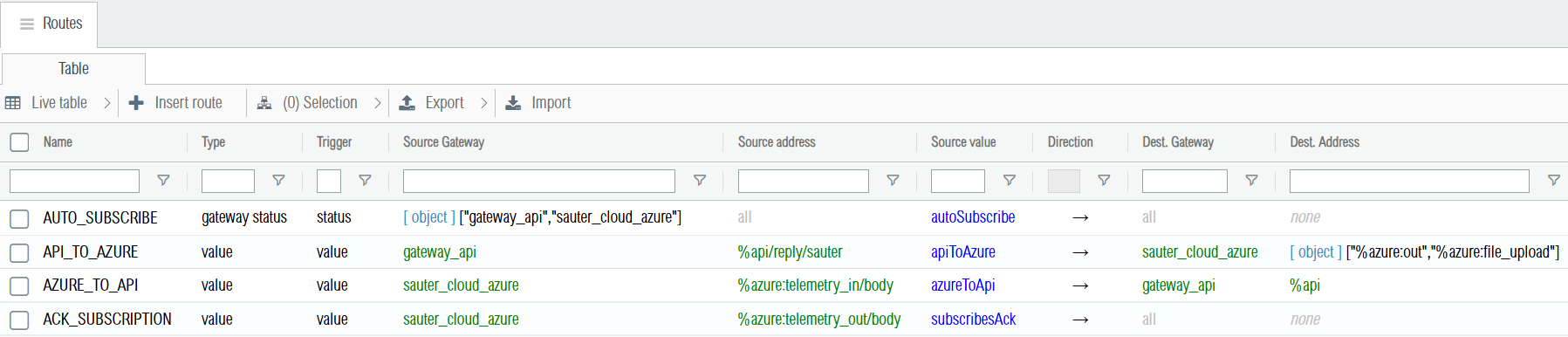
The goal of this project is to get all bacnet addresses and to subscribe to their value changes. This example shows an advanced use case of how to process API requests coming from some protocol (here MQTT Azure IoT hub). There is 4 routes describe below
- Azure to API route : receives the JSON requests from the MQTT and transmit it to the API gateway. It also checks the permissions for the methods calls.
- API to Azure route : sends back the API response to the MQTT API.
- Acknowledgement route : the azure gateway emits the JSON on its telemetry out address once it has been successfuly sent over MQTT (with QoS = 1, meaning that the message was indeed received once by the azure broker). Once the azure gateway receives this confirmation, it acknowledges the data records sent by the API subscribe method using the ackSubscribe method. If the data records are not acknowledged, those will be sent again.
- Auto subscribe route : automatically subscribes to subscriptions starting with the prefix
history/. Additionaly, it automatically pauses subscrpitions if the azure gateway gets disconnected, and resumes those once the azure gateway is back online.
¶ 5.1 Azure to API route
- type :
value, - trigger :
value, - source address :
%azure:telemetry_in/bodyfrom the Azure gateway. - destination address :
%apifrom the API gateway. - source value routing function :
function azureToApi(value, source,dest, infos){

    // 1. checks that the object received is correct
    // 2. checks if the method calls are permitted.
    // 3. checks if the api gateway is online
    // 4. adds the "sauter/" to requests for call ids and subscriptions.
    // 5. sets the subscriber to "sauter" for subscribes.
    // 6. sets the subscribe acknowledgment to "md5" for the ACK_SUBSCRIPTION route.

    if(!value) return
    if(!value  || (value && value.constructor.name != "Object")){
        console.error("invalid telemetry from azure",value)
        return
    }

    if(!value.method || !value.module){
        console.error("invalid telemetry from azure", value)
        return
    }
    if(!value.id) value.id = "defaultId"


    var permitted = infos.context.permitted
    if(!permitted){
        permitted = {
        "gateways" : {
            "getAddress" : 1,
            "getAddresses" : 1,
            "getAddressesByGateway" : 1,
            "getGateways" : 1,
            "getGateway" : 1,
            "getLastValue" : 1,
            "readValue" : 1,
            "writeValue" : 1
        },
        "loggers" : {
            "getSubscription" : 1,
            "getSubscriptions" : 1,
            "insertSubscription" : 1,
            "replaceSubscription" : 1,
            "updateSubscription" : 1,
            "deleteSubscription" : 1,
            "subscribe" : 1,
            "unsubscribe" : 1,
            "flushSubscribe" : 1,
            "pauseSubscribe" : 1,
            "resumeSubscribe" : 1
        }
        }
        infos.context.permitted = permitted
    }


    if(!permitted[value.module]) {
        this.writeValue(source.gateway_id + "¬%azure:out", {id : value.id, module : value.module, method : value.method, error : "invalid module"})
        return
    }
    if(!permitted[value.module][value.method]){
        this.writeValue(source.gateway_id + "¬%azure:out", {id : value.id, module : value.module, method : value.method, error : "invalid method"})
        return
    }

    let apiGw = this.getGateway(dest.gateway_id)
    if(apiGw.state != "connected"){
        this.writeValue(source.gateway_id + "¬%azure:out", {id : value.id, module : value.module, method : value.method, error : "API driver not connected"})
        return
    }

    if(value.method == "getSubscriptions"){
        value.subscription = "sauter/"
    }else if(value.method == "getSubscription" || value.method == "deleteSubscription"){
        value.subscription = "sauter/" + value.subscription
    }else if(value.method == "insertSubscription" || value.method == "updateSubscription" || value.method == "replaceSubscription"){
        value.subscription.id = "sauter/" + value.subscription.id
    }else if(value.method == "subscribe" || value.method == "unsubscribe" || value.method == "flushSubscribe" || value.method == "pauseSubscribe" || value.method == "resumeSubscribe"){
        value.subscription = "sauter/" + (value.subscription[0] == "/" ? value.subscription.substring(1) : value.subscription)
        if(!value.subscriber) value.subscriber = "sauter"
        if(value.method == "subscribe"){
            value.ack = "md5"
        }
    }

    value.id = "sauter/" + (value.id || "")

    return value
}
¶ 5.2 Api to Azure route
- type :
value, - trigger :
value, - source address :
%api/reply/sauterfrom the API gateway. - destination address :
["%azure:out","%azure:file_upload"]from the Azure gateway. The%azure:outaddress is used for normal messages, while the%azure:file_uploadis used for requests having the stream parameter (for big datasets such has the gateways getAddresses method reply). - source value routing function :
function apiToAzure(v, source,dest, infos){
    // removes the "sauter/" prefixes from replies values for getSubscription(s).
    if(v && v.id == "autoSubscribe" && v.method == "subscribe" && v.event != "flush"){
        //do not send autoSubscribe errors or info to sauter cloud.
        return
    }
    if(!infos.context.transform){
        infos.context.transform = function(v){
            if(v.value){
                if(v.value.id && v.value.id.startsWith("sauter/")){
                    v.value.id = v.value.id.substring(7)
                }else if(v.value.constructor.name == "Array"){
                    for(let subv of v.value){
                        if(subv.id && subv.id.startsWith && subv.id.startsWith("sauter/")){
                            subv.id = subv.id.substring(7)
                        }
                    }
                }
     }
     if(v.subscription && v.subscription.startsWith &&  v.subscription.startsWith("sauter/")){
         v.subscription = v.subscription.substring(7)
         }
        }
    }
    if(v.stream){
        if(dest.name != "%azure:file_upload") return;
        return { //stream object
            name : "%api/stream/sauter",
            gateway_id : source.gateway_id,
            sourceOptions : {
                "id" : v.id,
                "transform" : infos.context.transform
            },
            destinationOptions : {
                "name" : v.id, //
            }
        }
    }else{
        if(dest.name != "%azure:out") return;
        infos.context.transform(v)
        return v
    }
}
¶ 5.3 Acknowledgment route
- type :
value, - trigger :
value, - source address :
%azure:telemetry_out/bodyfrom the Azure gateway. - destination address :
none(no destination address). - source value routing function :
function subscribesAck(v,source,dest,infos){

    // listens to azure telemetry out notifications to acknowledge the records using the md5 hash.

    if(v.method == "subscribe"){
        if(v.event == "flush"){
            var loggers = this.loggers
            var crypto = this.crypto
            let md5 = crypto.createHash('md5').update(JSON.stringify(v.value)).digest("hex")

            if(!infos.context.ackCallback){
                infos.context.ackCallback = function(err){
                    if(err){
                        console.error("ACK callback error",err)
                    }
                }
            }

            loggers.ackSubscribe({
                subscription : "sauter/",
                subscriber : "sauter",
                ack : md5
            },infos.context.ackCallback)
        }
    }
}
¶ 5.4 Auto subscribe route
- type :
gateway_status, - trigger :
status, - source gateway :
["gateway_api", "sauter_cloud_azure"]. Listens to both the API and Azure gateway statuses. - destination address :
none
function autoSubscribe(statusObj,source,dest,infos){

    // 1. subscribes automatically to subscription ids starting with prefix "sauter/history/"

    // 2. If the azure gateway disconnects pauses all "sauter/" subscriptions.
    //    Resumes the paused subscriptions when the azure gateway is online.

    var gateways = this;
    var status = statusObj.status

    if(statusObj.name == "gateway_api"){
        if(status == "connected"){
            gateways.writeValue("%api/loggers/subscribe", {
                id  : "sauter/autoSubscribe",
                ack : "md5",
                subscriber : "sauter",
                subscription : "sauter/history/" //all subscriptions whose id starts with sauter/history/..xyz..
            },function(err){
                if(err){
                    console.error("error at sauter subscribe",err)
                }
            })
        }
    }else { //azure has issues, needs to pause sauter subscribes

        var context = infos.context
        var loggers = this.loggers //in this case, use the API directy

        if(status == "connected"){
            if(!context.pausedSubscriptions) return  //	no pause were made before, so do nothing
            let subs = Object.keys(context.pausedSubscriptions)
            loggers.resumeSubscribe({
                subscriber : "sauter",
                subscription : subs
            },function(err,res){
                for(let sub of subs){
                    delete context.pausedSubscriptions[sub]
                }
                if(Object.keys(context.pausedSubscriptions).length == 0) delete context.pausedSubscriptions
            })
        }else{
            loggers.pauseSubscribe({
                subscriber : "sauter",
                subscription : "sauter/"
            },function(err,errorBySub){
                let subs = Object.keys(errorBySub)
                for(let sub of subs){
                    if(!errorBySub[sub]){ // null means no error
                        if(!context.pausedSubscriptions) context.pausedSubscriptions = {}
                        context.pausedSubscriptions[sub] = true
                    }
                }
            })
        }
    }
}