
BACnet was developed by the American Society of Heating, Refrigeration and Air Conditioning Engineers Inc., abbreviated as ASHRAE. Published as an American standard in 1995, BACnet has been an ISO 16484-5 standard since 2003. BACnet offers open and interoperable building automation. Many technologies and network topologies are supported such as ETHERNET, ARCNET LAN, MS/TP, or PTP. It offers great flexibility as well as lower maintenance and installation costs in building automation and control.
This driver supports both Bacnet IP and Bacnet MSTP. Most bacnet features are supported including COV subscriptions, alarms, BBMD, and foreign devices registration, and trend logs.
¶ 1. Getting started
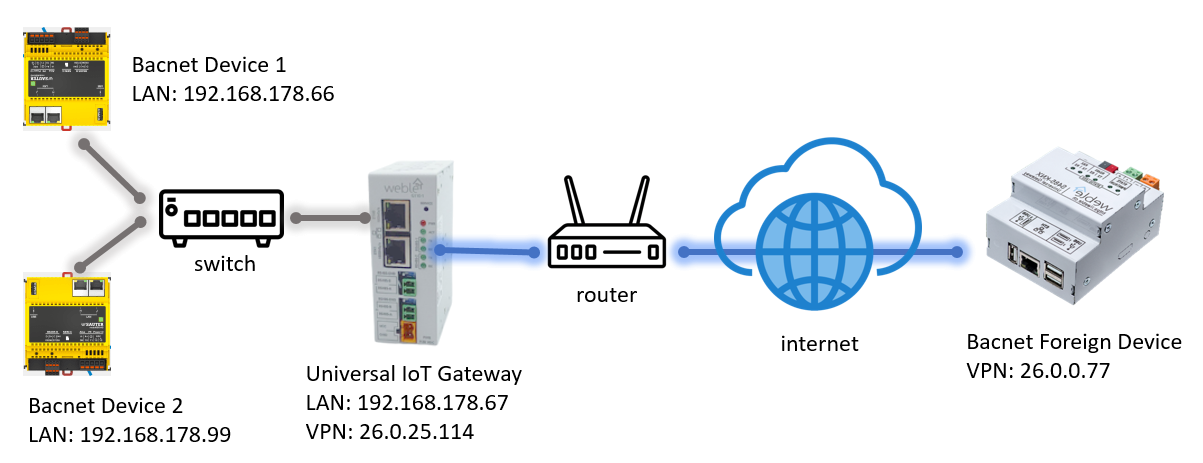
This tutorial showcases the configuration of the Bacnet IP on the Universal IoT Gateway. In the topology, there is 2 other bacnet devices on the local network area (LAN), and on the VPN interface one foreign bacnet device. In this example, it will be shown how to route a value from the foreign device (26.0.0.77) to one of the local devices (192.168.178.66).
¶ 1.1 Inserting the bacnet driver
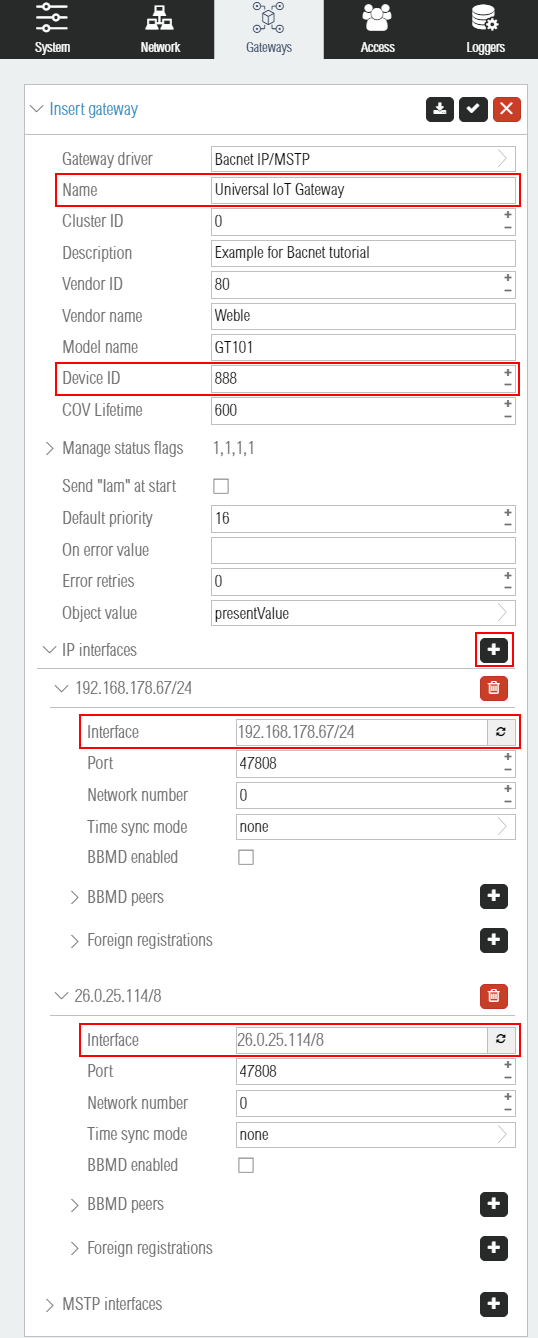
The first step is to insert the Bacnet IP/MSTP gateway. Each bacnet gateway is one bacnet device, and the bacnet device can interact on multiple IP and/or MSTP interfaces. Here we setup the bacnet device name to Universal IoT Gateway and the bacnet device id to 888. By clicking on the highlighted + button, multiple IP interfaces can be added. Here 2 interfaces are used, one on 192.168.178.67/24 the LAN (note that here the /24 netmask must be correct because the bacnet protocol uses multicast packets for device discovery), and 26.0.25.114 for the VPN interface.
¶ 1.2 Inserting local objects
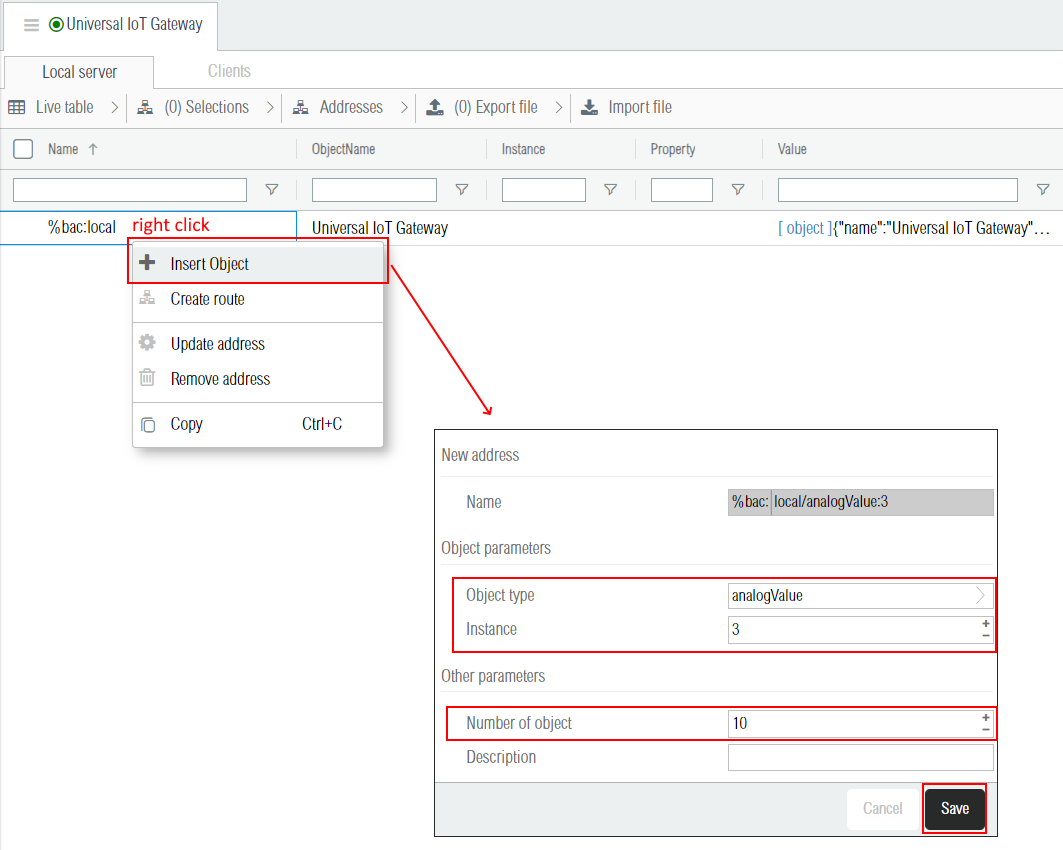
When the bacnet driver is started for the first time, the %bac:local is created and contains the general information about the local device (i.e. the bacnet driver process itself). By right-clicking on this address, it is possible to insert local objects.
¶ 1.3 Bacnet devices discovery
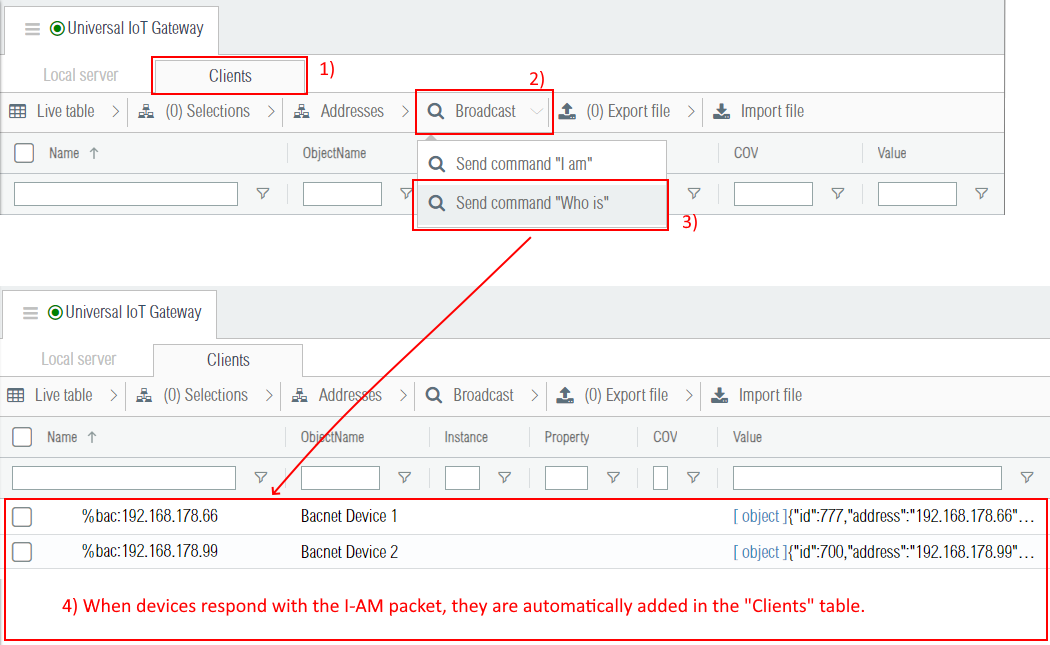
The bacnet driver administration interface is separated in two parts, the Local server tab, where objects were added in previous section, and the Clients tab.
In order to discover devices on the same network, the bacnet broadcasts a who-is packet on all its interfaces. Note that in this example, the multicast works only on the LAN interface and is blocked on the VPN interface. Once the who-is packet is sent, bacnet devices receiving it will reply by broadcasting the bacnet i-am packet, which contains the bacnet identifier (integer), the vendor identifier (integer), and technical information regarding the supported packets segmentation methods and their maximum length.
¶ 1.4 Manual device insertion
As the VPN IP interface 26.x.x.x does not support the multicast traffic, it is not possible to add the devices automatically with the discovery. In this context, it is needed to do a manual insertion of this device.
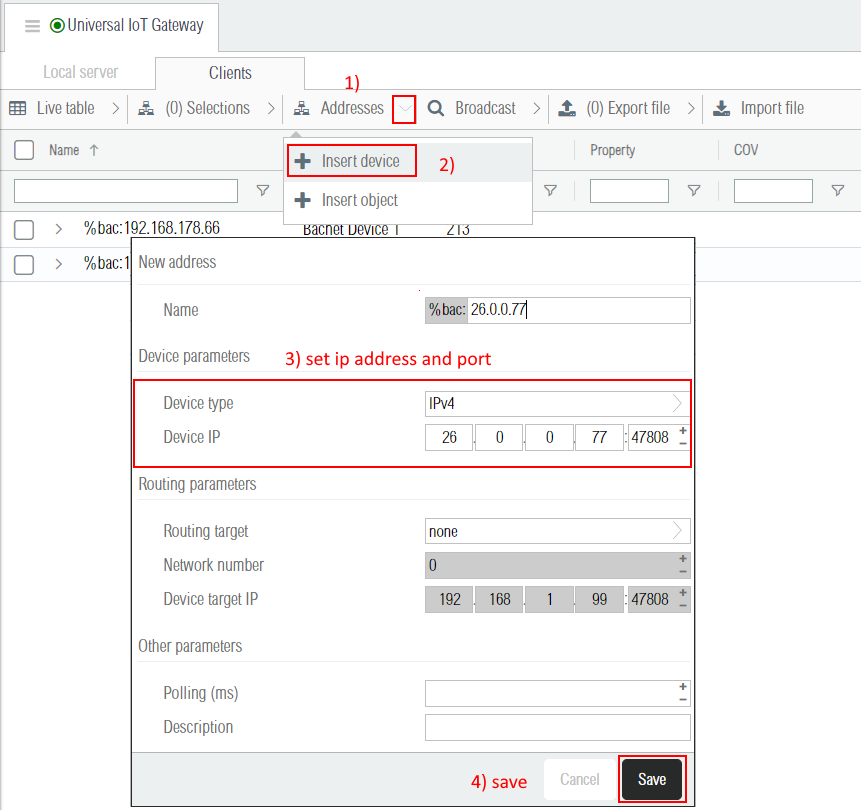
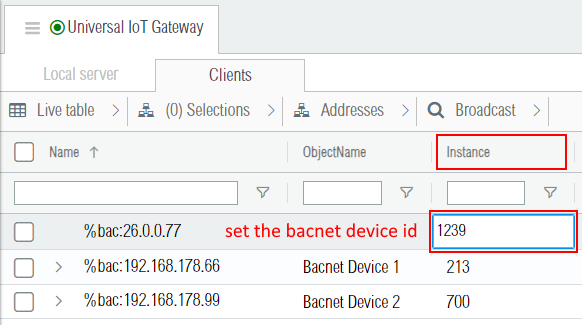
After the insertion, the driver tries to get the bacnet device id by sending unicast bacnet requests. If the bacnet device id cannot be retrieved automatically, it may be necessary to define it manually. To do so, the Instance column can be edited as shown below. When the communication with the device works, the bacnet device name should appear.
¶ 1.5 Import bacnet objects
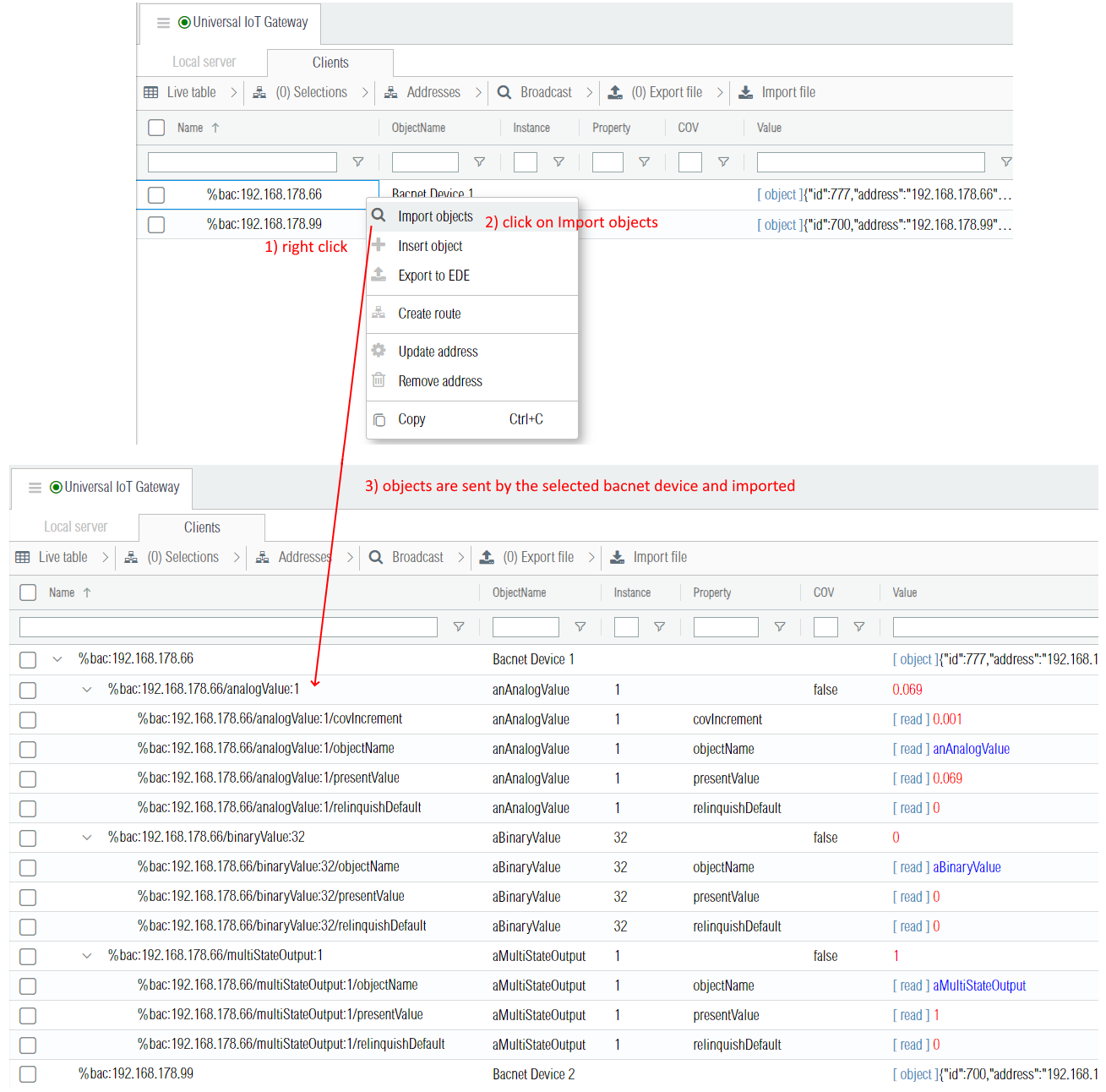
Each bacnet device has one special object of type Device whose instance is the bacnet device id. That device object contains many information about the device such as its name and its supported bacnet services / features. One of these properties is the bacnet device objectList. This property is particulary useful because it contains the list of all the objects present on that device. By reading this property, it is possible to browse the device, e.g. to retrieve the list and import all its bacnet objects. In the web interface objects are imported by right-clicking on the device and then in the context menu by clicking on "Import objects" as shown in the screenshot below. Once the list of objects is received, the corresponding object addresses are inserted along with their bacnet properties.
¶ 1.6 COV subscriptions
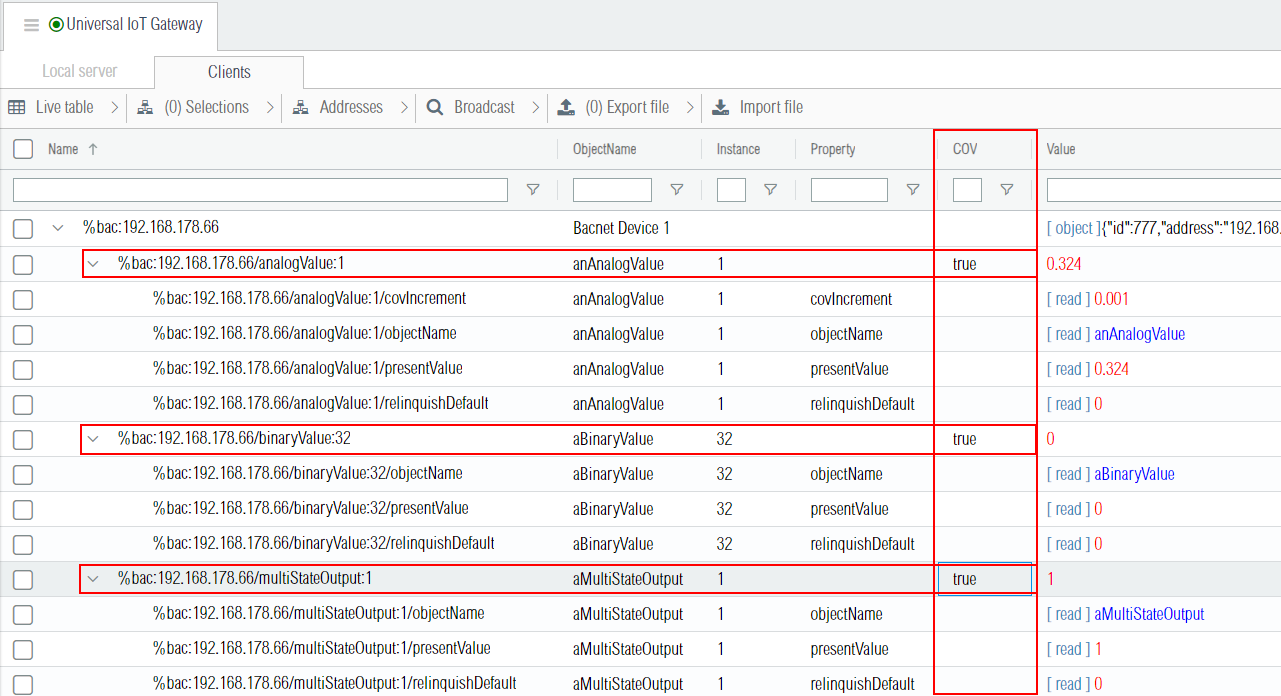
In this tutorial the local bacnet device on 192.168.178.67 acts as a data client and subscribe to an object for COV (Change Of Value) reporting. The target device, here 192.168.178.66, monitors the present value of the object property and checks the subscription list and the change criteria. When the change criteria are met the target device sends notifications of the new value to the subscriber(s) (here 192.168.178.67). As shown in the screenshot below, each object has a COV column which can be set to true to subscribe to the object change of value.
¶ 1.7 Polling properties
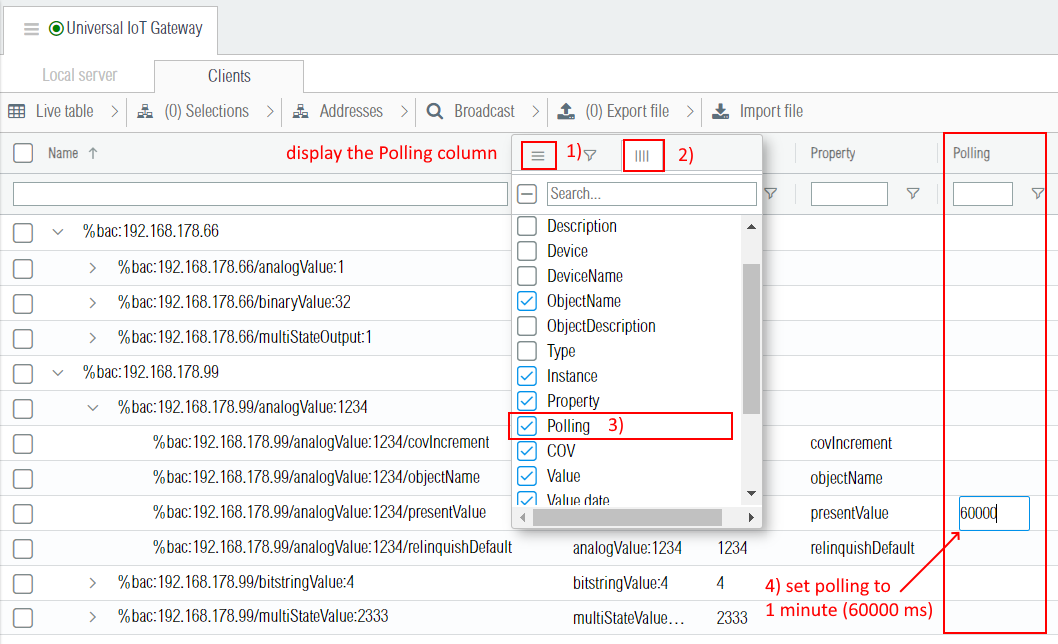
As not all devices support COV subscriptions, it is sometimes needed to poll bacnet objects. Each bacnet object property can be polled independently, but usually only the presentValue is polled. The polling is configured in the Polling column. That column is hidden by default and need to be displayed in the table. In this tutorial, the bacnet device with ip address 192.168.178.99 is polled every minutes to update its present values as shown in the screenshot below. Note that the polling should be used as sparsely as possible because it can cause traffic congestion, especially when using bacnet MSTP.
¶ 1.8 Create a route
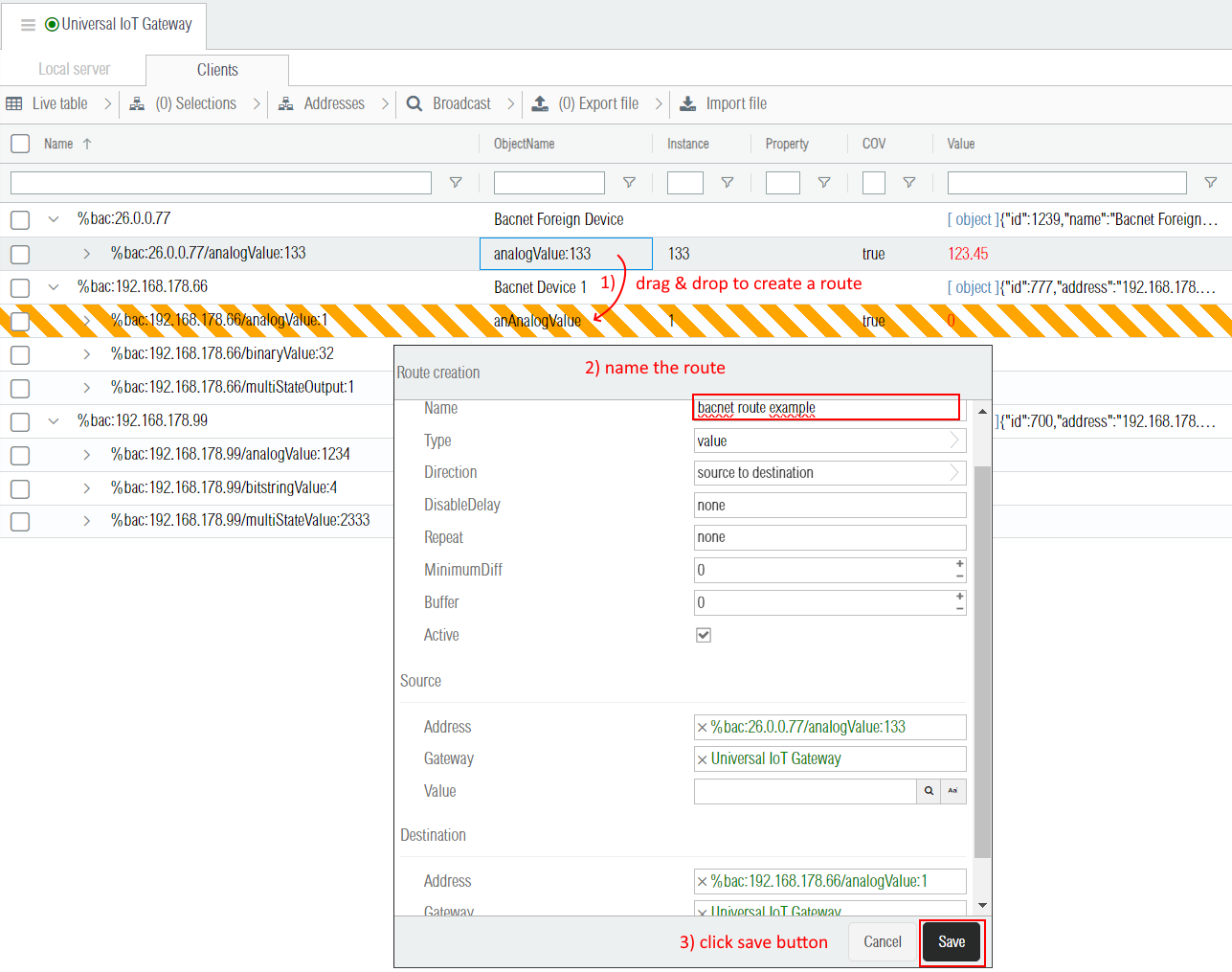
In this example we create a route between the source address %bac:26.0.0.77/analogValue:133 and the destination address %bac:192.168.178.66/analogValue:1. Note that in this case only the object values are routed, but for other use cases it is also possible to route the other object properties.
¶ 1.9 The bacnetName View
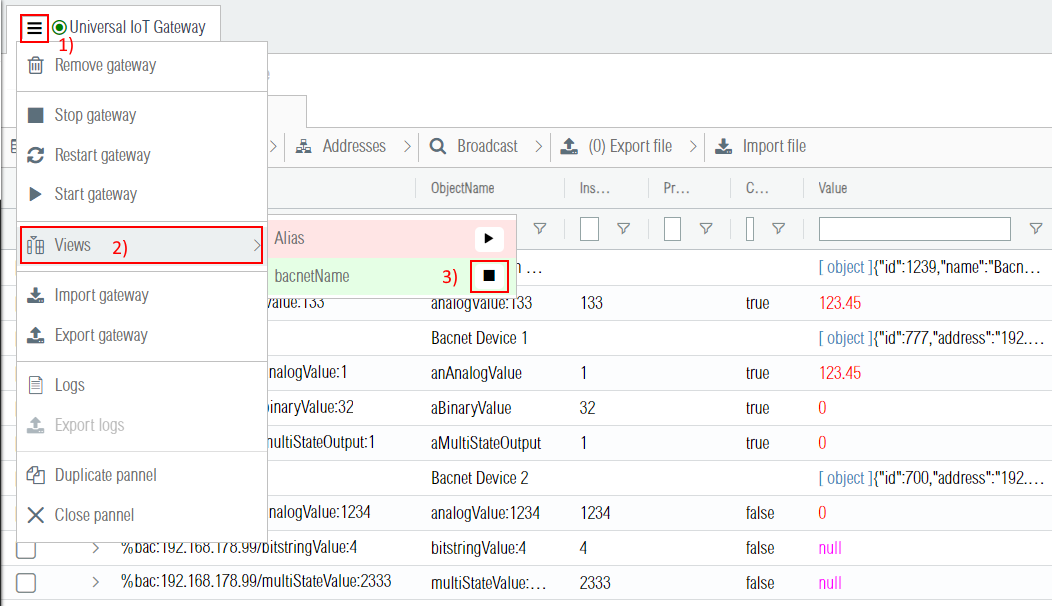
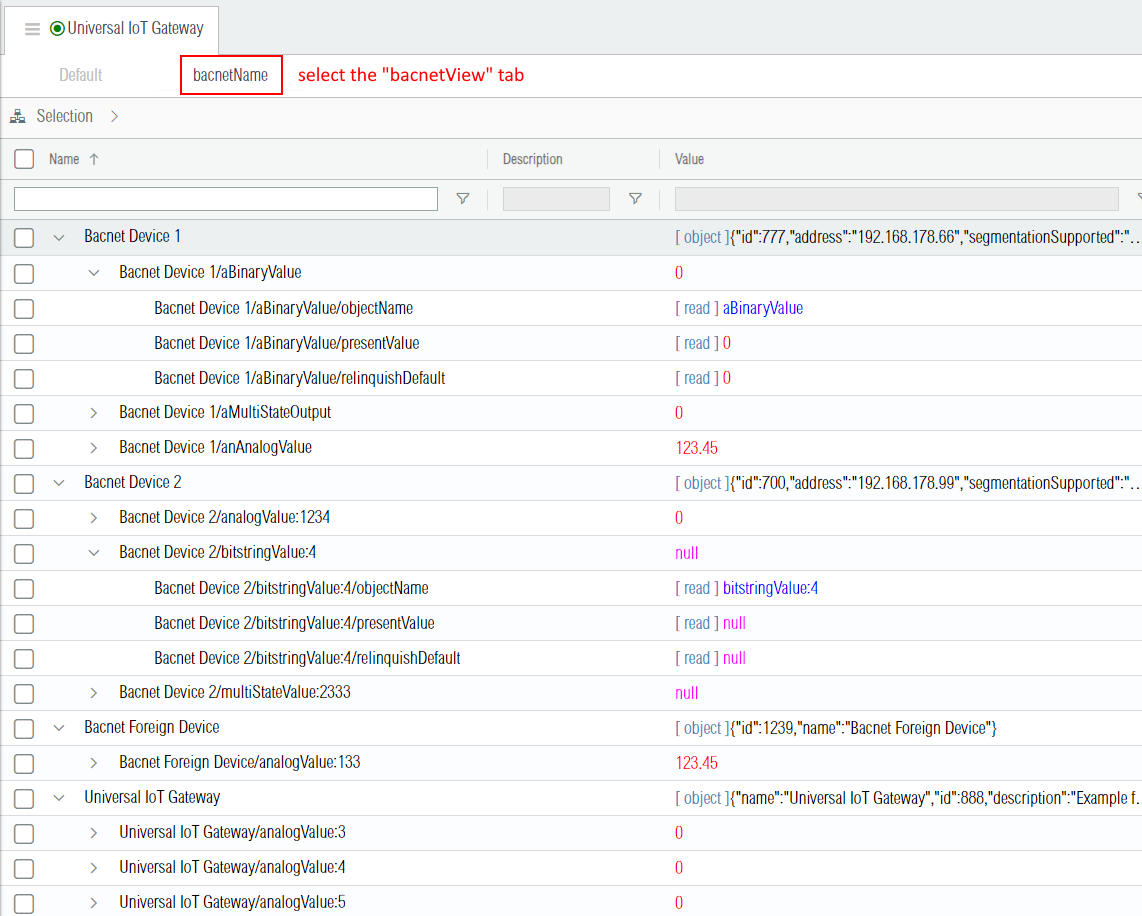
While the default addressing scheme is good for the bacnet internal communication, humans enjoy visualizing their bacnet network using the bacnet device names and bacnet object names. The screenshot below shows how to activate this alternative view. Note that it is possible to do routings and build logic circuits using this simplified address naming scheme.
¶ 2. Gateway
The bacnet gateway has many parameters.
| Label | JSON Key | Description |
|---|---|---|
| Device ID | id | Unique identifier of the device on the BACnet network. It is the instance number of the object of type device. The standard specifies that the instance number range is 22 bits: 0-4194303 and that no objects should have an instance number of 4194303. |
| Vendor ID | vendorId | The vendor id as defined in the list of assigned vendors. |
| Vendor name | vendorName | Note that the vendor name should match the assigned vendor id. |
| Model name | modelName | Model name of this bacnet device. |
| COV Lifetime | covLifetime | Lifetime in seconds of the change of value subscriptions. Each subscription is automatically renewed when it expires. Devices that execute SubscribeCOV or SubscribeCOVProperty (COV servers) accept all lifetime values in the range 1 through 28800 seconds (8 hours). |
| Manage status flags | manageStatusFlags | Specifies wether the local objects statusFlags property is automatically managed (1) or not (0). The value is an array with 4 booleans (one for each status flag) such as [1,0,1,1]. If it is set to 1 for alarms, which is the first boolean flag, then it is automatically updated to 1 when the object is in alarm. |
| Send "Iam" at start | sendIamAtStart | Broadcasts or not the "iam" packet at startup. Note that frequent automatic broadcasts are discouraged in order to avoid traffic congestion. |
| Default priority | defaultPriority | Defines the default write priority (ranging from 1 to 16) when a value is written to a device supporting the priorityArray property. |
| On error value | onErrorValue | If the bacnet client replies to a read request by an error, or if it ends up in timeout, then the default error value (if defined) is emitted on the client object presentValue property address. |
| Error retries | errorRetries | Number of request retries in case of errors. |
| Object value | objectValue | Determines wether bacnet object addresses hold only the presentValue property or a JSON object containing all properties. |
| IP interfaces | ip | A list (array) of IP interfaces as described in the following section. |
| MSTP interfaces | mstp | A list (array) of MSTP interfaces as described in the following section. |
¶ 2.1 IP interface
BACnet can communicate on several different networks, so a list of multiple IP interfaces can be configured with the following parameters.
| IP Label | JSON Key | Description |
|---|---|---|
| Interface | ip[n].interface | The IP interface identifier, either the interface name such as eth0 or the ip address and mask such as 192.168.1.99/24. |
| Port | ip[n].port | The IP port (usually 47808) |
| Network number | ip[n].networkNumber | 16-bit decimal value (1–65534). Each BACnet network, regardless of technology, must have a unique network number. By retaining the default value of 0, BACnet routing is disabled. |
| Time sync mode | ip[n].timeSyncMode | none, client or server. Specifies wether the device acts as a time synchronization server or client on this interface. |
| Broadcast interval(ms) | ip[n].timeSyncBroadcastMs | Only applies if the time sync mode is server. The time synchronization server broadcasts the current time peridocally. The period is defined by this milliseconds interval. |
| UTC time format | ip[n].timeSyncUtc | When using UTC time synchronization (UTC=Universal Time Coordinated) the time is transmitted as GMT (Greenwich Mean Time = local time London). The timer converts the time to GMT before sending. |
| BBMD enabled | ip[n].bbmd | If activated, the device acts on the interface as a BACnet Broadcast Management Device (BBMD). It is used to forward multicast/broadcast messages to other BBMDs lying on different networks. |
| BBMD peers | ip[n].bbmds | The list of BBMD peers. Their parameters are desribed in the BBMD table below. |
| Foreign registrations | ip[n].foreignRegistrations | This device registers itself as a foreign device to the BBMDs listed in this parameter. Upon receipt of the message, the BBMD adds this device as a foreign device to its Foreign-Device-Table (FDT) and starts a timer equal to the Time-to-Live parameter (hereafter "ttl"). Their parameters are described in the Foreign registration table below. |
| BBMD Label | JSON Key | Description |
|---|---|---|
| Address | ip[n].bbmds[m].address | The IP address of the BBMD peer. |
| Netmask | ip[n].bbmds[m].netmask | The IP netmask of the BBMD peer. |
| Port | ip[n].bbmds[m].port | The IP port of the BBMD peer. |
| Foreign Registration Label | JSON Key | Description |
|---|---|---|
| Address | ip[n].foreignRegistrations[m].address | The IP address of the BBMD to which this device registers itself as a foreign device. |
| Port | ip[n].foreignRegistrations[m].port | The IP port of the BBMD to which this device registers itself as a foreign device. |
| TTL (seconds) | ip[n].foreignRegistrations[m].ttl | The time to live in seconds of the foreign device registration (additionnaly there is an additional grace period of 30 seconds). |
¶ 2.2 MSTP interface
BACnet can communicate on several different networks, so a list of MSTP interfaces can configured with the following parameters.
| MSTP Label | JSON Key | Description |
|---|---|---|
| Serial Port | mstp[n].port | Serial port of the MSTP rs485 line. |
| BaudRate | mstp[n].baudRate | Typical baud rates used for BACnet MSTP are 9600, 19200, 38400, and 76800. |
| Serial ID | mstp[n].serialId | A valid MAC address for a passive slave node on the BACnet MSTP network may range between MAC addresses 0 to 254. The MAC addresses range 0 to 127 is a shared address range between both master and passive slave nodes. |
| Max Masters | mstp[n].maxMasters | Setting this parameter permits to limit unecessary MSPT polls sent to find new masters that do not exist. This is especially important when this device has the highest mac address / serial id on the serial line. |
| Network number | mstp[n].networkNumber | 16-bit decimal value (1–65534). Each BACnet network, regardless of technology, must have a unique network number. By retaining the default value of 0, BACnet routing is disabled. |
| Time sync mode | mstp[n].timeSyncMode | none, client or server. Specifies wether the device acts as a time synchronization server or client on this interface. |
| UTC time format | mstp[n].timeSyncUtc | When using UTC time synchronization (UTC=Universal Time Coordinated) the time is transmitted as GMT (Greenwich Mean Time = local time London). The timer converts the time to GMT before sending. |
| Broadcast interval(ms) | mstp[n].timeSyncBroadcastMs | Only applies if the time sync mode is server. The time synchronization server broadcasts the current time peridocally. The period is defined by this milliseconds interval. |
¶ 2.3 Gateway JSON examples
{
    "name": "Bacnet Device 1",
    "driver": "bacnet",
    "description": "",
    "active": 1,
    "json": {
        "vendorId": 80,
        "vendorName": "Weble",
        "modelName": "EY-GTW103S",
        "id": 777,
        "covLifetime": 600,
        "manageStatusFlags": [
            1,
            1,
            1,
            1
        ],
        "sendIamAtStart": false,
        "defaultPriority": 16,
        "onErrorValue": "",
        "errorRetries": 0,
        "objectValue": "presentValue",
        "ip": [
            {
                "interface": "eth0",
                "port": 47808,
                "networkNumber": 0,
                "timeSyncBroadcastMs": "",
                "bbmds": [],
                "foreignRegistrations": []
            }
        ],
        "mstp": []
    }
}
{
    "name": "Bacnet Foreign Device",
    "driver": "bacnet",
    "description": "",
    "active": 1,
    "json": {
        "vendorId": 80,
        "vendorName": "Weble",
        "modelName": "EY-GTW103S",
        "id": 1239,
        "covLifetime": 600,
        "manageStatusFlags": [
            1,
            1,
            1,
            1
        ],
        "sendIamAtStart": false,
        "defaultPriority": 16,
        "onErrorValue": "",
        "errorRetries": 0,
        "objectValue": "presentValue",
        "ip": [
            {
                "interface": "26.0.0.77/8",
                "port": 47808,
                "networkNumber": 0,
                "timeSyncBroadcastMs": "",
                "bbmds": [],
                "foreignRegistrations": []
            }
        ],
        "mstp": []
    }
}
¶ 3. Addresses
Bacnet addresses name all start with the %bac: prefix. There is 3 types / levels of bacnet addresses
- Devices : BACnet devices communicate to one another over a network. The gateway bacnet device is named
localas it can operate over multiple networks, while client devices are identifier either by the[ip address][:optional udp port](the port is 47808 if omitted) for Bacnet IP and the MSTP mac address[0-254]for Bacnet MSTP. Note that if the client bacnet device is behind a bacnet router, the address of the device contains the routing addresses chain. Example of a chained address :%bac:192.168.1.2>2, where192.168.1.2is the bacnet ip to mstp router, and2is the final client MSTP mac address. - Objects : The objects in bacnet are addressed by their object type (
analogValue,binaryValue, ...) coupled with their instance number ranging from0,1,2, ... up to4194302. Example :multistateValue:44. - Properties : The bacnet properties such as
presentValue,objectName,description, etc...
The table below shows examples of addresses of different types
| prefix | device | object | property | description |
|---|---|---|---|---|
%bac: |
local |
The local bacnet device of the bacnet driver. | ||
%bac: |
192.168.178.66 |
Another bacnet device on the local ip address 192.168.178.66. | ||
%bac: |
12 |
The bacnet serial MSTP device with MSTP MAC address 12. | ||
%bac: |
local |
/analogValue:1 |
The analog value object with instance 1 of the local bacnet device. | |
%bac: |
local |
/analogValue:1 |
/presentValue |
The present value property of the analog value object with instance 1 of the local bacnet device. |
%bac: |
12 |
/binaryValue:4 |
/objectName |
The object name property of the binary value object with instance 4 of the MSTP bacnet device with MAC address 12. |
¶ 3.1 Supported object types
New bacnet objects types can be added on customer request. Please find below the list of currently supported bacnet object types.
| Object type | Local bacnet device | Clients bacnet devices | Description |
|---|---|---|---|
| device |  |
|
Device objects are special, each bacnet device has one device object whose instance is the device id. This object will contain a note of who made it (the vendor), and often a firmware version. |
| analogInput | |
|
Analog inputs are typically sensor values. You can’t write to an analog input, they are read-only. |
| analogOutput | |
|
Analog outputs are typically physical outputs that touch the field and often can be overridden by a user. Valve commands, fan speeds, and boiler fire rate outputs are represented as Analog Outputs. |
| analogValue | |
|
An analog value can be thought of as an internal point; they don’t typically represent a physical value. You can read and write analog value points. They could be setpoints, override commands, or anything else the programmer decided. |
| largeAnalogValue | |
|
Same as an standard analogValue object, but the presentValue is encoded with double precision (64 bits instead of the 32 bits floating point). |
| integerValue | |
|
A 32-bit signed integer value ranging from -2147483648 to 2147483647 |
| postiveIntegerValue | |
|
A 32-bit unsigned integer value ranging from 0 to 4294967295 |
| binaryInput | |
|
Binary inputs are typically used to represent a physically measured two-position state of something. They are read-only BACnet objects. |
| binaryOutput | |
|
Binary outputs typically represent a physical digital output. |
| binaryValue | |
|
These are internal points that don’t typically represent a physical value. This could be used to “enable” a heating system by operator control, or maybe to represent some internal logic in a way that can be overridden by the operator. A nice thing about BACnet objects and binary values is that the “text” can be something other than “ON” and “OFF”. |
| bitstringValue | |
|
A bitstring value object is used to represent a sequence of single bit 1/0 values/flags that are always taken together as a group. |
| mutliStateInput | |
|
These are just like binary inputs, except they can represent many states. Each can be descriptively labelled, allowing a system to distill the mode of a complicated sequence with one simple point. These are less likely to represent physical points, and more likely to represent some state of a process that cannot be changed by the user. |
| mutliStateOutput | |
|
Just like binary outputs, but for more states. These can often be overridden by a user. Useful for process states, like “morning warm up”, “normal”, “standby”, etc. |
| mutliStateValue | |
|
Just like binary values, but for more states. |
| notificationClass | |
|
This object provides a means to send alarm messages (Event Notification Messages) that are generated by other objects to any BACnet device. |
| trendLog | |
|
This object type archives a property of a referenced object (typically analog objects) . |
| trendLogMultiple | |
|
Same as the trendLog object, but can log multiple objects instead of 1. |
| schedule | |
|
The schedule object is defined by the standard as a periodic schedule of events that may repeat within a range of dates. The schedule object is categorized into two types of days: Normal Days in a Week and Exception Days |
| calendar | |
|
The calendar object type defines a list of calendar dates, which might be thought of as "holidays," "special events," or simply as a list of dates. Those can be refered to in the schedule object exceptionDays property. |
| accumulator | |
The accumulator object allows you to count pulses, which are often provided by energy meters. The accumulator objects can feed their Present Values to the Pulse Meter Object. | |
| lifeSafetyPoint | |
The Life Safety Point object type defines a standardized object whose properties represent the externally visible characteristics associated with initiating and indicating devices in fire, life safety and security applications. | |
| lifeSafetyZone | |
The Life Safety Zone object type defines a standardized object whose properties represent the externally visible characteristics associated with an arbitrary group of BACnet Life Safety Point and Life Safety Zone objects in fire, life safety and security applications. | |
| lightingOutput | |
The lighting output is analog in nature. The physical output level, or nonnormal- ized range, is specified as the linearized percentage (0% to 100%). It allows a third-party bacnet devic eto control lights. |
¶ 3.2 Supported properties
The table below is the list of exploitable bacnet properties. Note that some other properties are supported by the bacnet device itself in order to comply with the bacnet protocol, but not present in the software user interface for exploitation.
| Property | Description |
|---|---|
| GENERAL CATEGORY | |
| objectIdentifier | The object identifier in bacnet is the coupling of of the object type and its instance number. This property is used in the address name structure such as in %bac:local/analogValue:2, the object identifier is analogValue:2. |
| objectName | This is the name of the bacnet object. It is mandatory and should be unique. |
| description | A text description of the bacnet object, it normally has no impact on the operations and solely there as an additional information / documentation for technicians or users. |
| statusFlags | Contains four Boolean flags such as [1,0,1,0]that indicate the general health of the object. By reading these attributes, you can achieve a clearer picture of the object status. The four flags meaning are in order "In Alarm", "Fault", "Overridden", and "Out of Service". |
| presentValue | The current value of the object. Bacnet has ways of telling you if the present value is valid – it uses a property called Reliability. |
| priorityArray | Applies to all objects that are writeable by client devices such all object types ending with Value or Output. An object can be written at different priorities ranging from 1 (higher priority) to 16 (lower priority). The actual value of the object is the highest defined priority. Priorities without values have the null value in the priority array. |
| relinquishDefault | The default presentValue when the priorityArray has only null values. |
| units | The Bacnet engineering units of the presentValue such as degreesCelsius (C°) for a temperature in Celsius.List of Bacnet engineering unitsmetersPerSecondPerSecond : 166squareMeters : 0 squareCentimeters : 116 squareFeet : 1 squareInches : 115 currency1 : 105 currency2 : 106 currency3 : 107 currency4 : 108 currency5 : 109 currency6 : 110 currency7 : 111 currency8 : 112 currency9 : 113 currency10 : 114 milliamperes : 2 amperes : 3 amperesPerMeter : 167 amperesPerSquareMeter : 168 ampereSquareMeters : 169 decibels : 199 decibelsMillivolt : 200 decibelsVolt : 201 farads : 170 henrys : 171 ohms : 4 ohmMeters : 172 ohmMeterPerSquareMeter : 237 milliohms : 145 kilohms : 122 megohms : 123 microSiemens : 190 millisiemens : 202 siemens : 173 siemensPerMeter : 174 teslas : 175 volts : 5 millivolts : 124 kilovolts : 6 megavolts : 7 voltAmperes : 8 kilovoltAmperes : 9 megavoltAmperes : 10 ampereSeconds : 238 ampereSquareHours : 246 voltAmpereHours : 239 kilovoltAmpereHours : 240 megavoltAmpereHours : 241 voltAmperesReactive : 11 kilovoltAmperesReactive : 12 megavoltAmperesReactive : 13 voltAmpereHoursReactive : 242 kilovoltAmpereHoursReactive : 243 megavoltAmpereHoursReactive : 244 voltsPerDegreeKelvin : 176 voltsPerMeter : 177 voltsSquareHours : 245 degreesPhase : 14 powerFactor : 15 webers : 178 joules : 16 kilojoules : 17 kilojoulesPerKilogram : 125 megajoules : 126 joulesPerHours : 247 wattHours : 18 kilowattHours : 19 megawattHours : 146 wattHoursReactive : 203 kilowattHoursReactive : 204 megawattHoursReactive : 205 btus : 20 kiloBtus : 147 megaBtus : 148 therms : 21 tonHours : 22 joulesPerKilogramDryAir : 23 kilojoulesPerKilogramDryAir : 149 megajoulesPerKilogramDryAir : 150 btusPerPoundDryAir : 24 btusPerPound : 117 joulesPerDegreeKelvin : 127 kilojoulesPerDegreeKelvin : 151 megajoulesPerDegreeKelvin : 152 joulesPerKilogramDegreeKelvin : 128 newton : 153 cyclesPerHour : 25 cyclesPerMinute : 26 hertz : 27 kilohertz : 129 megahertz : 130 perHour : 131 gramsOfWaterPerKilogramDryAir : 28 percentRelativeHumidity : 29 micrometers : 194 millimeters : 30 centimeters : 118 kilometers : 193 meters : 31 inches : 32 feet : 33 candelas : 179 candelasPerSquareMeter : 180 wattsPerSquareFoot : 34 wattsPerSquareMeter : 35 lumens : 36 luxes : 37 footCandles : 38 milligrams : 196 grams : 195 kilograms : 39 poundsMass : 40 tons : 41 gramsPerSecond : 154 gramsPerMinute : 155 kilogramsPerSecond : 42 kilogramsPerMinute : 43 kilogramsPerHour : 44 poundsMassPerSecond : 119 poundsMassPerMinute : 45 poundsMassPerHour : 46 tonsPerHour : 156 milliwatts : 132 watts : 47 kilowatts : 48 megawatts : 49 btusPerHour : 50 kiloBtusPerHour : 157 horsepower : 51 tonsRefrigeration : 52 pascals : 53 hectopascals : 133 kilopascals : 54 pascalSeconds : 253 millibars : 134 bars : 55 poundsForcePerSquareInch : 56 millimetersOfWater : 206 centimetersOfWater : 57 inchesOfWater : 58 millimetersOfMercury : 59 centimetersOfMercury : 60 inchesOfMercury : 61 degreesCelsius : 62 degreesKelvin : 63 degreesKelvinPerHour : 181 degreesKelvinPerMinute : 182 degreesFahrenheit : 64 degreeDaysCelsius : 65 degreeDaysFahrenheit : 66 deltaDegreesFahrenheit : 120 deltaDegreesKelvin : 121 years : 67 months : 68 weeks : 69 days : 70 hours : 71 minutes : 72 seconds : 73 hundredthsSeconds : 158 milliseconds : 159 newtonMeters : 160 millimetersPerSecond : 161 millimetersPerMinute : 162 metersPerSecond : 74 metersPerMinute : 163 metersPerHour : 164 kilometersPerHour : 75 feetPerSecond : 76 feetPerMinute : 77 milesPerHour : 78 cubicFeet : 79 cubicFeetPerDay : 248 cubicMeters : 80 cubicMetersPerDay : 249 imperialGallons : 81 milliliters : 197 liters : 82 usGallons : 83 cubicFeetPerSecond : 142 cubicFeetPerMinute : 84 cubicFeetPerHour : 191 cubicMetersPerSecond : 85 cubicMetersPerMinute : 165 cubicMetersPerHour : 135 imperialGallonsPerMinute : 86 millilitersPerSecond : 198 litersPerSecond : 87 litersPerMinute : 88 litersPerHour : 136 usGallonsPerMinute : 89 usGallonsPerHour : 192 degreesAngular : 90 degreesCelsiusPerHour : 91 degreesCelsiusPerMinute : 92 degreesFahrenheitPerHour : 93 degreesFahrenheitPerMinute : 94 jouleSeconds : 183 kilogramsPerCubicMeter : 186 kilowattHoursPerSquareMeter : 137 kilowattHoursPerSquareFoot : 138 megajoulesPerSquareMeter : 139 megajoulesPerSquareFoot : 140 noUnits : 95 newtonSeconds : 187 newtonsPerMeter : 188 partsPerMillion : 96 partsPerBillion : 97 percent : 98 percentObscurationPerFoot : 143 percentObscurationPerMeter : 144 percentPerSecond : 99 perMinute : 100 perSecond : 101 psiPerDegreeFahrenheit : 102 radians : 103 radiansPerSecond : 184 revolutionsPerMinute : 104 squareMetersPerNewton : 185 wattsPerMeterPerDegreeKelvin : 189 wattsPerSquareMeterDegreeKelvin : 141 perMille : 207 gramsPerGram : 208 kilogramsPerKilogram : 209 gramsPerKilogram : 210 milligramsPerGram : 211 milligramsPerKilogram : 212 gramsPerMilliliter : 213 gramsPerLiter : 214 milligramsPerLiter : 215 microgramsPerLiter : 216 gramsPerCubicMeter : 217 milligramsPerCubicMeter : 218 microgramsPerCubicMeter : 219 nanogramsPerCubicMeter : 220 gramsPerCubicCentimeter : 221 wattHoursPerCubicMeter : 250 joulesPerCubicMeter : 251 becquerels : 222 kilobecquerels : 223 megabecquerels : 224 gray : 225 milligray : 226 microgray : 227 sieverts : 228 millisieverts : 229 microsieverts : 230 microsievertsPerHour : 231 decibelsA : 232 nephelometricTurbidityUnit : 233 pH : 234 gramsPerSquareMeter : 235 minutesPerDegreeKelvin : 236 |
| reliability | This property provides an indication of whether the presentValue or the operation of the physical I/O in question is “reliable” as far as the BACnet Device or operator can determine and, if not, why. It can be used to indicate errors when routing from some other protocol such as modbus to bacnet. List of reliability values0 : NO_FAULT_DETECTED1 : NO_SENSOR 2 : OVER_RANGE 3 : UNDER_RANGE 4 : OPEN_LOOP 5 : SHORTED_LOOP 6 : NO_OUTPUT 7 : UNRELIABLE_OTHER 8 : PROCESS_ERROR 9 : MULTI_STATE_FAULT 10 : CONFIGURATION_ERROR 11 : MEMBER_FAULT 12 : COMMUNICATION_FAILURE 13 : TRIPPED |
| activeText inactiveText |
The activeText property contains the text to used by visualization softwares for binaryInput, binaryOutput, and binaryValue objects when their presentValue is equal to 1. The inactiveText property contains the text displayed when the presentValue is equal to 0. |
| stateText | For multistate objects it defines the text of each state in an array. Example : ["OFF", "LOW", "MED", "HIGH"]. According to the standard, the series should start with the presentValue number 1 (not zero) and continue to the highest state, ie here 1 = "OFF", 2 = "LOW", 3 = "MED", and 4 = "HIGH". |
| EVENTS CATEGORY | |
| covIncrement | For analogInput, analogOutput, and analogValue defines the minimum change of value (COV) between the last published value and the new value necessary to send to the subscribed bacnet devices the new value in the COV notification. Example: 0.01. |
| alarmValue | For binaryInput, binaryOutput, and binaryValue objects, it defines the OFFNORMAL value (1 or 0) for alarms / events. |
| highLimit lowLimit deadband |
The concept is that the analog object’s presentValue is continuously compared with highLimit and lowLimit. If the presentValue becomes less than the lowLimit, or greater than the highLimit, then the object changes from the normal state to the high limit or low limit state. Once the value becomes greater than the (lowLimit + deadband) or less than the (highLimit - deadband) then the object returns to the normal state. |
| limitEnable | Specifies wether the lowLimit and highLimit properties apply (1) or not (0). Example : [1,0] enables the lowLimit but disables highLimit. |
| eventEnable | EventEnable is used for notifications and it consists of 3 bits indicating if the 3 type of state transitions [OFFNORMAL, FAULT, NORMAL] do trigger (1) or do not trigger (0) an event/alarm notification. Example: [1,1,0]. |
| eventMessageTexts | This property is used to construct the text appearing in state transition events [OFFNORMAL, FAULT, NORMAL]. The default value is ["off-normal", "fault", "normal"] |
| notificationClass | Specifies the notification class object id used to send events / alarms. |
| notifyType | Defines the type of notifications between alarm, event, or ack_notification. |
| NOTIFICATION CLASS CATEGORY | |
| ackRequired | It is an array of 3 booleans such as [1,1,0] stored in notificationClass objects (alarms / events) that specifies wether or not acknowledgments are expected for event state transitions [OFFNORMAL, FAULT, NORMAL]. |
| priority | Priorities for event state notification transitions [OFFNORMAL, FAULT, NORMAL]. Example : [0, 255, 127]. The range of priorities spans from 0 (high priority) to 255 (low priority). |
| recipientList | Applies to notificationClass objects. This property lists all the bacnet client devices subscribed to this notification class. When events / alarms class are triggered, those are sent to the list of recipients. |
| TRENDLOGS CATEGORY | |
| logDeviceObjectProperty | Applies to trendlog objects, defines the object identifier to record values from. Example : {"device":888,"type":"analogValue", "instance":1, "property":"presentValue"} here logs values for the presentValue of the analogValue object with instance 1 of device id 888 (could be our own local device or another device in the network). |
| logInterval | Interval in seconds to add new values in the trendlog buffer. If configured to 60, it will take new samples every minutes. Only applies if the logging type is polling. |
| loggingType | POLLING (0) or COV (1). Logs values at specific time intervals or on change of values. |
| recordCount | It defines for trendLog objects the number of data points present in the record buffer. |
| stopWhenFull | It defines for trendLog objects wether the recording stops or continues when the buffer is full. |
| totalRecordCount | It defines for trendLog objects the total number of recorded points since the process started (can be higher than the bufferSize). |
| bufferSize | It defines for trendLog objects the maximum number of recorded values kept in the buffer (maximum number of data points in the trend plot). |
| SCHEDULE CATEGORY | |
| weeklySchedule | Each day of the week has its own schedule that may be different from the schedule for other days. BACnet calls these weekly schedules. A weekly schedule is used every week throughout the year and represents "normal" operation. Example{ "monday":[ { "time":"08:00", "value":1 }, { "time":"17:00", "value":0 } ], "tuesday":[ { "time":"08:00", "value":1 } ], "wednesday":[ { "time":"08:00", "value":1 }, { "time":"17:00", "value":0 } ], "thursday":[ { "time":"08:00", "value":1 }, { "time":"17:00", "value":0 }, { "time":"19:00", "value":1 }, { "time":"23:30", "value":0 } ], "friday":[ { "time":"08:00", "value":1 }, { "time":"17:00", "value":0 } ], "saturday":[ { "time":"00:00", "value":0 } ], "sunday":[ { "time":"10:00", "value":1 }, { "time":"17:00", "value":0 } ] } |
| exceptionDays | Exception days are days when you do not want the weekly schedule to operate, such as holidays. They can be defined as specific dates, ranges of dates, or by reference to a Calendar object. Example[{ "type":"date", "year":2025, "month":"january", "date":1, "day":"any", "priority":8, "schedule":[ { "time":"00:00", "value":1 }, { "time":"13:00", "value":0 } ] }, { "type":"range", "start_date":{ "date":1, "day":"any", "month":"january", "year":2024 }, "end_date":{ "date":"last", "day":"any", "month":"december", "year":2024 }, "priority":8, "schedule":[ { "time":"00:00", "value":0 }, { "time":"08:30", "value":null }, { "time":"09:00", "value":1 }, { "time":"18:55", "value":null } ] }, { "type":"weekAndDay", "month":"any", "week":"any", "day":"monday", "priority":8, "schedule":[ { "time":"04:30", "value":1 }, { "time":"11:00", "value":0 }, { "time":"21:30", "value":null } ] }, { "type":"calendar", "instance":1, "priority":4 } ] |
| effectivePeriod | Defines the range of dates within which the Schedule object is active. |
| listOfObjectPropertyReferences | List of objects and their properties that are updated by the schedule. |
| priorityForWriting | Defines the priority at which the referenced attributes are commanded. The priority defined here corresponds to the Priority parameter of the Write Property service. 1 is the highest priority and 16 is the lowest. |
| dateList | List of dates defined as entries to the calendar object. Each entry is either an individual date, range of dates, or month/week-of-month/day-of-week specification. If the current date matches any calendar entry, the Present Value is set to 1. Should be used as a reference in the schedule object exceptionDays property. |
¶ 3.3 Custom properties
Bacnet property ids full list for reference
absenteeLimit:244
acceptedModes:175
accessAlarmEvents:245
accessDoors:246
accessEvent:247
accessEventAuthenticationFactor:248
accessEventCredential:249
accessEventTag:322
accessEventTime:250
accessTransactionEvents:251
accompaniment:252
accompanimentTime:253
ackRequired:1
ackedTransitions:0
action:2
actionText:3
activationTime:254
activeAuthenticationPolicy:255
activeCovSubscriptions:152
activeText:4
activeVtSessions:5
actualShedLevel:212
adjustValue:176
alarmValue:6
alarmValues:7
alignIntervals:193
all:8
allWritesSuccessful:9
allowGroupDelayInhibit:365
apduSegmentTimeout:10
apduTimeout:11
applicationSoftwareVersion:12
archive:13
assignedAccessRights:256
attemptedSamples:124
authenticationFactors:257
authenticationPolicyList:258
authenticationPolicyNames:259
authenticationStatus:260
authorizationExemptions:364
authorizationMode:261
autoSlaveDiscovery:169
averageValue:125
backupAndRestoreState:338
backupFailureTimeout:153
backupPreparationTime:339
baseDeviceSecurityPolicy:327
belongsTo:262
bias:14
bitMask:342
bitText:343
blinkWarnEnable:373
bufferSize:126
changeOfStateCount:15
changeOfStateTime:16
channelNumber:366
clientCovIncrement:127
configurationFiles:154
controlGroups:367
controlledVariableReference:19
controlledVariableUnits:20
controlledVariableValue:21
count:177
countBeforeChange:178
countChangeTime:179
covIncrement:22
covPeriod:180
covResubscriptionInterval:128
covuPeriod:349
covuRecipients:350
credentialDisable:263
credentialStatus:264
credentials:265
credentialsInZone:266
databaseRevision:155
dateList:23
daylightSavingsStatus:24
daysRemaining:267
deadband:25
defaultFadeTime:374
defaultRampRate:375
defaultStepIncrement:376
derivativeConstant:26
derivativeConstantUnits:27
description:28
descriptionOfHalt:29
deviceAddressBinding:30
deviceType:31
directReading:156
distributionKeyRevision:328
doNotHide:329
doorAlarmState:226
doorExtendedPulseTime:227
doorMembers:228
doorOpenTooLongTime:229
doorPulseTime:230
doorStatus:231
doorUnlockDelayTime:232
dutyWindow:213
effectivePeriod:32
egressActive:386
egressTime:377
elapsedActiveTime:33
entryPoints:268
enable:133
errorLimit:34
eventAlgorithmInhibit:354
eventAlgorithmInhibitRef:355
eventDetectionEnable:353
eventEnable:35
eventMessageTexts:351
eventMessageTextsConfig:352
eventState:36
eventTimeStamps:130
eventType:37
eventParameters:83
exceptionSchedule:38
executionDelay:368
exitPoints:269
expectedShedLevel:214
expiryTime:270
extendedTimeEnable:271
failedAttemptEvents:272
failedAttempts:273
failedAttemptsTime:274
faultParameters:358
faultType:359
faultValues:39
feedbackValue:40
fileAccessMethod:41
fileSize:42
fileType:43
firmwareRevision:44
fullDutyBaseline:215
globalIdentifier:323
groupMembers:345
groupMemberNames:346
highLimit:45
inactiveText:46
inProcess:47
inProgress:378
inputReference:181
instanceOf:48
instantaneousPower:379
integralConstant:49
integralConstantUnits:50
intervalOffset:195
isUtc:344
keySets:330
lastAccessEvent:275
lastAccessPoint:276
lastCredentialAdded:277
lastCredentialAddedTime:278
lastCredentialRemoved:279
lastCredentialRemovedTime:280
lastKeyServer:331
lastNotifyRecord:173
lastPriority:369
lastRestartReason:196
lastRestoreTime:157
lastUseTime:281
lifeSafetyAlarmValues:166
lightingCommand:380
lightingCommandDefaultPriority:381
limitEnable:52
limitMonitoringInterval:182
listOfGroupMembers:53
listOfObjectPropertyReferences:54
listOfSessionKeys:55
localDate:56
localForwardingOnly:360
localTime:57
location:58
lockStatus:233
lockout:282
lockoutRelinquishTime:283
logBuffer:131
logDeviceObjectProperty:132
logInterval:134
loggingObject:183
loggingRecord:184
loggingType:197
lowLimit:59
maintenanceRequired:158
manipulatedVariableReference:60
manualSlaveAddressBinding:170
maskedAlarmValues:234
masterExemption:284
maximumOutput:61
maximumValue:135
maximumValueTimestamp:149
maxActualValue:382
maxApduLengthAccepted:62
maxFailedAttempts:285
maxInfoFrames:63
maxMaster:64
maxPresValue:65
maxSegmentsAccepted:167
memberOf:159
memberStatusFlags:347
members:286
minimumOffTime:66
minimumOnTime:67
minimumOutput:68
minimumValue:136
minimumValueTimestamp:150
minActualValue:383
minPresValue:69
mode:160
modelName:70
modificationDate:71
musterPoint:287
negativeAccessRules:288
networkAccessSecurityPolicies:332
nodeSubtype:207
nodeType:208
notificationClass:17
notificationThreshold:137
notifyType:72
numberOfApduRetries:73
numberOfAuthenticationPolicies:289
numberOfStates:74
objectIdentifier:75
objectList:76
objectName:77
objectPropertyReference:78
objectType:79
occupancyCount:290
occupancyCountAdjust:291
occupancyCountEnable:292
occupancyExemption:293
occupancyLowerLimit:294
occupancyLowerLimitEnforced:295
occupancyState:296
occupancyUpperLimit:297
occupancyUpperLimitEnforced:298
operationExpected:161
optional:80
outOfService:81
outputUnits:82
packetReorderTime:333
passbackExemption:299
passbackMode:300
passbackTimeout:301
polarity:84
portFilter:363
positiveAccessRules:302
power:384
prescale:185
presentValue:85
priority:86
priorityArray:87
priorityForWriting:88
processIdentifier:89
processIdentifierFilter:361
profileName:168
programChange:90
programLocation:91
programState:92
propertyList:371
proportionalConstant:93
proportionalConstantUnits:94
protocolObjectTypesSupported:96
protocolRevision:139
protocolServicesSupported:97
protocolVersion:98
pulseRate:186
readOnly:99
reasonForDisable:303
reasonForHalt:100
recipientList:102
recordsSinceNotification:140
recordCount:141
reliability:103
reliabilityEvaluationInhibit:357
relinquishDefault:104
requestedShedLevel:218
requestedUpdateInterval:348
required:105
resolution:106
restartNotificationRecipients:202
restoreCompletionTime:340
restorePreparationTime:341
scale:187
scaleFactor:188
scheduleDefault:174
securedStatus:235
securityPDUTimeout:334
securityTimeWindow:335
segmentationSupported:107
serialNumber:372
setpoint:108
setpointReference:109
setting:162
shedDuration:219
shedLevelDescriptions:220
shedLevels:221
silenced:163
slaveAddressBinding:171
slaveProxyEnable:172
startTime:142
stateDescription:222
stateText:110
statusFlags:111
stopTime:143
stopWhenFull:144
structuredObjectList:209
subordinateAnnotations:210
subordinateList:211
subscribedRecipients:362
supportedFormats:304
supportedFormatClasses:305
supportedSecurityAlgorithms:336
systemStatus:112
threatAuthority:306
threatLevel:307
timeDelay:113
timeDelayNormal:356
timeOfActiveTimeReset:114
timeOfDeviceRestart:203
timeOfStateCountReset:115
timeSynchronizationInterval:204
timeSynchronizationRecipients:116
totalRecordCount:145
traceFlag:308
trackingValue:164
transactionNotificationClass:309
transition:385
trigger:205
units:117
updateInterval:118
updateKeySetTimeout:337
updateTime:189
userExternalIdentifier:310
userInformationReference:311
userName:317
userType:318
usesRemaining:319
utcOffset:119
utcTimeSynchronizationRecipients:206
validSamples:146
valueBeforeChange:190
valueSet:191
valueChangeTime:192
varianceValue:151
vendorIdentifier:120
vendorName:121
verificationTime:326
vtClassesSupported:122
weeklySchedule:123
windowInterval:147
windowSamples:148
writeStatus:370
zoneFrom:320
zoneMembers:165
zoneTo:321
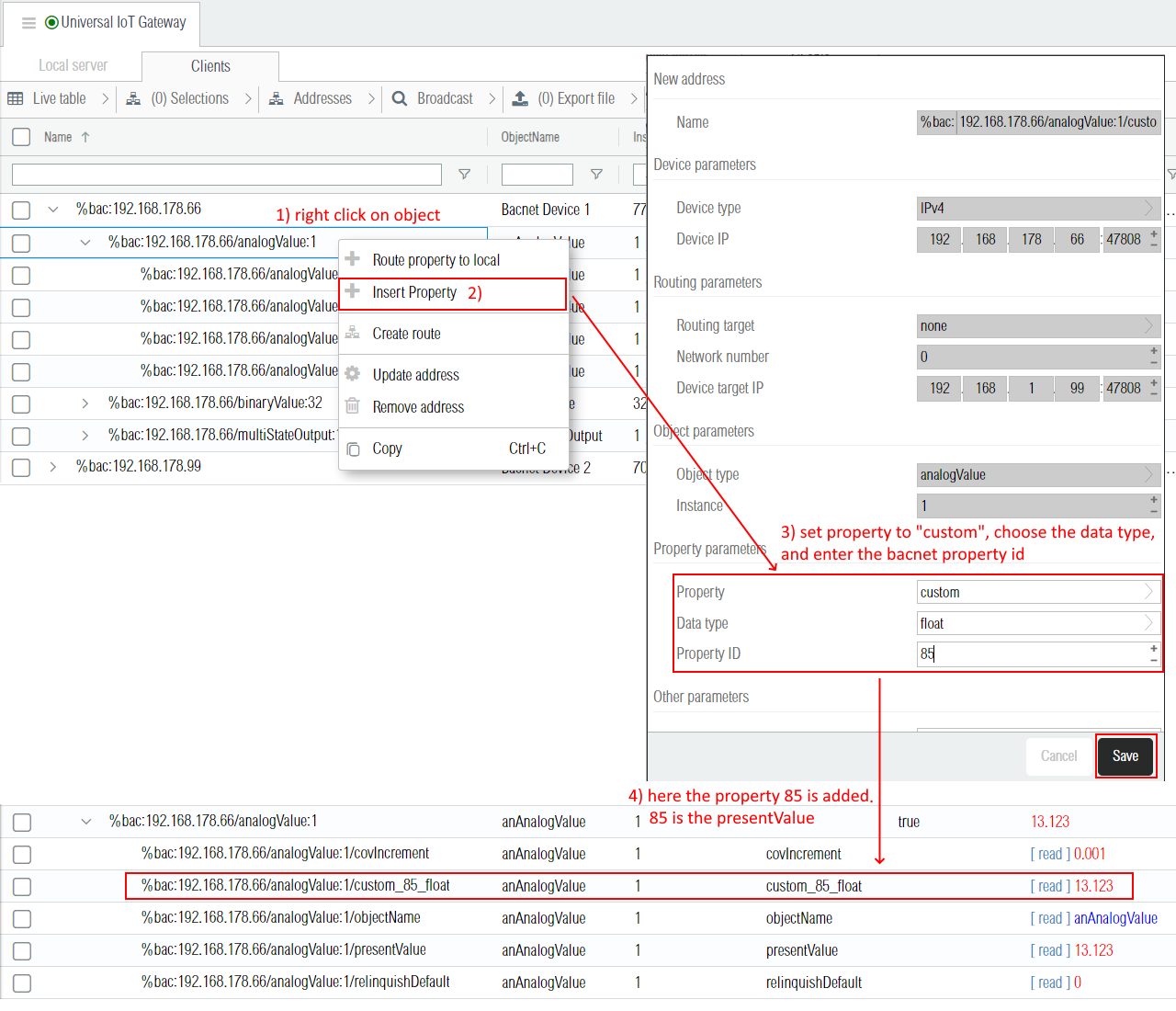
In bacnet clients devices, it is possible to insert custom properties by entering the property id and its datatype for encoding/decoding. The example below shows the insertion of one custom property with property id 85 (presentValue) and datatype float.
¶ 3.4 Priorities
The priority array is a special property that applies to all objects that are writeable by client devices such all object types ending with Value or Output. There are 16 priorities, 16 being the lowest. On restart, each slot in the array is set to a null (unused) state. When the command is received the BACnet device updates the slot in the Priority Array that corresponds to the commanded priority with the new value. The device continuously looks through the priority array of each commandable property and looks for the highest priority slot that is not null. It uses that value to update the Present Value. For example the following priorityArray: [null, null, null, null, null, null, null, 3, null, null, null, null, null, null, null, 1] has the value 3 on priority 8 and the value 1 on priority 16, so its actual presentValue is 3 (the one with the highest priority). To reset or empty a priority slot (set to NULL), it's required to send a command to the point to relinquish (give up control). This is like a normal write command, but with the specific null value and the priority to reset.
Priority Levels List
| Priority Level | Application |
|---|---|
| 1 | Manual-Life Safety |
| 2 | Automatic-Life Safety |
| 3 | Available |
| 4 | Available |
| 5 | Critical Equipment Control |
| 6 | Minimum On/Off |
| 7 | Available |
| 8 | Manual Operator |
| 9 | Available |
| 10 | Available |
| 11 | Available |
| 12 | Available |
| 13 | Available |
| 14 | Available |
| 15 | Available |
| 16 | Available |
¶ 3.4.1 Setting the write priority
By default when writing a value to objects supporting the priorityArray property the default priority defined in the gateway "Default priority" is used.
However it is possible to write on any priority by wrapping the value into an object and defining the priority in the "priority" key, and the value in the "value" key as shown in the screenshot below for priority 8.

In order to write at another specific priority in a route, the source value transform function can be defined to wrap the value in an object and specify the priority. It can be done either using graphical blocks,

or directly as a Javascript function.
function writeAtPriority8(v){
    return {
    "priority" : 8,
    "value"    : v
  }
}
¶ 3.4.2 Reset a priority
In order to reset a priority, it is the same as writing a value except the value must be null (either the raw null value or the string "null").
{
     "priority" : 8,
   "value"    : null
}
Here is below an example of a Javascript routing function writing at priority 8 and reseting the priority after 10 minutes.
function resetAfter10min(v, source, destination, infos){
  var self = this;
  clearTimeout(infos.context.timeout)
  infos.context.timeout = setTimeout(function(){
    // no new value has been routed for 10 minutes, automatically
    // reset the priority.
    self.writeValue(destination, {
      	"priority" : 8,
      	"value"    : null
    },
  }, 1000*60*10)

  return {
        "priority" : 8
        "value" : v
  }
}
Priorities can also be automatically reseted by specifying a delay in millesconds in the address resetPriority parameter has explained in the next section below
¶ 3.6 Addresses parameters
The bacnet addresses are mainly defined by their address name and don't have many custom parameters.
| Label | JSON Key | Description |
|---|---|---|
| Store value | remanent | This parameter is not specific to bacnet but general across all drivers and defines wether the last known value is stored or not on the permanent storage (disk) in case of reboot. By default the present value and statusFlags properties are never stored (false) and other properties are always stored (true) upon changes. |
| DefaultPriority | defaultPriority | Only applies to the presentValue property and only lif the object supports the priortyArray property. Permits to define different writing default priorities on different bacnet objects. If this parameter is not defined, then the default priority defined in the gateway parameters is taken instead. |
| ResetPriority | resetPriority | Only applies to the presentValue property and only if the object supports the priortyArray property. This parameter is a JSON object defining delays in milliseconds for each priority before reseting the priority. If no delay is defined, then the priority is never reset. For example {"16" : 40000, "8" : 16000} defines a reset after 40 seconds when writing on the priority 16, and a reset after 16 seconds when writing on the priority 8. |
¶ 3.7 Addresses JSON examples
{
    "alias": null,
    "name": "%bac:local/analogValue:1/presentValue",
  "description": null,
    "log": null,
    "json": {
        "remanent": false
    }
}
{
    "alias": null,
    "name": "%bac:local/binaryValue:32/relinquishDefault",
    "description": null,
    "log": null,
    "json": {
        "remanent": true
    },
    "value_string": "0"
}
{
    "name": "%bac:192.168.178.67/analogValue:3/objectName",
    "json": {},
    "value_string": "\"analogValue:3\""
}
¶ 4. Events & Alarms
The Weble gateway supports both ends of the BACnet event mechanism: it can receive EventNotification messages from remote devices it is subscribed to, and it can emit them on its own — either by forging events from the local server, or by sending AcknowledgeAlarm requests to remote devices. This section describes the underlying concepts, the /events addressing scheme, and how to subscribe a gateway to a remote notificationClass.
¶ 4.1 Events vs COV
Change-of-Value (COV) and Events are two independent mechanisms in the BACnet specification. They serve different purposes and use different services:
| COV | Events | |
|---|---|---|
| Purpose | Track a property's value | Report threshold transitions / alarms |
| Subscription service | SubscribeCOV |
Modify the recipientList of a notificationClass |
| Notification service | COVNotification |
EventNotification |
| Triggered by | Any property change | Intrinsic reporting evaluating limits, deadbands, fault states |
| Acknowledgment | None | Optional, via AcknowledgeAlarm |
The COV column in the BACnet object table behaves differently depending on the object type:
- For most objects (analogValue, binaryValue, ...) it controls a
SubscribeCOVregistration. - For
notificationClassobjects it controls the registration in the device'srecipientList— see §4.3.
¶ 4.2 NotificationClass
A notificationClass object (NC) is a configuration container on a BACnet device that defines:
| Property | Description |
|---|---|
recipientList |
The recipients (IP addresses or device IDs) that receive EventNotification messages emitted by any object referencing this NC |
ackRequired |
Which transitions require an acknowledgment — array of three booleans [offnormal, fault, normal] |
priority |
Per-transition priority (3 levels) |
Instrumented objects (analogInput, binaryValue, ...) reference an NC through their notificationClass property, which contains the NC instance number. For example, an analogValue:1 with notificationClass: 6 is bound to the notificationClass:6 object on the same device — when the AV's intrinsic reporting fires, the EventNotification is sent to all recipients listed in that NC's recipientList.
To receive events from a remote device, the gateway must register itself in the appropriate NC's recipientList. There is no SubscribeEventNotification service in BACnet — the registration is done by writing to the NC's recipientList property, see §4.3.
¶ 4.3 Subscribing to a remote notificationClass
To receive events from a remote device, the gateway must be present in that NC's recipientList. This is done from the BACnet object table by setting the COV column on the corresponding notificationClass address.
¶ 4.3.1 The COV column on notificationClass
For notificationClass objects the COV column accepts three values:
| JSON value | Label in UI | Behavior |
|---|---|---|
"unsubscribe" |
unsubscribe | Not registered. If previously registered, removes the gateway entry from the remote recipientList. |
"subscribe" |
subscribe | Registers the gateway in the remote recipientList. |
"subscribe + autoack" |
subscribe + autoack | Registers AND automatically emits an AcknowledgeAlarm to the remote device for each incoming event that has ackRequired: true. |
JSON example — subscribe to NC 1 on a remote device:
{
  "name": "%bac:192.168.178.99/notificationClass:1",
  "json": {
    "cov": "subscribe"
  }
}
¶ 4.3.2 Subscription mechanism
There is no SubscribeEventNotification service in the BACnet specification — registration goes through the NC's recipientList property:
- Subscribe: the driver issues an
AddListElementservice to insert the gateway entry into therecipientList. If the device does not implementAddListElement, a fallback path is used — the fullrecipientListis read, the new entry is appended (with deduplication), and the entire list is rewritten. - Unsubscribe: the driver issues a
RemoveListElementservice. Same fallback if unsupported.
¶ 4.3.3 Confirmed delivery — the confirm parameter
By default the gateway registers itself with confirm: false — the remote device sends EventNotification messages as Unconfirmed, with no transport-level acknowledgment. This is the right default for most installations: it minimizes traffic and avoids retries on noisy networks.
To force Confirmed delivery (the device expects a SimpleAck for each event), set "confirm": true in the address JSON:
{
  "name": "%bac:192.168.178.99/notificationClass:1",
  "json": {
    "cov": "subscribe",
    "confirm": true
  }
}
For the conceptual difference between Confirmed EventNotification (transport-level) and AcknowledgeAlarm (application-level), see §4.6.
¶ 4.3.4 Retry and stale-subscription detection
- Subscribe retries with exponential backoff: 11 s, 22 s, 44 s, ... capped at 10 minutes between attempts.
- Unsubscribe retries up to 3 times with backoff (30 s, 60 s, 120 s). The cached
recipientListis checked before each retry, so an unsubscribe that already succeeded will not retry. - Stale-subscription detection: if the gateway receives an event from a device for which it is no longer registered (
cov: false), it automatically retriggers an unsubscribe to clean up.
¶ 4.4 The /events address
Once subscribed (or for the local server), events are exposed on the gateway through dedicated /events addresses. These addresses are also used to emit events and acknowledgments — writing to them triggers the corresponding BACnet service.
¶ 4.4.1 Address shape
Two levels of /events addresses exist on the gateway:
| Address | Scope |
|---|---|
%bac:<device>/events |
Global — every event emitted by or sent to that remote device |
%bac:<device>/<type>:<instance>/events |
Object-specific — only events for that object on that device |
For the local server (the BACnet identity exposed by the gateway):
| Address | Scope |
|---|---|
%bac:local/events |
Global — every event emitted or acknowledged locally |
%bac:local/<type>:<instance>/events |
Object-specific |
¶ 4.4.2 Inserting an /events address
The /events addresses are inserted from the table interface by selecting the events object type in the BACnet form. When events is selected the instance, property and additional parameter fields are hidden — only the device (or local) and an optional object scope are required.
{
  "name": "%bac:192.168.178.99/events",
  "json": {}
}
{
  "name": "%bac:192.168.178.99/analogValue:1/events",
  "json": {}
}
¶ 4.5 Reading events
The current value of an /events address is the last event observed at that scope. The exact semantics depend on direction:
%bac:<client>/events— lastEventNotificationreceived from that remote device, OR lastAcknowledgeAlarmsent to that device (confirmation that the ack was emitted).%bac:local/events— lastEventNotificationemitted by the local server (viaforgeEventor intrinsic reporting), OR lastAcknowledgeAlarmreceived from an external client.
JSON example — EventNotification received from a remote device on %bac:192.168.178.99/events:
{
  "ackRequired": true,
  "deviceIdentifier": ["device", 2112],
  "eventType": "EVENT_CHANGE_OF_VALUE",
  "fromState": "NORMAL",
  "message": "off-normal",
  "notificationClass": 1,
  "notifyType": "alarm",
  "objectIdentifier": ["analogValue", 1],
  "priority": 127,
  "processIdentifier": 26511,
  "timestamp": "4/29/2026 8:38:14 AM",
  "toState": "HIGH_LIMIT"
}
Key fields:
| Field | Meaning |
|---|---|
deviceIdentifier |
The device that raised the event |
objectIdentifier |
The object the event refers to |
notificationClass |
The NC instance that distributed the event |
fromState / toState |
The transition (e.g. NORMAL → HIGH_LIMIT) |
ackRequired |
Whether an acknowledgment is expected |
notifyType |
"alarm", "event" or "ack_notification" |
priority |
Event priority (per the source NC's priority array) |
timestamp |
When the device emitted the event |
¶ 4.6 Confirmed vs Unconfirmed EventNotification and AcknowledgeAlarm
There are two distinct levels of acknowledgment in BACnet — they are easy to confuse but unrelated:
Confirmed / Unconfirmed EventNotification — transport-level. The recipient sends a SimpleAck ("I received your packet"). This is analogous to a TCP ACK and only confirms delivery of the network message. It is configured per recipient in the recipientList via the confirm flag (see §4.3.3).
AcknowledgeAlarm — application-level. An operator (or a system) sends an AcknowledgeAlarm to the device to signal "I have seen this alarm, it is being handled". The device updates its ackedTransitions and replies with an EventNotification of notifyType: "ack_notification" to all its recipients to confirm the alarm has been acknowledged.
A device can therefore emit a Confirmed EventNotification (transport-acked at packet level) that is never AcknowledgeAlarm-ed (no operator action), and conversely an Unconfirmed event can be acknowledged by an operator hours later.
¶ 4.7 Forging an event from the local server
Writing to an %bac:local/events address emits an EventNotification from the local BACnet server to the recipients of the local NC referenced in the payload. This is how the gateway exposes its own internal state as BACnet alarms.
| Address | Effect |
|---|---|
%bac:local/events |
Emits an EventNotification. The object identifier is taken from the objectIdentifier field of the JSON payload. |
%bac:local/<type>:<instance>/events |
Same as above; object identifier comes from the address. |
JSON example — emit a HIGH_LIMIT event for analogValue:1 from the local server:
{
  "ackRequired": true,
  "eventType": "EVENT_CHANGE_OF_VALUE",
  "fromState": "NORMAL",
  "message": "off-normal",
  "notificationClass": 1,
  "notifyType": "alarm",
  "objectIdentifier": ["analogValue", 1],
  "priority": 127,
  "timestamp": "4/29/2026 8:38:14 AM",
  "toState": "HIGH_LIMIT"
}
Once written, the event is sent over BACnet to every recipient of notificationClass:1 on the local server. The address value is updated to reflect the emitted event, with an additional _forged: true metadata field (see §4.9).
¶ 4.8 Sending an AcknowledgeAlarm to a remote device
Writing to an %bac:<client>/events address with a JSON payload tagged type: "acknowledge" emits an AcknowledgeAlarm BACnet service to the remote client. This is how an operator-driven acknowledgment is sent out from the gateway.
| Address | Effect |
|---|---|
%bac:<client>/events with type: "acknowledge" |
Sends an AcknowledgeAlarm to the client device. The objectIdentifier field of the JSON identifies the object to acknowledge. |
%bac:<client>/<type>:<instance>/events with type: "acknowledge" |
Same; object identifier comes from the address. |
JSON example — acknowledge a HIGH_LIMIT alarm on analogValue:1 of a remote device:
{
  "type": "acknowledge",
  "objectIdentifier": ["analogValue", 1],
  "state": 3,
  "text": "operator_01",
  "eventdate": "4/29/2026 8:38:14 AM",
  "ackdate": "4/29/2026 8:45:00 AM",
  "processIdentifier": 57
}
| Field | Meaning |
|---|---|
type: "acknowledge" |
Marks this payload as an acknowledgment (Weble internal shape, not a BACnet event) |
objectIdentifier |
The object being acknowledged |
state |
The acknowledged state (3 = HIGH_LIMIT, encoded as uint) |
eventdate |
Original timestamp of the event being acknowledged |
ackdate |
Timestamp of the acknowledgment |
text |
Free-form operator text |
processIdentifier |
Process identifier of the acknowledging entity |
After the AcknowledgeAlarm is sent, the remote device typically replies with a follow-up EventNotification of notifyType: "ack_notification" confirming the acknowledgment.
¶ 4.9 Metadata fields
Fields prefixed with an underscore are Weble-internal metadata that may appear in the JSON read from /events addresses. They are not part of the BACnet protocol — the BACnet stack ignores them on emission.
| Field | Where it appears | Meaning |
|---|---|---|
_forged: true |
%bac:local/events |
The event was emitted by a write to the address (not by intrinsic reporting on a local object) |
_autoack: true |
%bac:<client>/events |
The acknowledgment was generated by subscribe + autoack mode (§4.3.1), not by an explicit write |
_source: "<ip>" |
%bac:local/events (acknowledge) |
IP address of the external client that issued an AcknowledgeAlarm to the local server |
¶ 4.10 NotificationClass validation
When a local object has a notificationClass property referencing an NC that does not exist (for example notificationClass: 0 while no notificationClass:0 object is defined), the property status displays a warning:
! notificationClass:0 not found
This validation runs at driver startup, whenever the property changes value, and whenever a notificationClass object is inserted or removed.