OPC Unified Architecture (OPC UA) is a manufacturer-independent communication protocol for industrial automation applications. It is based on the client-server principle and allows transparent communication, from sensors and actuators to ERP systems or the cloud. The protocol is platform-independent and includes built-in security mechanisms. Flexible and completely independent, OPC UA is considered the ideal communication protocol for the implementation of Industry 4.0.
The Weble universal gateway OPC UA driver supports both client and server roles:
- Client mode: connects to an external OPC UA server, automatically discovers the address space using a node crawler, and reads/writes variable values with support for COV (Change of Value) subscriptions and polling.
- Server mode: exposes the gateway's addresses as an OPC UA server, allowing external OPC UA clients (such as SCADA systems, HMIs, or other gateways) to read, write, and subscribe to data points. The server supports user authentication, TLS security, historical data access, and an optional discovery server.
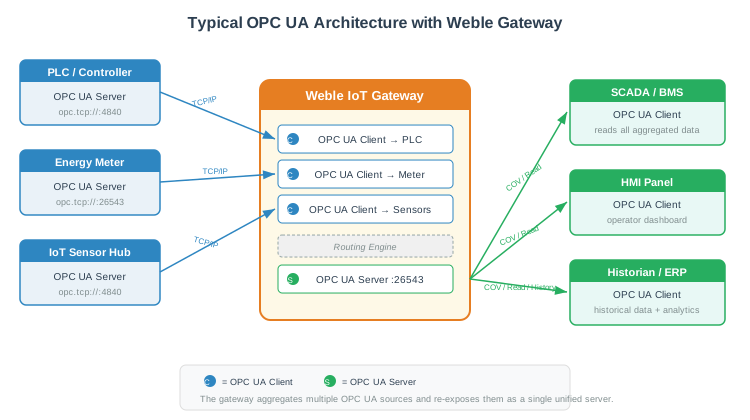
A typical use case is to use the Weble gateway as a protocol aggregator: multiple OPC UA clients connect to various field devices (PLCs, sensors, meters), and the gateway re-exposes all aggregated data as a single OPC UA server for SCADA, BMS, or ERP systems.
¶ 1. Getting started
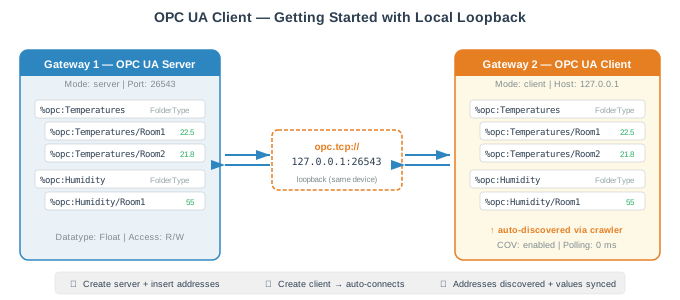
This section walks through a basic setup with an OPC UA server on one gateway and an OPC UA client on another (or on the same device for testing purposes).
¶ 1.1 Server configuration
Create a new gateway and select the OPC UA driver. Set the Mode to server. The key parameters to configure are:
- Port: the TCP port on which the OPC UA server listens (default:
26543). - Allow anonymous: if enabled, clients can connect without credentials. For production, disable this and configure the User list.
- /Root/Objects/: optional root path prefix under the OPC UA Objects folder where all addresses will be published.
Once the gateway is started, the OPC UA server generates a self-signed TLS certificate automatically. You can then insert addresses that will be exposed as OPC UA variables.
¶ 1.2 Inserting server addresses
In server mode, addresses are manually created. Each address requires:
- A Name (e.g.
%opc:Temperatures/Room1). - A Datatype (e.g.
Float,Boolean,String). - A NodeId — automatically generated as a GUID (e.g.
ns=1;g=A1B2C3D4-...), but can be customized. - An Access level — defines whether OPC UA clients can read, write, or access historical values.
Addresses can be organized hierarchically using / in the name, and folder nodes (datatype FolderType) can be created to structure the address space. Right-click on a FolderType address to insert child addresses directly into that folder.
¶ 1.3 Client configuration
Create another gateway with the OPC UA driver. Set the Mode to client and configure:
- Host: the IP address or hostname of the OPC UA server (e.g.
192.168.1.50or127.0.0.1for local testing). - Port: the port of the OPC UA server (default:
26543). - Security mode and Security policy: must match the server's configuration.
- Username / Password: if the server requires authentication.
- Application name: the client application identity sent to the server.
¶ 1.4 Automatic address discovery
When the client gateway starts, it automatically connects to the OPC UA server and crawls the address space. All discovered variables are imported as gateway addresses with their corresponding datatypes, NodeIds, and initial values.
The crawler explores the server's Objects folder (or the configured root path) recursively. It resolves datatypes and organizes addresses in a tree structure matching the OPC UA server's browse hierarchy.
If the Use crawler option is disabled, the client performs a simpler browse (one level only) and you can manually expand nodes by right-clicking on an address and selecting Browse addresses.
¶ 1.5 Subscribing to changes (COV)
For addresses where real-time updates are needed, enable the COV (Change of Value) parameter. The client will create a monitored item subscription on the OPC UA server for that variable. Whenever the value changes on the server side, the update is pushed to the client immediately — no polling needed.
For addresses where COV is not suitable (e.g. the server doesn't support subscriptions for that node), use the Polling parameter to periodically read the value at a defined interval in milliseconds.
¶ 2. Gateway parameters
¶ 2.1 General parameters
| Label | JSON Key | Description |
|---|---|---|
| Name | name | A descriptive name for this OPC UA gateway instance. |
| Cluster ID | cluster | Cluster identifier (integer). Use 0 for single-gateway setups. |
| Description | description | Optional description for this gateway. |
| Mode | type | Operating mode: client (connects to an OPC UA server) or server (exposes an OPC UA server). |
| Port | port | TCP port. For server: the listening port (default: 26543). For client: the remote server port. |
| /Root/Objects/ | objectsRoot | Optional path prefix under the OPC UA Objects folder. In server mode, all addresses are published under this path. In client mode, the crawler starts browsing from this path. |
¶ 2.2 Client parameters
These parameters are only visible when the Mode is set to client.
| Label | JSON Key | Description |
|---|---|---|
| Host | host | IP address or hostname of the remote OPC UA server. Default: 127.0.0.1. |
| Security mode | securityMode | Transport security mode: None, Sign (messages are signed), or SignAndEncrypt (messages are signed and encrypted). Must match the server configuration. |
| Security policy | securityPolicy | The security algorithm used: None, Basic128, Basic128Rsa15, Basic192, Basic192Rsa15, Basic256, Basic256Rsa15, Basic256Sha256, Aes128_Sha256_RsaOaep, PubSub_Aes128_CTR, PubSub_Aes256_CTR. Must match the server configuration. |
| Application name | applicationName | The application name used to identify this client to the server. Default: WebleOPCUA. |
| Username | name | Username for user authentication on the OPC UA server. Leave empty for anonymous connections. |
| Password | password | Password for user authentication. |
| Use crawler | useCrawler | If enabled (default), the client automatically crawls and imports the entire address space from the server at startup. If disabled, only a one-level browse is performed, and addresses can be expanded manually via right-click > Browse addresses. |
¶ 2.3 Server parameters
These parameters are only visible when the Mode is set to server.
| Label | JSON Key | Description |
|---|---|---|
| Max sessions | maxAllowedSessionNumber | Maximum number of concurrent OPC UA client sessions. Default: 500. |
| Max subscriptions | maxAllowedSubscriptionNumber | Maximum number of concurrent subscriptions across all clients. Default: 50. |
| User list | users | List of username/password pairs authorized to connect to the server. Each entry has a username and password field. |
| Allow anonymous | allowAnonymous | If enabled, clients can connect without providing credentials. |
| Description Browse | descriptionBrowse | If enabled, the OPC UA browse name of each variable is set to the address description field instead of the address name. Useful for providing human-readable names to OPC UA clients. |
| Register method | registerServerMethod | How the server registers itself for discovery: HIDDEN (not registered), MDNS (multicast DNS discovery), or LDS (Local Discovery Server). |
| Discovery server | discoveryServer | Enable a built-in OPC UA discovery server alongside the main server. |
| Discovery server port | discoveryServerPort | Port for the discovery server. Default: 4840 (OPC UA standard discovery port). Only visible when discovery server is enabled. |
¶ 2.4 Gateway JSON examples
Client mode:
{
  "type": "client",
  "host": "192.168.1.50",
  "port": 26543,
  "useCrawler": true,
  "securityMode": "None",
  "securityPolicy": "None",
  "applicationName": "WebleOPCUA",
  "name": "",
  "password": "",
  "objectsRoot": ""
}
Client with authentication and encryption:
{
  "type": "client",
  "host": "10.0.0.100",
  "port": 4840,
  "useCrawler": true,
  "securityMode": "SignAndEncrypt",
  "securityPolicy": "Basic256Sha256",
  "applicationName": "WebleGateway",
  "name": "operator",
  "password": "securePassword123",
  "objectsRoot": "/BuildingA/Floor1"
}
Server mode:
{
  "type": "server",
  "port": 26543,
  "allowAnonymous": false,
  "descriptionBrowse": false,
  "registerServerMethod": "HIDDEN",
  "discoveryServer": false,
  "discoveryServerPort": 4840,
  "maxAllowedSessionNumber": 500,
  "maxAllowedSubscriptionNumber": 50,
  "objectsRoot": "",
  "users": [
    { "username": "admin", "password": "adminPass" },
    { "username": "reader", "password": "readOnly" }
  ]
}
¶ 3. Addresses
¶ 3.1 Address format
OPC UA addresses use the prefix %opc: followed by a hierarchical path:
%opc:Temperature— a top-level variable%opc:HVAC/AHU1/SupplyTemp— a variable nested in folders%opc:Sensors/Room1/CO2— organized by location
In server mode, the path structure defines how variables appear in the OPC UA address space. Using / creates folder nodes (FolderType), allowing OPC UA clients to browse the data in a structured tree.
In client mode, the address names are automatically generated from the server's browse path during the crawl.
¶ 3.2 NodeId
Every OPC UA variable has a unique NodeId that identifies it within the address space. The NodeId format is:
ns=<namespace>;<type>=<identifier>
Where:
- ns is the namespace index (always
1for user-created variables). - type is the identifier type:
i— Numeric (UInteger), e.g.ns=1;i=1001s— String, e.g.ns=1;s=SupplyTemperatureg— GUID, e.g.ns=1;g=A1B2C3D4-E5F6-7890-ABCD-EF1234567890b— Opaque (ByteString)
By default, new addresses in server mode are assigned a GUID-based NodeId (e.g. ns=1;g=...). The NodeId can be customized when inserting an address.
¶ 3.3 Datatypes
The OPC UA driver supports the following standard OPC UA datatypes:
| Datatype | Description | Value range |
|---|---|---|
Boolean |
True/False | 0 or 1 |
SByte |
Signed 8-bit integer | -128 to 127 |
Byte |
Unsigned 8-bit integer | 0 to 255 |
Int16 |
Signed 16-bit integer | -32768 to 32767 |
UInt16 |
Unsigned 16-bit integer | 0 to 65535 |
Int32 |
Signed 32-bit integer | -2147483648 to 2147483647 |
UInt32 |
Unsigned 32-bit integer | 0 to 4294967295 |
Int64 |
Signed 64-bit integer | Full range |
UInt64 |
Unsigned 64-bit integer | Full range |
Float |
32-bit floating point | IEEE 754 |
Double |
64-bit floating point | IEEE 754 |
String |
UTF-8 text string | — |
DateTime |
Date and time | ISO 8601 |
Guid |
Globally unique identifier | UUID format |
ByteString |
Raw byte array | Array of integers 0-255 |
XmlElement |
XML fragment | — |
NodeId |
OPC UA node reference | ns=x;t=value format |
ExpandedNodeId |
Extended node reference | Includes namespace URI |
StatusCode |
OPC UA status code | e.g. Good, Bad |
QualifiedName |
Namespace-qualified name | ns:name format |
LocalizedText |
Localized text string | locale=xx text=... |
FolderType |
Folder node (no value) | — |
The FolderType is a special type used to create organizational folders in the address space. Folder nodes do not hold values and are not routable or loggable.
¶ 3.4 Address parameters
¶ Client mode
| Label | JSON Key | Description |
|---|---|---|
| COV | cov | Enable Change of Value monitoring. When enabled, the OPC UA server pushes value updates to the client whenever the value changes. This is the most efficient method for real-time data. |
| Polling | polling | Polling interval in milliseconds. The client periodically reads the OPC UA variable at this interval. Use this as an alternative to COV when subscriptions are not supported by the server. Minimum effective interval: 100 ms. |
| Description | description | Optional description. |
| Log | log | Logging mode: never, on update, always, or a duration in ms. |
¶ Server mode
| Label | JSON Key | Description |
|---|---|---|
| Datatype | datatype | The OPC UA datatype for this variable (see section 3.3). Determines how the value is encoded and validated. |
| Access level | accessLevel | Defines what operations OPC UA clients can perform on this variable: CurrentRead (read current value), CurrentWrite (write value), HistoryRead (read historical values). Multiple levels can be combined with `` |
| NodeId | nodeId | The OPC UA NodeId for this variable. Auto-generated as a GUID by default. Can be customized to use numeric, string, or GUID identifiers. |
| Store value | remanent | Value persistence: never (value lost on restart), always (persisted to disk). |
| Description | description | Optional description. When Description Browse is enabled on the gateway, this field is used as the OPC UA browse name. |
| Log | log | Logging mode: never, on update, always, or a duration in ms. |
¶ 3.5 Address JSON examples
Server address (Float variable, read/write, default access level):
{
  "datatype": "Float",
  "accessLevel": "CurrentRead | CurrentWrite",
  "nodeId": "ns=1;g=A1B2C3D4-E5F6-7890-ABCD-EF1234567890",
  "remanent": false
}
Server address (FolderType):
{
  "datatype": "FolderType",
  "nodeId": "ns=1;g=11111111-2222-3333-4444-555555555555"
}
Client address (COV subscription):
{
  "datatype": "Double",
  "nodeId": "ns=2;s=SupplyAirTemperature",
  "cov": true,
  "polling": 0
}
Client address (polling every 5 seconds):
{
  "datatype": "Int32",
  "nodeId": "ns=2;i=1001",
  "cov": false,
  "polling": 5000
}
¶ 4. Security
¶ 4.1 TLS certificates
In server mode, the OPC UA driver automatically generates and manages a self-signed TLS certificate. The certificate is stored in the gateway configuration and is automatically renewed when it approaches expiration (checked every hour, renewed if less than 1.5 hours remain).
When connecting a client to the server, the client retrieves the server certificate during the initial handshake and uses it for subsequent secured connections.
¶ 4.2 Security modes
The combination of Security mode and Security policy determines the level of transport security:
| Security mode | Description |
|---|---|
None |
No security. Messages are sent in plain text. Suitable for isolated networks or testing. |
Sign |
Messages are digitally signed to ensure integrity. Data is not encrypted. |
SignAndEncrypt |
Messages are both signed and encrypted. Recommended for production environments. |
The security policy defines the cryptographic algorithm used. Basic256Sha256 and Aes128_Sha256_RsaOaep are recommended for modern deployments.
¶ 4.3 User authentication
In server mode, user authentication can be configured via the User list parameter. Each entry consists of a username and password. If Allow anonymous is disabled, only users in the list can connect.
In client mode, the Username and Password fields are sent to the server during session creation.
¶ 5. Historical data
When an address in server mode has the HistoryRead access level, the OPC UA server automatically installs a historical data node for that variable. This allows OPC UA clients to query past values using the standard OPC UA HistoricalRead service.
To enable this feature, add HistoryRead to the address access level (e.g. CurrentRead | CurrentWrite | HistoryRead). Note that the default access level is CurrentRead | CurrentWrite (without history), so HistoryRead must be explicitly added.
¶ 6. Address properties summary
| Property | Client mode | Server mode |
|---|---|---|
| Readable | Yes | Yes |
| Writable | Yes | Yes |
| Routable | Yes (except FolderType) | Yes (except FolderType) |
| Loggable | Yes (except FolderType) | Yes (except FolderType) |
| COV subscription | Yes | N/A (server pushes to clients) |
| Polling | Yes | N/A |
| Historical data | N/A | Yes (when HistoryRead access level) |