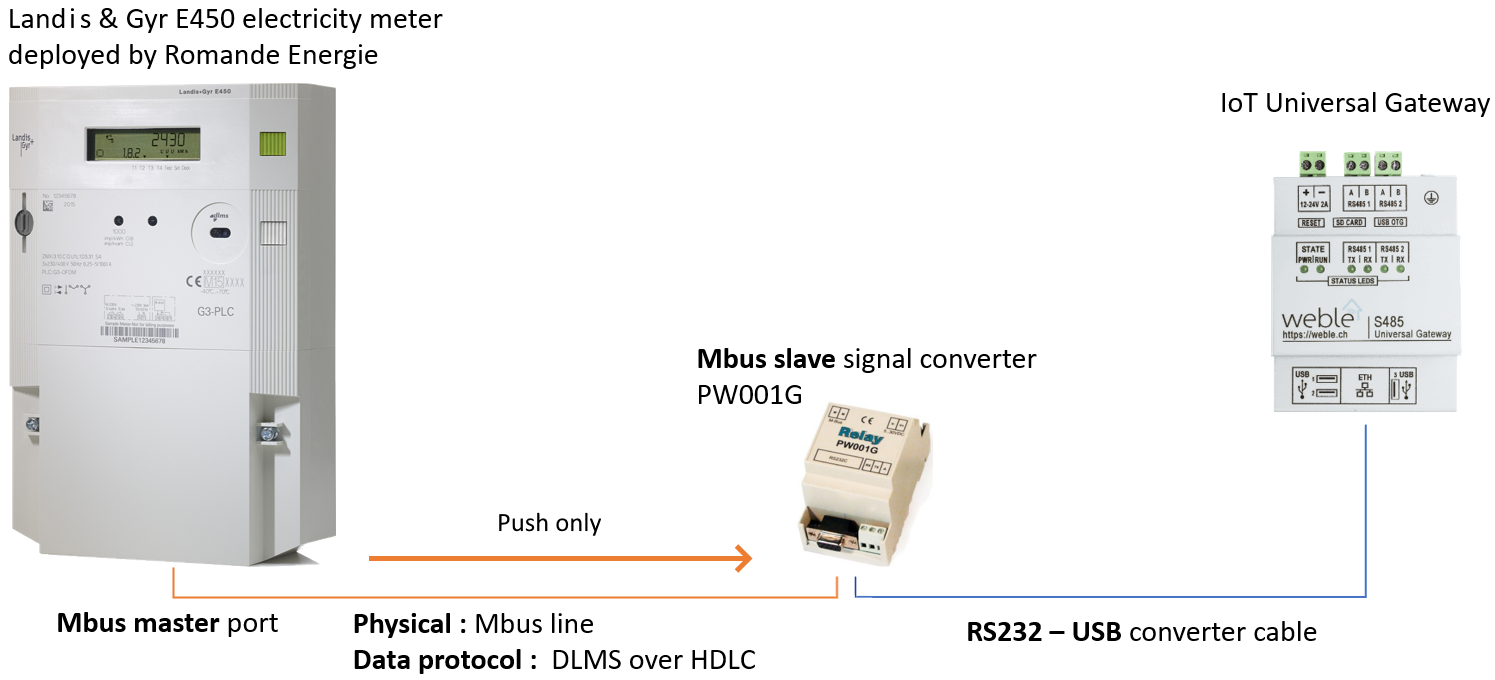
In this article we describe how to gather the electricity data pushed by the Landis & Gyr E450 meter. The process is unusual as the Landis & Gyr E450 electricity meter sends its data periodically over a mbus line, but with a different protocol to encode the bytes: DLMS over HDLC. The meter acts as a "mbus master" in the sense that it provides current over the line to the slave devices on the line.
The Weble IoT universal gateway never writes on the mbus line, it only receives and decodes the data periodically pushed by the E450 meter.
¶ 1 Obis IEC 62056 gateway
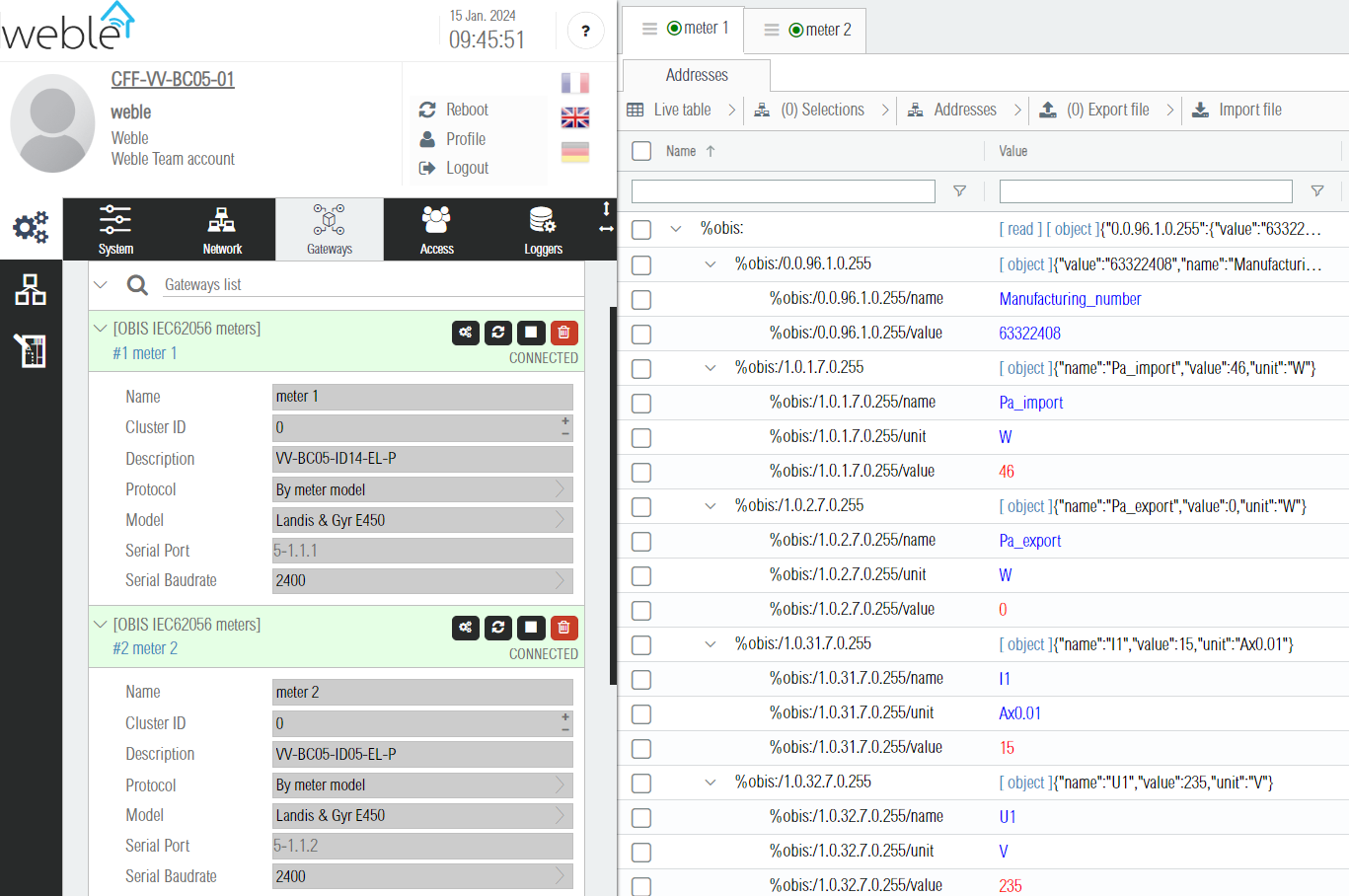
OBIS ("Object Identification System") codes (formerly EDIS) are used for the unambiguous identification of measured values as well as abstract data in electronic exchange between the communication partners. The OBIS Codesystem is described in IEC 62056-61 for electrical energy. Electricity meters use a variety of different of protocols relying on obis codes. The OBIS IEC 62056 gateway driver of the Weble universal IoT gateway supports some of these protocols such as the d0 protocol. For the E450 meter, set Protocol to By meter model and Model to Landis & Gyr E450, then select the Serial Port. Set Serial Baudrate to 2400 and Serial Parity to even (8 data bits and 1 stop bit are always used in this mode). A new gateway starts with the D0 defaults (300 baud): change the baudrate yourself. No polling is needed: the gateway only listens, and the addresses are created when the first frame is received. The same mode supports the Kamstrup OMNIPOWER HAN meter (parity none). Note that multiple E450 meters can be connected to a single universal IoT gateway. In the example below, a generic USB hub is used to connect to 4 different meters. If the universal IoT Gateway has rs485 ports, those can also be used along with the correct signal converters for mbus.
¶ 2 Transmitted data
This section describes the data transmitted by the E450 meters when configured for the Romande Energie energy supplier. The data is encoded using DLMS with an extra HDLC layer. No encryption is used. The data is pushed periodically.
The set of data below is transmitted 11 times per minutes at seconds 5, 10, 15, 20, 25, 30, 35, 40, 45, 50, 55
| OBIS code | Description |
|---|---|
| 0.0.96.1.0 | Manufacturer serial number |
| 1.0.1.7.0 | Instantaneous active power import +P |
| 1.0.2.7.0 | Instantaneous active power export -P |
| 1.1.1.8.0 | Total imported active energy +A |
| 1.1.2.8.0 | Total exported active energy -A |
| 1.0.31.7.0 | Instantaneous current L1 |
| 1.0.51.7.0 | Instantaneous current L2 |
| 1.0.71.7.0 | Instantaneous current L3 |
| 1.0.32.7.0 | Instantaneous voltage L1 |
| 1.0.52.7.0 | Instantaneous voltage L2 |
| 1.0.72.7.0 | Instantaneous voltage L3 |
The set of data below is transmitted once per minute at second 0
| OBIS code | Description |
|---|---|
| 1.1.1.8.1 | Active energy import +A rate 1 (Peak Hours) |
| 1.1.1.8.2 | Active energy import +A rate 2 (Off-peak Hours) |
| 1.1.2.8.1 | Active energy export -A rate 1 (Peak Hours) |
| 1.1.2.8.2 | Active energy export -A rate 2 (Off-peak Hours) |
¶ 2.1 Addresses created by the gateway
The gateway creates the address %obis: (the whole message) and, for each OBIS code, an address %obis:/<OBIS code> with the sub-addresses /name, /value, /unit and /desc. For example %obis:/1.0.1.7.0.255/value is the imported active power in W.
| OBIS code | Name | Unit |
|---|---|---|
| 1.0.1.7.0.255 / 1.0.2.7.0.255 | Pa_import / Pa_export | W |
| 1.1.1.8.0.255 / 1.1.2.8.0.255 | Ea_Import / Ea_export | Wh |
| 1.0.31.7.0.255 / 1.0.51.7.0.255 / 1.0.71.7.0.255 | I1 / I2 / I3 | A x 0.01 |
| 1.0.32.7.0.255 / 1.0.52.7.0.255 / 1.0.72.7.0.255 | U1 / U2 / U3 | V |
| 1.1.1.8.1.255 / 1.1.1.8.2.255 | Ea_import+A_tarif_1 / Ea_import+A_tarif_2 | Wh |
| 1.1.2.8.1.255 / 1.1.2.8.2.255 | Ea_export-A_tarif_1 / Ea_export-A_tarif_2 | Wh |
Currents are sent in hundredths of an ampere: a value of 15 means 0.15 A. Divide by 100 in the route or logger that uses them.
¶ 3 Applications
Once the energy data is retrieved on the Weble IoT Gateway, it is possible to send it over any protocol and to log the data. If an internet connexion is needed to send the data over, a cellular network (4g / 5g ) can be configured on the IoT gateway. Some examples of potential applications are listed below:
- The energy data can be logged and exported as a CSV files over (S)FTP or emails (SMTP).
- Sent over to a cloud server using MQTT.
- Logged in the weble time-series database, either locally or in our cloud. Then, it is possible to generate graphics and visuals from our visualization.
¶ 4 Documents
Technical specifications from Romande Energie regarding the communication protocol with the E450 meters. courrier_cii_annexe_landis_prod.pdf
The mbus slave to rs232 signal converter: pw001_g.pdf
Document in french describing the 2021 swiss laws and recommendations for energy suppliers to guarentee that the customer can access the energy data from the electricity meters: 10456-catalogue_de_questions_(faq)_oapel-rév_01.01.2021_fr.pdf
¶ 5 Example of DLMS over HDLC packets
The meter can send multiple HDLC frames received on the mbus serial line, which once unpack form the DLMS PDU bytes.
¶ 5.1 HDLC frames
Here is an example of 3 consecutive HDLC frames forming a single message. Note that HDLC frames start and end with 7E.
7E A0 84 CE FF 03 13 12 8B E6 E7 00 E0 40 00 01 00 00 70 0F 00 2D 67 84 0C 07 E7 0A 14 05 0C 00 32 FF 80 00 00 02 0D 01 0D 02 04 12 00 28 09 06 00 08 19 09 00 FF 0F 02 12 00 00 02 04 12 00 28 09 06 00 08 19 09 00 FF 0F 01 12 00 00 02 04 12 00 01 09 06 00 00 60 01 00 FF 0F 02 12 00 00 02 04 12 00 03 09 06 01 00 01 07 00 FF 0F 02 12 00 00 02 04 12 00 03 09 06 01 00 02 07 00 FF 0F 02 12 00 00 42 55 7E
7E A0 7D CE FF 03 13 D0 45 E0 40 00 02 00 00 6C 02 04 12 00 03 09 06 01 01 01 08 00 FF 0F 02 12 00 00 02 04 12 00 03 09 06 01 01 02 08 00 FF 0F 02 12 00 00 02 04 12 00 03 09 06 01 00 1F 07 00 FF 0F 02 12 00 00 02 04 12 00 03 09 06 01 00 33 07 00 FF 0F 02 12 00 00 02 04 12 00 03 09 06 01 00 47 07 00 FF 0F 02 12 00 00 02 04 12 00 03 09 06 01 00 20 07 00 FF 0F 02 12 00 00 B8 A2 7E
7E A0 6D CE FF 03 13 90 F1 E0 C0 00 03 00 00 5C 02 04 12 00 03 09 06 01 00 34 07 00 FF 0F 02 12 00 00 02 04 12 00 03 09 06 01 00 48 07 00 FF 0F 02 12 00 00 09 06 00 08 19 09 00 FF 09 08 36 33 33 32 32 34 31 30 06 00 00 00 F6 06 00 00 00 00 06 00 16 38 49 06 00 00 00 00 12 00 16 12 00 31 12 00 37 12 00 E7 12 00 EA 12 00 EA BA BE 7E
¶ 5.2 DLMS packet
the 3 HDLC frames above once unwrap contain the following DLMS packet :
0F 00 2D 67 84 0C 07 E7 0A 14 05 0C 00 32 FF 80 00 00 02 0D 01 0D 02 04 12 00 28 09 06 00 08 19 09 00 FF 0F 02 12 00 00 02 04 12 00 28 09 06 00 08 19 09 00 FF 0F 01 12 00 00 02 04 12 00 01 09 06 00 00 60 01 00 FF 0F 02 12 00 00 02 04 12 00 03 09 06 01 00 01 07 00 FF 0F 02 12 00 00 02 04 12 00 03 09 06 01 00 02 07 00 FF 0F 02 12 00 00 02 04 12 00 03 09 06 01 01 01 08 00 FF 0F 02 12 00 00 02 04 12 00 03 09 06 01 01 02 08 00 FF 0F 02 12 00 00 02 04 12 00 03 09 06 01 00 1F 07 00 FF 0F 02 12 00 00 02 04 12 00 03 09 06 01 00 33 07 00 FF 0F 02 12 00 00 02 04 12 00 03 09 06 01 00 47 07 00 FF 0F 02 12 00 00 02 04 12 00 03 09 06 01 00 20 07 00 FF 0F 02 12 00 00 02 04 12 00 03 09 06 01 00 34 07 00 FF 0F 02 12 00 00 02 04 12 00 03 09 06 01 00 48 07 00 FF 0F 02 12 00 00 09 06 00 08 19 09 00 FF 09 08 36 33 33 32 32 34 31 30 06 00 00 00 F6 06 00 00 00 00 06 00 16 38 49 06 00 00 00 00 12 00 16 12 00 31 12 00 37 12 00 E7 12 00 EA 12 00 EA
¶ 5.3 Decoded XML DLMS packet
The DLMS packet above can finally be decoded into a readable format, here using the Gurux DLMS translator software.
<DataNotification>
  <!-- Invoke ID: 2975620 -->
  <LongInvokeIdAndPriority Value="002D6784" />
  <!-- 20.10.2023 12:00:50 -->
  <DateTime Value="07E70A14050C0032FF800000" />
  <NotificationBody>
    <DataValue>
      <Structure Qty="0D" >
        <Array Qty="0D" >
          <Structure Qty="04" >
            <UInt16 Value="0028" />
            <!-- 0.8.25.9.0.255 -->
            <OctetString Value="0008190900FF" />
            <Int8 Value="02" />
            <UInt16 Value="0000" />
          </Structure>
          <Structure Qty="04" >
            <UInt16 Value="0028" />
            <!-- 0.8.25.9.0.255 -->
            <OctetString Value="0008190900FF" />
            <Int8 Value="01" />
            <UInt16 Value="0000" />
          </Structure>
          <Structure Qty="04" >
            <UInt16 Value="0001" />
            <!-- 0.0.96.1.0.255 -->
            <OctetString Value="0000600100FF" />
            <Int8 Value="02" />
            <UInt16 Value="0000" />
          </Structure>
          <Structure Qty="04" >
            <UInt16 Value="0003" />
            <!-- 1.0.1.7.0.255 -->
            <OctetString Value="0100010700FF" />
            <Int8 Value="02" />
            <UInt16 Value="0000" />
          </Structure>
          <Structure Qty="04" >
            <UInt16 Value="0003" />
            <!-- 1.0.2.7.0.255 -->
            <OctetString Value="0100020700FF" />
            <Int8 Value="02" />
            <UInt16 Value="0000" />
          </Structure>
          <Structure Qty="04" >
            <UInt16 Value="0003" />
            <!-- 1.1.1.8.0.255 -->
            <OctetString Value="0101010800FF" />
            <Int8 Value="02" />
            <UInt16 Value="0000" />
          </Structure>
          <Structure Qty="04" >
            <UInt16 Value="0003" />
            <!-- 1.1.2.8.0.255 -->
            <OctetString Value="0101020800FF" />
            <Int8 Value="02" />
            <UInt16 Value="0000" />
          </Structure>
          <Structure Qty="04" >
            <UInt16 Value="0003" />
            <!-- 1.0.31.7.0.255 -->
            <OctetString Value="01001F0700FF" />
            <Int8 Value="02" />
            <UInt16 Value="0000" />
          </Structure>
          <Structure Qty="04" >
            <UInt16 Value="0003" />
            <!-- 1.0.51.7.0.255 -->
            <OctetString Value="0100330700FF" />
            <Int8 Value="02" />
            <UInt16 Value="0000" />
          </Structure>
          <Structure Qty="04" >
            <UInt16 Value="0003" />
            <!-- 1.0.71.7.0.255 -->
            <OctetString Value="0100470700FF" />
            <Int8 Value="02" />
            <UInt16 Value="0000" />
          </Structure>
          <Structure Qty="04" >
            <UInt16 Value="0003" />
            <!-- 1.0.32.7.0.255 -->
            <OctetString Value="0100200700FF" />
            <Int8 Value="02" />
            <UInt16 Value="0000" />
          </Structure>
          <Structure Qty="04" >
            <UInt16 Value="0003" />
            <!-- 1.0.52.7.0.255 -->
            <OctetString Value="0100340700FF" />
            <Int8 Value="02" />
            <UInt16 Value="0000" />
          </Structure>
          <Structure Qty="04" >
            <UInt16 Value="0003" />
            <!-- 1.0.72.7.0.255 -->
            <OctetString Value="0100480700FF" />
            <Int8 Value="02" />
            <UInt16 Value="0000" />
          </Structure>
        </Array>
        <!-- 0.8.25.9.0.255 -->
        <OctetString Value="0008190900FF" />
        <!-- 63322410 -->
        <OctetString Value="3633333232343130" />
        <UInt32 Value="000000F6" />
        <UInt32 Value="00000000" />
        <UInt32 Value="00163849" />
        <UInt32 Value="00000000" />
        <UInt16 Value="0016" />
        <UInt16 Value="0031" />
        <UInt16 Value="0037" />
        <UInt16 Value="00E7" />
        <UInt16 Value="00EA" />
        <UInt16 Value="00EA" />
      </Structure>
    </DataValue>
  </NotificationBody>
</DataNotification>