
The HTTP/HTTPS driver provides a versatile HTTP server and client implementation for the Weble universal gateway. It enables bidirectional communication over HTTP and WebSocket protocols, making it ideal for REST API integrations, webhook receivers, real-time data streaming, and custom web-based visualizations.
The driver supports two main modes:
- Server mode: creates an HTTP server that listens for incoming requests (GET, POST, PUT, DELETE, PATCH) and WebSocket connections. It can also serve static files (HTML, CSS, JS) for building custom dashboards and visualizations, with optional FTP/SFTP servers for file management.
- Client mode: sends HTTP requests to external APIs and services, with support for polling, custom headers, and multiple authentication methods (Basic, OAuth2).

¶ 1. Getting started
¶ 1.1 Server mode
Create a new gateway with the HTTP driver. Set the Type to server and configure the Port on which the server will listen (default: 80).
Once the gateway is started, the HTTP server begins listening for incoming requests. Each incoming request automatically creates an address with the received data. For example, a POST request to /sensors/temperature will create the address %http-post:#/sensors/temperature with the request body as its value.
The server responds with the current stored value of the address. This makes it easy to build simple REST APIs where external devices or services push data into the gateway.
¶ 1.2 Client mode
Set the Type to client and configure the URL of the target API endpoint. The driver will send HTTP requests to this URL based on the configured addresses.
Each address represents an API endpoint with a specific HTTP method. For example, the address %http-get:/api/data will send a GET request to the configured base URL appended with /api/data. A Polling interval can be set on each address to periodically fetch data from the remote API.
¶ 1.3 WebSocket support
The HTTP server also supports WebSocket connections. Clients can connect via WebSocket to any path on the server. Each WebSocket path creates a set of addresses for managing connections and messages:
%http-ws:/path— the base WebSocket address%http-ws:/path/message— receives incoming messages from connected clients%http-ws:/path/clients— lists currently connected clients%http-ws:activeClients— lists all active WebSocket clients across all paths
¶ 2. Gateway parameters
¶ 2.1 General parameters
| Label | JSON Key | Description |
|---|---|---|
| Name | name | A descriptive name for this HTTP gateway instance. |
| Cluster ID | cluster | Cluster identifier (integer). Use 0 for single-gateway setups. |
| Description | description | Optional description for this gateway. |
| Type | type | Operating mode: server (HTTP server listening for requests) or client (HTTP client sending requests to a remote API). |
| Port | port | Server only. TCP port on which the HTTP server listens. Default: 80. |
| URL | url | Client only. Base URL of the remote API endpoint (e.g. https://api.example.com). |
¶ 2.2 Client authentication
These parameters are only visible when the Type is set to client.
| Label | JSON Key | Description |
|---|---|---|
| Auth. Method | authentificationMethod | Authentication method: none, Bearer basic (HTTP Basic Auth), or oAuth2. |
| Username | username | Bearer basic only. Username for HTTP Basic authentication. |
| Password | password | Bearer basic only. Password for HTTP Basic authentication. |
¶ OAuth2 parameters
These parameters are visible when the authentication method is set to oAuth2.
| Label | JSON Key | Description |
|---|---|---|
| oAuth2 url | oAuth2_host | The OAuth2 token endpoint URL (e.g. https://auth.example.com/oauth/token). |
| Client_id | oAuth2_client_id | The OAuth2 client identifier. |
| Client_secret | oAuth2_client_password | The OAuth2 client secret. |
| Scope | oAuth2_scope | The OAuth2 scope to request (optional). |
| Grant type | oAuth2_grant_type | The OAuth2 grant type. Currently supported: client_credentials. |
| Request type | oAuth2_request_type | How the token request is sent: POST/x-www-form-urlencoded or POST/body (JSON). |
¶ 2.3 Client request parameters
| Label | JSON Key | Description |
|---|---|---|
| Headers | headers | Client only. Custom HTTP headers to include with every request. Each header is a key/value pair (e.g. Content-Type: application/json). |
| Idle timeout | idleTimeout | Client only. Pause in milliseconds between each sequential request when polling multiple addresses. Set to 0 for parallel requests. |
¶ 2.4 Server parameters
These parameters are only visible when the Type is set to server.
| Label | JSON Key | Description |
|---|---|---|
| Basic authorization | authorizations | List of username/password pairs for HTTP Basic authentication. If empty, no authentication is required. |
| Require Weble Session | requireWebleSession | If enabled, incoming requests must include a valid Weble session. |
| Restrict to existing path | restrictToAddressPath | If enabled, WebSocket connections are only accepted on paths that already have a corresponding address. |
| Websocket inactivity timeout | websocketInactivityTimeout | Time in milliseconds before an inactive WebSocket connection is automatically closed. Set to 0 to disable. |
¶ 2.5 Static file server parameters
When the Type is server, an optional static file server can be enabled.
| Label | JSON Key | Description |
|---|---|---|
| Serv static file | staticFileServer | Enable serving static files from the gateway's data directory. |
| Root path | rootPath | URL prefix path for the server (e.g. /myapp). |
| FTP Enable | ftpEnable | Enable an FTP server for uploading/managing static files. |
| FTP Port | ftpPort | FTP server port. Default: 2121. |
| SFTP Enable | sftpEnable | Enable an SFTP server for secure file transfers. |
| SFTP Port | sftpPort | SFTP server port. Default: 2323. |
¶ 2.6 Gateway JSON examples
Server mode:
{
  "type": "server",
  "port": 8080,
  "authorizations": [],
  "headers": [],
  "staticFileServer": false,
  "ftpEnable": false,
  "sftpEnable": false,
  "ftpPort": 2121,
  "sftpPort": 2323,
  "rootPath": "",
  "requireWebleSession": false,
  "restrictToAddressPath": false,
  "websocketInactivityTimeout": 0
}
Client mode with OAuth2:
{
  "type": "client",
  "url": "https://api.example.com",
  "idleTimeout": 0,
  "authentificationMethod": "oAuth2",
  "oAuth2_host": "https://auth.example.com/oauth/token",
  "oAuth2_client_id": "my_client_id",
  "oAuth2_client_password": "my_client_secret",
  "oAuth2_scope": "read write",
  "oAuth2_grant_type": "client_credentials",
  "oAuth2_request_type": "POST/body",
  "headers": [
    { "key": "Accept", "value": "application/json" }
  ]
}
Client mode with Basic Auth:
{
  "type": "client",
  "url": "https://api.example.com",
  "idleTimeout": 100,
  "authentificationMethod": "Bearer basic",
  "username": "myuser",
  "password": "mypassword",
  "headers": []
}
¶ 3. Addresses
¶ 3.1 Address format
HTTP addresses use the prefix %http-<method>: followed by the URL path:
%http-get:/api/sensors— GET request to /api/sensors%http-post:/data/upload— POST request to /data/upload%http-put:/config— PUT request to /config%http-delete:/items/42— DELETE request%http-patch:/users/1— PATCH request%http-ws:/realtime— WebSocket connection path%http-file:/index.html— a file or folder of the static file directory (server mode)
The supported address schemas are: GET, POST, PUT, DELETE, PATCH, WS (WebSocket), and FILE. Each schema is shown as a separate tab in the gateway's address grid. The FILE schema is not requested manually — it is populated automatically from the static file directory (see section 5.3).
¶ Server-specific auto-generated addresses
In server mode, incoming requests automatically create read-only addresses (prefixed with #):
%http-post:#/sensors/temp— stores the last received POST body on/sensors/temp%http-get:#lastQuery— stores the last received GET request (URL, query parameters, body)
¶ 3.2 Address parameters
¶ Client mode
| Label | JSON Key | Description |
|---|---|---|
| Polling | polling | Polling interval in milliseconds. The client will periodically send the HTTP request at this interval to refresh the value. |
| Description | description | Optional description for this address. |
| Log | log | Logging mode: never, on update, always, or a duration in milliseconds. |
¶ Server mode
| Label | JSON Key | Description |
|---|---|---|
| Store value | remanent | Value persistence: never (value lost on restart), always (value persisted to disk), or a duration in milliseconds. |
| Description | description | Optional description for this address. |
| Log | log | Logging mode: never, on update, always, or a duration in milliseconds. |
¶ WebSocket address parameters (server mode)
| Label | JSON Key | Description |
|---|---|---|
| Message filter | messageFilter | Filter incoming WebSocket messages by key/value pairs (e.g. type=temperature). Multiple filters can be comma-separated. Only matching messages are stored. |
| Child key | messageKey | Extract a nested value from the message payload using dot notation (e.g. data.value). |
| Only payload | messageOnlyPayload | If enabled, stores only the message payload instead of the full message object (which includes client identity). |
| Store value | remanent | Value persistence mode. |
| Log | log | Logging mode. |
¶ 3.3 Writing values
When writing a value to an HTTP client address, the value is sent as the HTTP request body. The value can be structured to include additional request options:
{
  "headers": { "X-Custom-Header": "value" },
  "query": { "param1": "value1" },
  "body": { "temperature": 22.5 }
}
- headers: additional HTTP headers for this specific request (merged with gateway headers).
- query: URL query parameters appended to the request URL.
- body: the actual request body. If omitted, the entire value is sent as the body.
¶ 4. WebSocket details
¶ 4.1 Server-side WebSocket addresses
When a WebSocket client connects to the server, the following addresses are automatically managed:
| Address | Description |
|---|---|
%http-ws:activeClients |
Array of all active WebSocket client identifiers across all paths. |
%http-ws:/path |
Base address for a WebSocket path. |
%http-ws:/path/message |
Last received message from any client on this path. |
%http-ws:/path/clients |
Array of client identifiers connected to this specific path. |
Each connected client is assigned a unique identifier in the format %http-ws:/path/#<index>.
¶ 4.2 Message format
Incoming WebSocket messages are wrapped in an object:
{
  "payload": "<the actual message content>",
  "client": "%http-ws:/path/#0"
}
The message filter and child key parameters can be used to filter and extract specific data from incoming messages before storing them.
¶ 5. Static file server and custom visualization
¶ 5.1 Overview
When the Serv static file option is enabled in server mode, the HTTP driver serves static files (HTML, CSS, JavaScript, images, etc.) from the gateway's data directory. This turns the gateway into a lightweight web server capable of hosting custom dashboards, visualizations, or single-page applications that interact with the gateway's data through the API driver.
On first startup, if the data directory is empty, a default template web application is automatically copied to get you started.
Enable Serv static file in the gateway parameters. To also allow uploading files over the network, enable FTP and/or SFTP and set their ports.
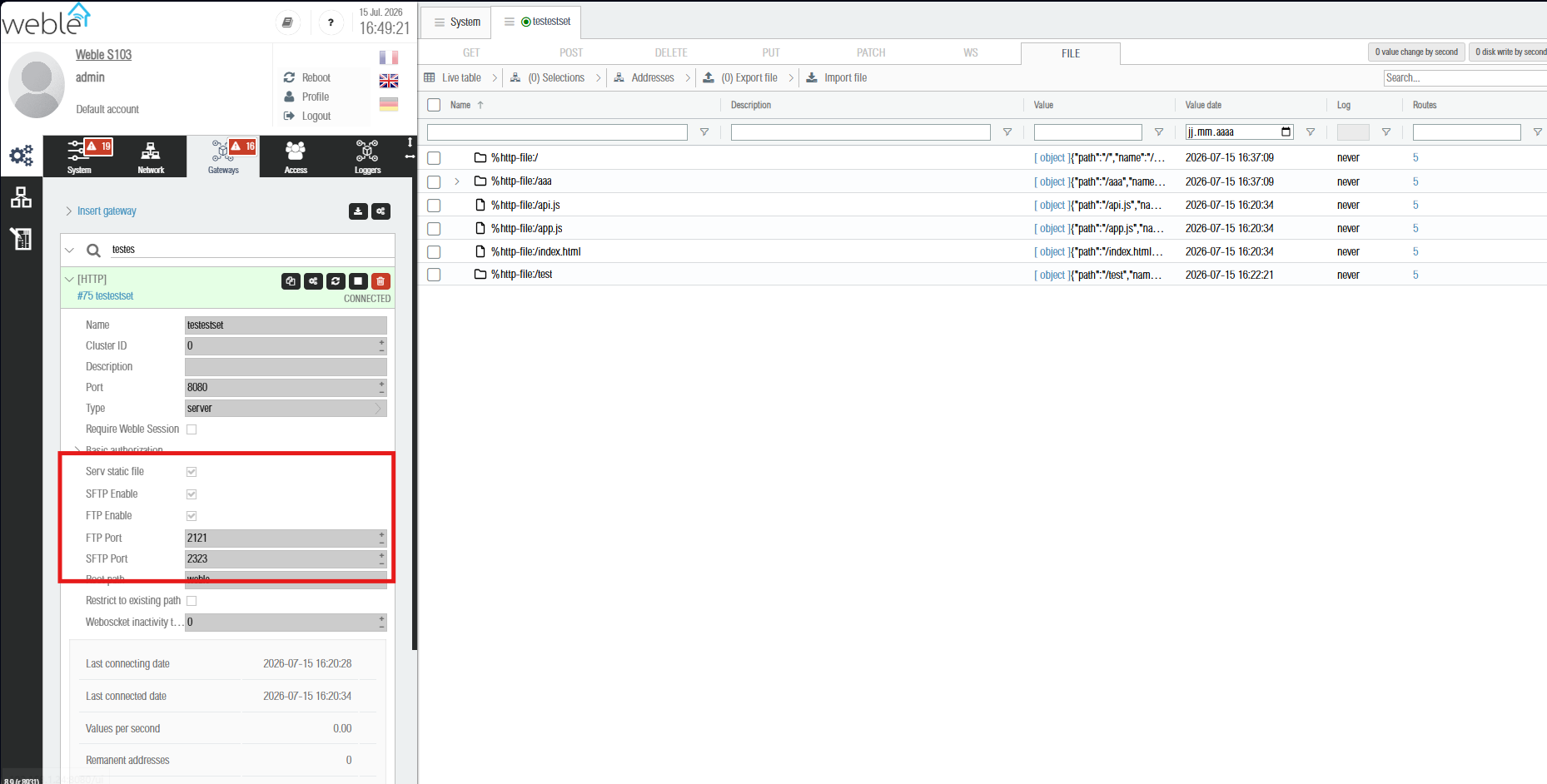
Static file server enabled, with FTP and SFTP. Click the image to view it full size.
¶ 5.2 How it works
The static file server:
- Serves files from the gateway's data directory (
/data/<gateway_id>/). - Supports
index.htmlas the default file for directory requests. - Handles
ETagandCache-Controlheaders for efficient caching (max-age: 1 hour). - Supports all common file types: HTML, CSS, JS, JSON, images (PNG, JPG, SVG, WebP), fonts, PDF, video, and more.
- Blocks access to hidden files (dotfiles) for security.
When the gateway is configured to use the same port as the Weble web server, the driver integrates seamlessly — the static files are served under the Root path prefix (e.g. /myapp/), and the Weble authentication session can be required via the Require Weble Session option.
¶ 5.3 Browsing and managing files from the interface
The static file directory of a server-mode gateway is exposed directly in the address grid under the FILE tab. Each file and folder becomes a read-only %http-file: address, presented as a tree with folder and file icons. The tree is kept in sync with the directory automatically: files added, renamed or removed — whether from the interface, over FTP/SFTP, or by the running web application — appear and disappear on their own.
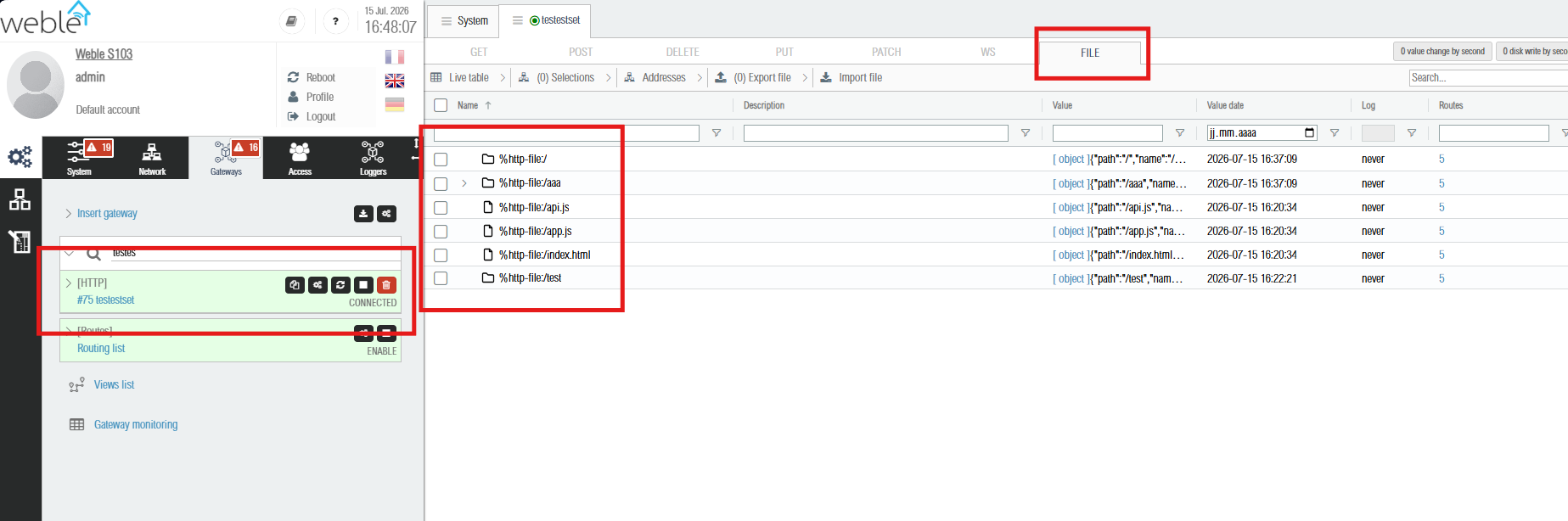
The FILE tab showing the static file directory as a tree of %http-file: addresses. Click the image to view it full size.
Each %http-file: address holds a descriptor of the entry as its value:
{
  "path": "/api.js",
  "name": "api.js",
  "directory": false,
  "date": "2026-07-15T14:20:34.000Z",
  "size": 1024
}
- path — path of the entry, relative to the gateway's data directory.
- name — file or folder name (the root folder is
/). - directory —
truefor a folder,falsefor a file. - date — last modification date.
- size — file size in bytes (files only). Folders instead expose a
filesarray of their children and acount.
¶ Interface actions
Right-click an entry in the FILE tab to open its context menu:
| Action | Available on | Description |
|---|---|---|
| Upload | folders | Pick a local file and upload it into the selected folder. |
| Create directory | folders | Create a new sub-folder inside the selected folder. |
| Rename | any entry except the root | Rename the file or folder. |
| Remove | any entry except the root | Delete the file, or a folder and all its content (recursive). |
All paths are confined to the gateway's own data directory.
¶ File management over FTP/SFTP
Files can also be managed over the network by enabling the FTP and/or SFTP server options on the gateway:
- FTP Enable — starts an FTP server (default port
2121) serving the gateway's data directory. - SFTP Enable — starts an SFTP server (default port
2323) for secure file transfers.
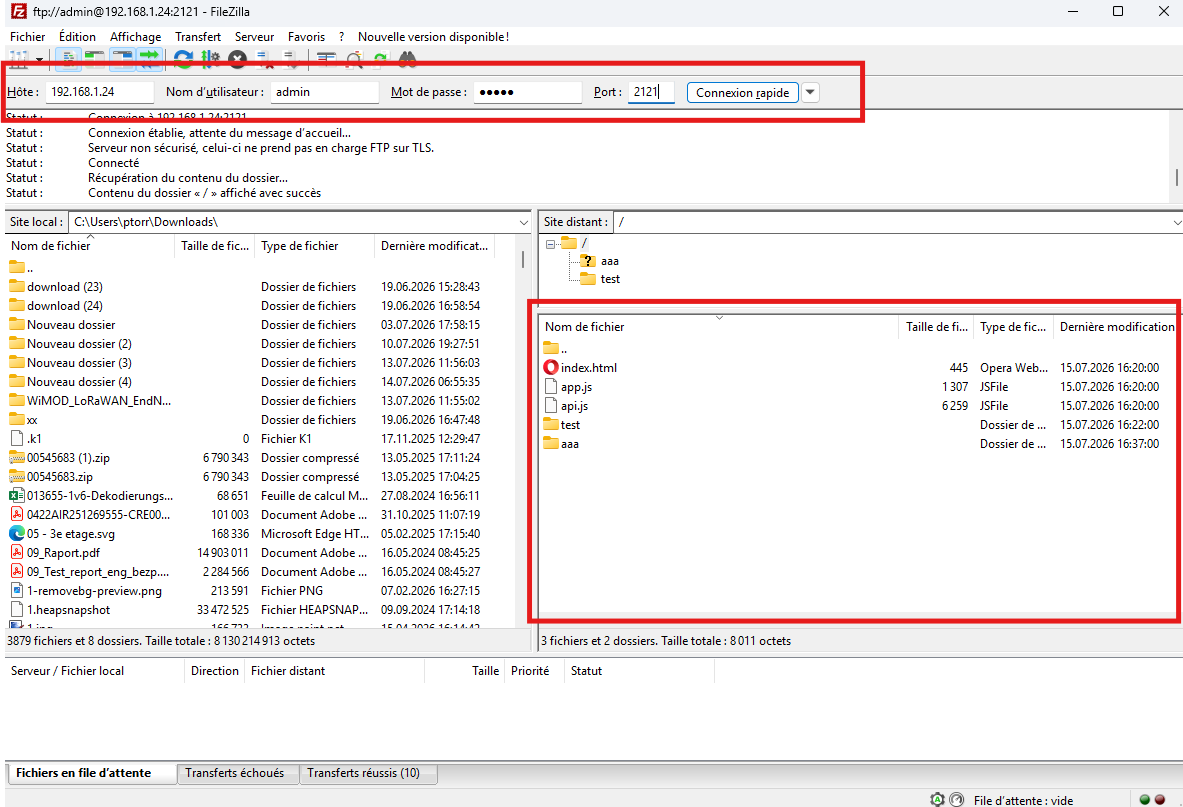
Connect with any FTP/SFTP client (e.g. FileZilla, WinSCP) to upload your custom HTML/CSS/JS files. Authentication uses the accounts configured in the Access configuration page of the gateway web interface (Administration → System → Accounts). Use the same username and password as for the web login.
Point the client at the gateway's IP address on the FTP or SFTP port. The remote directory shows the same files as the FILE tab (index.html, api.js, app.js and any folders you create).
FTP — connect on port 2121:
SFTP — connect on port 2323 (sftp:// prefix):
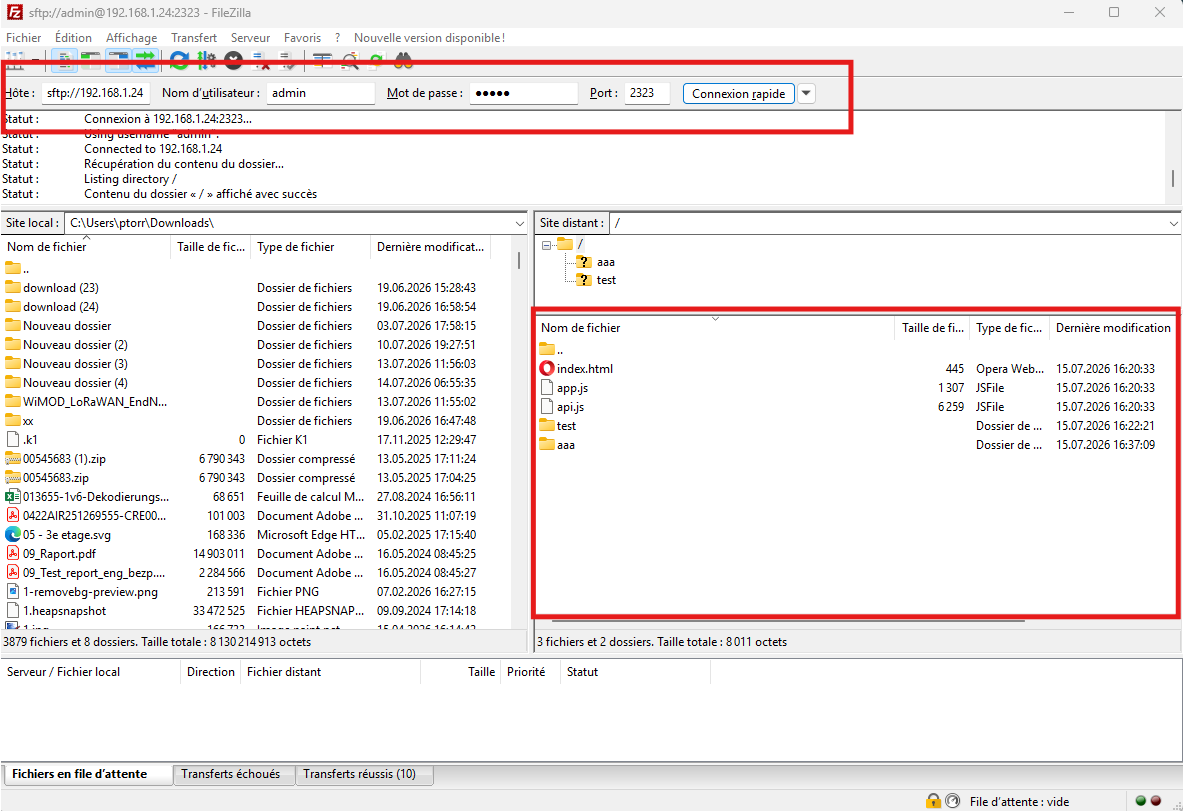
Click either screenshot to view it full size.
¶ Programmatic file management (peers API)
The same four operations are available programmatically through the peers API. Acquire the HTTP driver module from the gateways module, then call it with the target gateway's id:
peers('supervision').require('gateways', function(err, gateways) {
  gateways.requireDriver('http.js', function(err, http) {

    // create a folder "assets" inside the root folder
    http.mkdir(gatewayId, '%http-file:/', 'assets', function(err) {});

    // send (upload) a file into the "assets" folder
    http.push(gatewayId, '%http-file:/assets', {
      name    : 'logo.svg',
      content : '<base64 or data-URL encoded content>'
    }, function(err) {});

    // rename an entry
    http.rename(gatewayId, '%http-file:/assets/logo.svg', 'brand.svg', function(err) {});

    // remove an entry (recursive for folders)
    http.rm(gatewayId, '%http-file:/assets/brand.svg', function(err) {});
  });
});
| Function | Arguments | Description |
|---|---|---|
mkdir |
(gatewayId, parentAddress, name, cb) |
Create a folder name inside the folder addressed by parentAddress. |
push |
(gatewayId, parentAddress, file, cb) |
Upload a file { name, content } into parentAddress. content is base64 (a data: URL prefix is accepted and stripped). |
rename |
(gatewayId, address, newName, cb) |
Rename the file or folder at address. |
rm |
(gatewayId, address, cb) |
Delete the file or folder at address (recursive for folders). |
parentAddressmust be an existing%http-file:folder address, andname/newNamemust be a plain entry name (no/,\,.or..). The root%http-file:/cannot be renamed or removed.
¶ 5.4 Default template and API library
On first startup, if the data directory is empty, the driver copies a default web application template containing:
index.html— entry point that loads the app module.api.js— Weble JavaScript API library for connecting to the gateway via WebSocket. Provides functions for authentication, reading/writing values, and listening to real-time updates.app.js— example application that authenticates and listens to all address value changes.
¶ api.js — Weble JavaScript API
The api.js module provides the following functions:
| Function | Description |
|---|---|
connect(options, callback) |
Establishes a WebSocket connection to the gateway. Options: host (default: current origin), username, password. Returns a peers object for accessing all gateway modules. |
auth(options, callback) |
Alias for connect(). First tries session-based authentication, then falls back to username/password. |
listenAddress(name, callback) |
Subscribes to an address and receives real-time value updates. The callback is called with the initial value and then on every change. |
writeValue(address, value, callback) |
Writes a value to a gateway address (by name or ID). |
getPeers() |
Returns the peers object after connection for direct access to gateway modules. |
onBodyReady(callback) |
Utility — calls the callback when the DOM is ready. |
¶ Example: listen to a Modbus register
import { auth, listenAddress } from './api.js';

auth({}, function(err, peers) {
  if (err) {
    // Session auth failed, try with credentials
    auth({ username: 'admin', password: 'admin' }, function(err, peers) {
      if (err) return alert(err);
      startListening();
    });
  } else {
    startListening();
  }
});

function startListening() {
  listenAddress('%M1', function(err, address) {
    if (err) return console.error(err);
    document.getElementById('temp').textContent = address.value;
  });
}
¶ Example: write a setpoint
import { writeValue } from './api.js';

writeValue('%bac:local/analogValue:1', 22.5, function(err) {
  if (err) console.error('Write failed:', err);
  else console.log('Setpoint updated');
});
¶ Example: listen to all values
The default app.js template shows how to listen to all new values across all gateways:
import { auth } from './api.js';

auth({}, function(err, peers) {
  if (err) return auth({ username: 'admin', password: 'admin' }, onLogin);
  onLogin(null, peers);
});

function onLogin(err, peers) {
  if (err) return alert(err);

  peers('supervision').require('gateways', function(err, gateways) {
    gateways.on('newValue', function(id, value, value_string, value_date) {
      console.log(id, value, value_date);
    });
  });
}
¶ 5.5 Building a custom visualization
A typical custom visualization setup:
- Create an HTTP gateway in server mode with Serv static file enabled.
- Configure the Root path (e.g.
/dashboard). - Enable FTP or SFTP for file management.
- Upload your custom HTML/CSS/JS files via FTP/SFTP.
- In your JavaScript code, import
api.jsto connect, listen to addresses, and write values in real-time.
The static file server also proxies WebSocket connections (including /socket.io), allowing the api.js library to work seamlessly. The /auth path is automatically proxied to the Weble web server for session authentication.
¶ Authentication modes
The auth() function supports two authentication modes:
- Session-based — if the user is already logged into the Weble web interface in the same browser, the session cookie is reused automatically. Call
auth({}, callback)with empty options. - Username/Password — provide explicit credentials:
auth({ username: 'admin', password: 'admin' }, callback).
Access the dashboard at http://<gateway-ip>:<port>/ (or http://<gateway-ip>/<rootPath>/ if using the Weble web server port).
¶ 6. Developer reference
| Property | Value |
|---|---|
| Address regex | ``%http-(post |
| Readable | No (acceptsRead = false). In client mode, writing triggers the HTTP request and the response updates the address value. |
| Writable | Yes for all addresses matching the regex. |
| Remanent | Server mode: depends on json.remanent. Client mode: never. Addresses starting with # after the method prefix are read-only server-side auto-generated addresses. |
¶ Write value format
Simple value — sent as HTTP body (auto Content-Type: application/json if object):
writeValue('%http-post:/api/data', { temperature: 22.5 })
Structured value — separate headers, query parameters, and body:
writeValue('%http-post:/api/data', {
  headers: { 'X-Custom': 'value' },
  query: { param1: 'value1' },
  body: { temperature: 22.5 }
})
¶ WebSocket message format
Incoming WebSocket messages are received on %http-ws:<path>/message as:
{ "payload": "<message content>", "client": "%http-ws:/path/#0" }
¶ Server auto-generated addresses
Server mode auto-creates read-only addresses prefixed with #:
%http-get:#/path— last GET request data (with query params and body)%http-post:#lastQuery— last POST request received