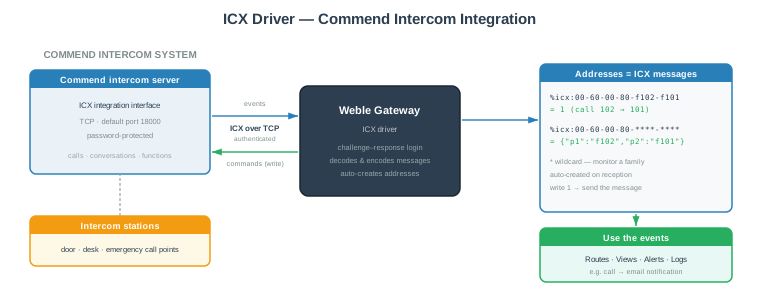
ICX (Intercom eXchange) is the integration protocol of Commend intercom systems. The Weble universal gateway ICX driver connects to the Commend intercom server over TCP/IP and exchanges ICX messages in both directions:
- Monitor — every message emitted by the intercom system (a call starts, a conversation ends, a function is activated…) is exposed as a gateway address, and unknown messages auto-create their address on first occurrence.
- Control — writing to an address sends the corresponding ICX message to the intercom server: start a call, activate a function, drive the system remotely.
Combined with routes, this bridges the intercom world to every other protocol of the gateway: forward call events to email or SMS, raise a BACnet alarm when an emergency station is triggered, start an intercom call from a KNX push button, and so on.
¶ 1. Getting started
¶ 1.1 Prerequisites
On the Commend side, the ICX interface must be enabled on the intercom server and reachable over IP. You need three pieces of information:
- the hostname / IP address of the intercom server,
- the TCP port of the ICX interface (default
18000), - the ICX password (protocol default
intercom).
The catalogue of ICX task numbers (which message starts a call, signals a conversation, activates a function…) is defined by the Commend ICX protocol specification and by your system configuration. Keep your Commend ICX documentation at hand — or simply use auto-discovery (below) to observe the real messages of your installation.
¶ 1.2 Gateway configuration
- Create a new gateway and select the ICX driver.
- Set Hostname to the address of the Commend intercom server.
- Adjust Port and Password if they differ from the defaults.
- Start the gateway.
The driver opens the TCP connection, answers the server's authentication challenge and starts listening.
¶ 1.3 Discovering the messages
The easiest way to map your installation is to let it talk: every message received creates its address automatically. Operate the intercom — press a call button, answer, hang up — and watch the corresponding addresses appear in the address grid, their value pulsing to 1 at each occurrence.
To send a message, write any value (typically 1) to its address. Example:
%icx:00-60-00-80-f102-f101— writing1starts a call from station 102 to station 101.
¶ 2. Gateway parameters
| Label | JSON Key | Description |
|---|---|---|
| Name | name | A descriptive name for this ICX gateway instance. |
| Cluster ID | cluster | Cluster identifier. Use 0 for single-gateway setups. |
| Description | description | Optional description. |
| Password | json.password | The ICX password configured on the Commend server. Left empty, the driver uses the protocol default intercom. |
| Hostname | json.hostname | IP address or hostname of the Commend intercom server. |
| Port | json.port | TCP port of the ICX interface. Default: 18000. |
¶ 2.1 Gateway JSON example
{
  "hostname": "192.168.1.201",
  "port": 18000,
  "password": "intercom"
}
¶ 3. Addresses
¶ 3.1 Address format
An ICX address is an ICX message: the six protocol fields written as lowercase hexadecimal groups separated by -:
%icx:SR-TA-SS-TY-P1-P2
| Field | Hex digits | Description |
|---|---|---|
SR |
2 | Message header field — 00 in typical setups (see your Commend ICX reference). |
TA |
2 | Task number — selects the ICX function (call handling, conversation signalling, function control…). Also fixes the parameter sizes, see below. |
SS |
2 | Message header field — 00 in typical setups (see your Commend ICX reference). |
TY |
2 | Task type / subtype. |
P1 |
4 or 8 | First parameter — typically a station or call number, written as digits left-padded with f (f102 = number 102). |
P2 |
1 – 480 | Second parameter — a second station / call number, or the task's data payload. |
The parameter sizes are fixed by the task number:
Task number TA |
P1 |
P2 |
|---|---|---|
00 – 5f |
4 digits | 4 digits |
60 – 7f |
4 digits | 1 – 480 digits |
80 – 9f |
8 digits | 1 – 476 digits |
a0 – ff |
rejected | rejected |
The address always uses the
SR-TA-SS-TY-P1-P2order, whatever the task family. On the wire the field order differs between short and long tasks — the driver reorders automatically in both directions.
Example: %icx:00-60-00-80-f102-f101 — task 60, type 80, P1 = station 102, P2 = station 101: a call from 102 to 101.
¶ 3.2 Wildcards
Any hex digit of the address can be replaced by * to build a monitoring pattern:
%icx:00-60-00-80-****-****
matches the call message above whatever the two station numbers are. When a received message matches a wildcard address, the address value becomes a JSON object containing the fields that differ from the pattern — i.e. exactly the parts you wildcarded:
{
  "p1": "f102",
  "p2": "f101"
}
One wildcard address can therefore monitor a whole family of messages while still telling you precisely which stations were involved — ideal as the source of a routing function.
Wildcard addresses are receive-only: writing to them is rejected. To send a message, use a fully-specified address.
¶ 3.3 Address parameters
| Label | JSON Key | Description |
|---|---|---|
| Name | name | The ICX message or pattern (the %icx: prefix is fixed). |
| Description | description | Optional description. |
| Log | log | Logging mode: never, on update, always, or a fixed duration in ms. |
An exact address pulses the same value
1at each occurrence — on update logging would record nothing after the first event. Usealwaysto log every occurrence.
¶ 3.4 Address properties
| Property | Value |
|---|---|
| Readable | Last received state only — reading does not query the intercom server |
| Writable | Yes — writing sends the message (wildcard addresses: read-only) |
| Routable | Yes |
| Loggable | Yes |
¶ 4. Receiving and sending
¶ 4.1 Receiving — every message becomes an address
For every valid message received from the intercom server, the driver:
- auto-creates the exact address if it does not exist yet,
- emits value
1on it — re-emitted at every occurrence, so routes fire each time and the Last change column shows the last occurrence, - updates every matching wildcard address with the reduced JSON object (see section 3.2).
¶ 4.2 Sending — write to transmit
Writing any value (typically 1) to an exact address encodes the corresponding message and transmits it to the intercom server. The driver validates the message first (hex format, task-number range, parameter sizes) and rejects invalid ones.
Sent messages are also reflected locally: the address and any matching wildcard addresses update exactly as if the message had been received — logs and routes therefore see outgoing traffic too.
Writing to a valid %icx: address that does not exist yet creates it on the fly — a route can target a new ICX destination directly.
¶ 4.3 Example — forward calls by email
- Source address:
%icx:00-60-00-80-****-****(the call message, stations wildcarded) - Source value — a routing function turning the event into readable text:
function(value){
    var from = (value.p1 || '').replace(/^f+/, '');
    var to   = (value.p2 || '').replace(/^f+/, '');
    return 'Intercom call from station ' + from + ' to station ' + to;
}
- Destination address:
%smtp:security@acme.com:Intercom activityon an SMTP gateway.
Every intercom call now sends an email naming the two stations involved.
¶ 5. How it works
- The driver opens a TCP connection to the intercom server and keeps it permanently open.
- The server sends an authentication challenge; the driver answers with an MD5 challenge–response derived from the ICX password (Commend password-hash scheme) — the password never travels in clear text.
- The link is kept alive by periodic idle frames. After 120 seconds without any data, the driver drops the connection and reconnects automatically.
- Incoming frames are reassembled, decoded and validated (field format, task-number ranges). Invalid messages are discarded and logged as warnings.
- Valid messages update the addresses (see chapter 4); writes are encoded to the same wire format and transmitted to the server.
The gateway status reflects the TCP connection state. Route it with a status route to be alerted when the intercom link goes down.