The routing table permits to transfer any type of serializable data (numerical values, strings, json objects, etc..) between all building automation and IoT protocols supported by the gateway software. Main standard open protocols are supported: KNX, Bacnet, Modbus, m-bus, MQTT, and more. The routing feature supports plain 1 to 1 routing between 2 addresses, but also more complex routing patterns detailed in this document. Due to the complex nature of universal/multi-protocol routing, advanced use cases often require basic programming skills.
Chapter 1 introduces quickly the gateways and the routing table. It describes how to setup step by step a simple route through the user interface.
Chapter 2 explains in details all the routes parameters.
Chapter 3 explains how the routing engine works internally: how the source → destination mapping is computed, and how a route is executed (with diagrams).
Chapter 4 concludes with advanced routing examples using JavaScript and regular expressions.
Related pages: Troubleshooting routes (a route that does not write, writes too often or loops), Intercept routes (answering the Modbus requests received by a gateway), Route functions (Blockly) and the Routing blocks reference.
¶ 1. Getting Started
This chapter is a beginner tutorial that shows how to route values between different protocols. It is assumed that the gateways (Modbus and Bacnet in this tutorial) are already configured and properly working. If needed please refer to the user manual for the gateways configuration.
¶ 1.1 The Gateways Panel
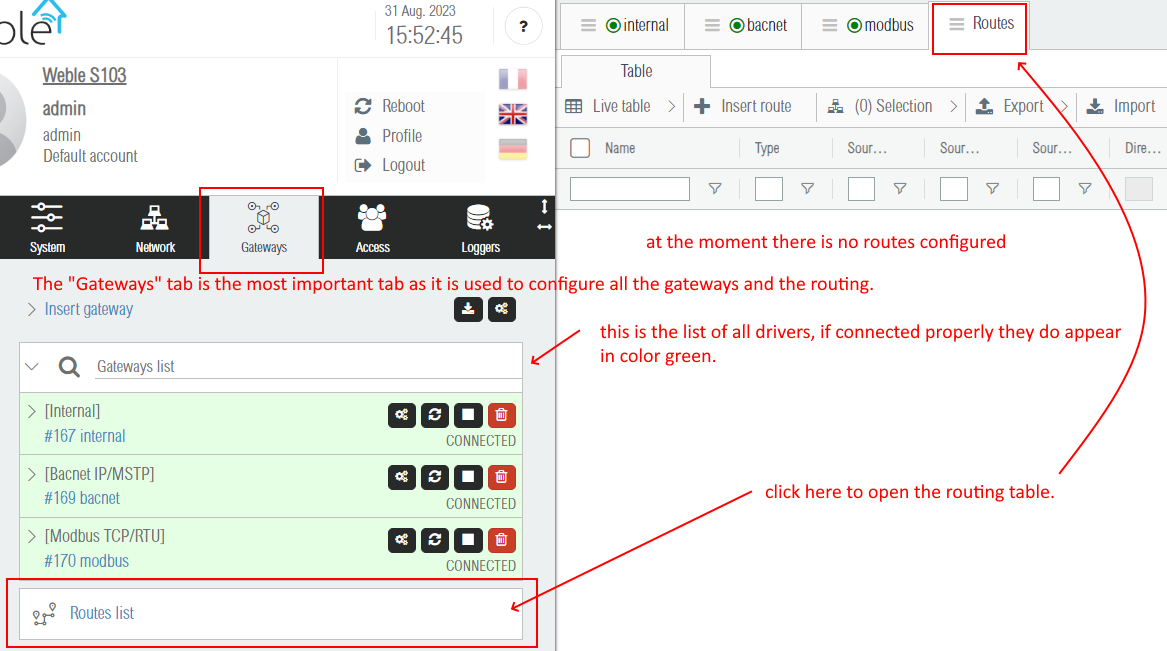
The gateways panel is the heart of the product, it permits to insert new gateways, many protocols are supported (KNX, MQTT, Modbus, Bacnet, Mbus, OPCUA, ADS, SMTP, ...) and new ones are regularly added into the software updates. The list of all gateways is displayed on the left panel, and appears in green color if they are active and connected. By clicking on a gateway, it opens the selected gateway tab which lets you see and configure its addresses. There is no fixed limit in the number of gateways or addresses, although they do consume RAM and CPU resources. At the bottom of the gateway list, the [Routes] entry (Routing list) lets you open the routing table.
¶ 1.2 Creating a Route with drag & drop
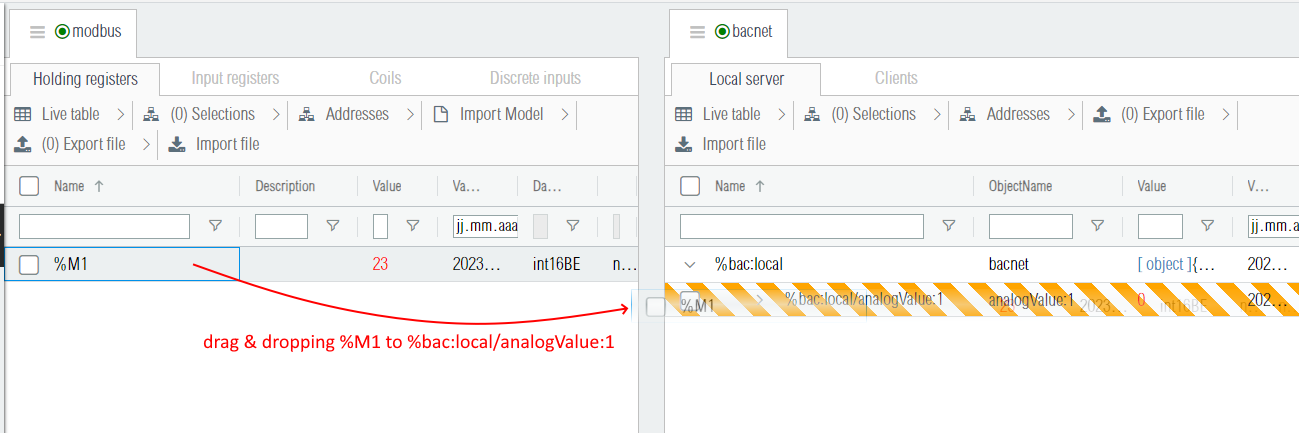
For beginners it is easy to create new routes by drag & dropping the source address on the destination address. To do so, open your source gateway tab (here the modbus tab) and your destination gateway tab (here the bacnet tab). It is possible to layout the tabs in two different panels as shown in the screenshot below, and then to drag your source address (here %M1) to your destination address (here %bac:local/analogValue:1).
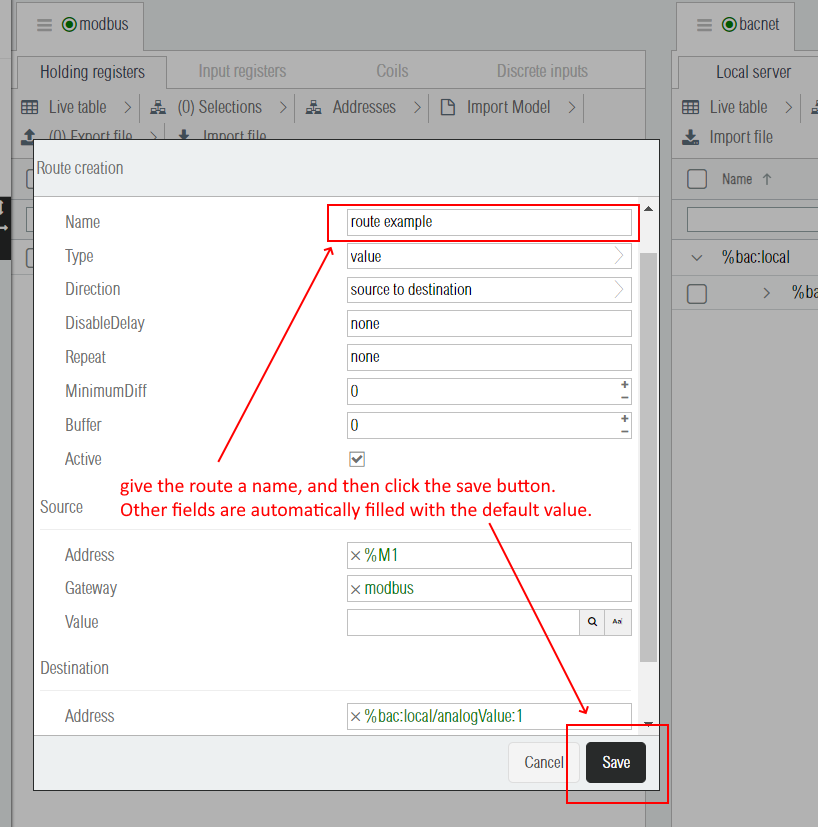
Once the drag & drop is released, a popup window containing the route creation menu appears. From this menu, you can configure the different parameters of the route. Once your route is configured, you can click the Save button to validate the creation of the route, or the Cancel button to abort the operation.
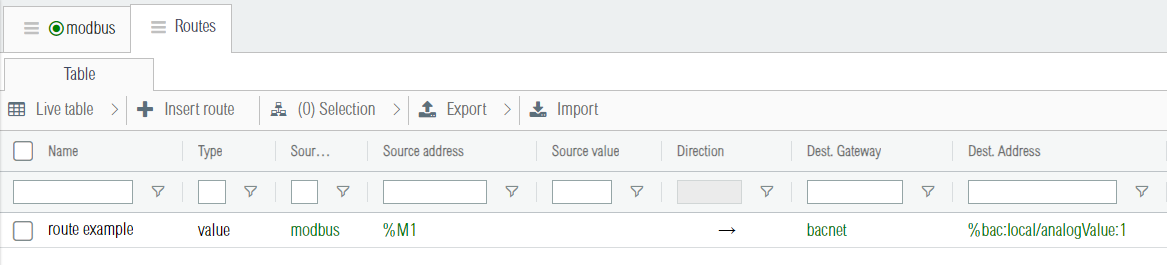
After creation, the route appears in the routing table. The routing table can contain any number of routes. In this example, the modbus register is simply routed to the bacnet analogValue object:
%M1 → %bac:local/analogValue:1
A route can also be created without drag & drop, with the Insert route button of the routing table. This is the direct way to create routes that have no single source address: gateway status routes, and routes whose source is a regular expression or a function.
¶ 1.3 The Routing Table
route parameters can be updated directly from the routing table (live updates)
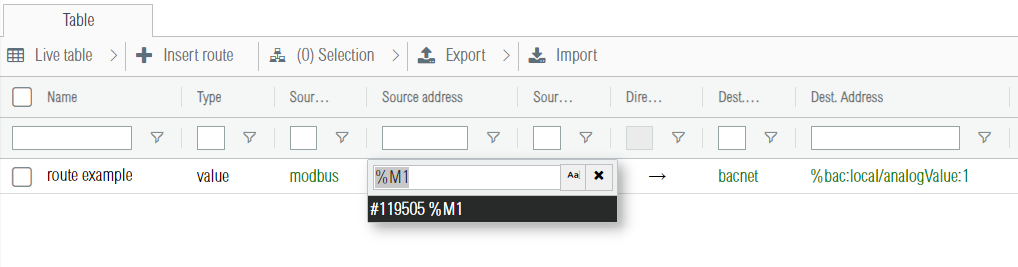
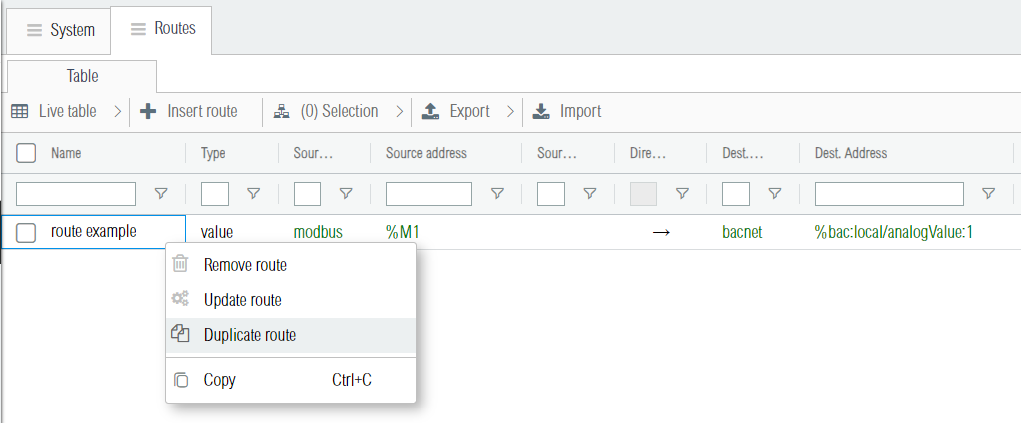
From the route context menu (right click) you can Remove, Update (opens the route popup) or Duplicate the route, Disable / Enable it, Refresh it (active routes only; the route is restarted: its mapping is recomputed and the current source values are sent again with the refresh trigger), open Show links (the list of source → destination pairs computed by the route) and Listen to it (section 1.4).
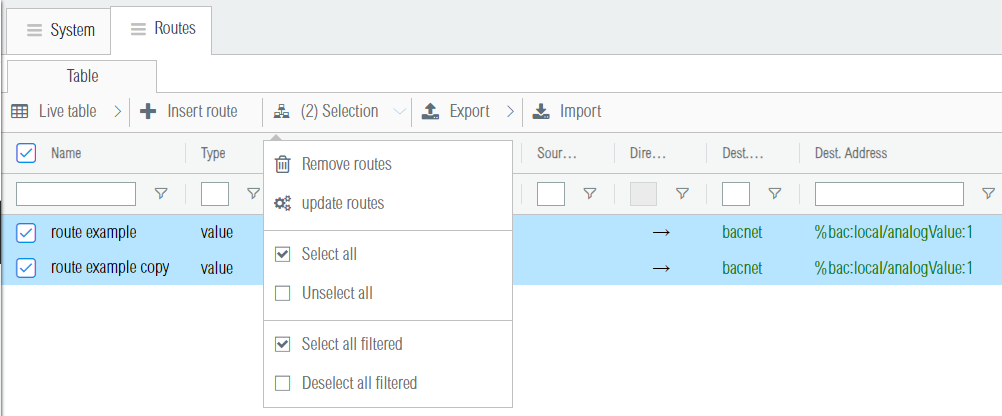
The routes can be edited by selecting multiple routes (ticks on the Name column) and then by opening the Selection menu. It is useful to remove or update multiple routes at once (bulk updates).
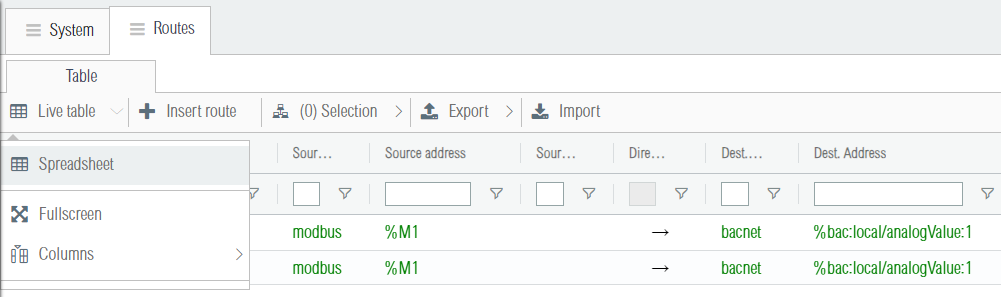
Hidden columns. The table shows only the most used parameters. Destination value, Repeat, Disable delay, Disable delay mode, Buffer, Retry, Active, Status, Index and ID are hidden by default: open the Live table menu, then Columns, and tick the columns to display. All the parameters are also available in the route popup (Update route).
Reading the table.
| Indicator | Meaning |
|---|---|
| Red dot before the name | The route is in error. Hover the dot to read the message, for example !source.value: x is not defined when a routing function throws. The error disappears at the next successful execution. |
| Orange dot before the name | No match found: the source or destination of the route matches no address (wrong name, regular expression typed without / … /, wrong gateway). |
| Count column | Number of addresses linked by the route (sources and destinations). Show links lists the source → destination pairs. |
| Status column (hidden) | pending, active, inactive, prepareComputing … while the mapping is being recomputed, or !message for an error. |
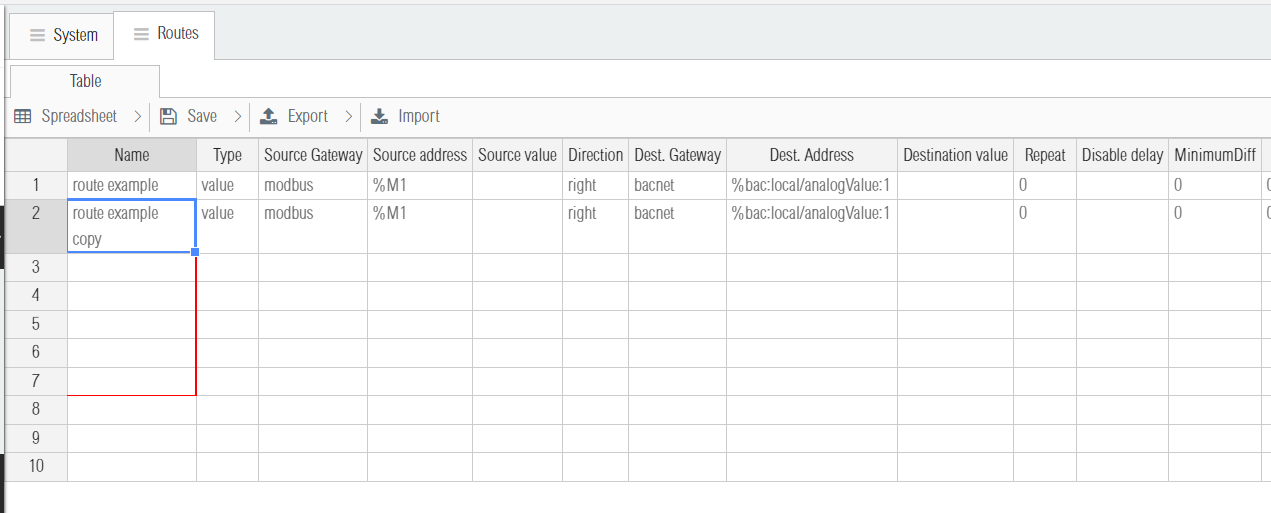
There is two main views for the routing table, the default Live table, and the Spreadsheet. The spreadsheet is similar to Microsoft Excel spreadsheets and is useful to update multiple parameters at once, or to copy paste routes.
The Export menu offers three file formats, for all the routes or for the selected routes only:
| Format | Content | Typical use |
|---|---|---|
CSV |
One line per route, comma separated. Columns: name, type, trigger, direction, disableDelay, disableDelayMode, repeat, minimumDiff, retry, buffer, active, source.address, source.gateway, source.value, destination.address, destination.gateway, destination.value. active is 1 or 0; line breaks inside functions are replaced by ⮨. |
Editing in a spreadsheet |
JSON |
Array of route objects. Functions and regular expressions are stored as strings starting with the marker ἑ=: keep these strings unchanged. |
Backups, processing by scripts |
JS |
The same array written as JavaScript, with readable functions and regular expressions. | Reading or editing routes that contain code |
Import accepts the three formats (.csv, .json, .js). The routes of the file are compared with the existing ones, then a dialog offers three operations to tick: Route to insert, Route to update and Route to remove.
Route to remove deletes every existing route that is absent from the file. Do not tick it when the file holds only a part of your routes.
Import route files only from a source you trust: see the security note of section 2.6.
Routes are matched on their content (type, direction, source and destination gateway, address and value), not on their name or id. A route whose address, direction or function was changed in the file is therefore proposed as a route to insert, and the previous one as a route to remove.
Values of the direction field in the files: right, left, bi, bi-right (bidirectional, initialize with source) and bi-left (bidirectional, initialize with destination). Use exactly these values.
In the Spreadsheet view nothing is applied while you type: use Save > All routes or Save > Selected route. The same dialog is shown.
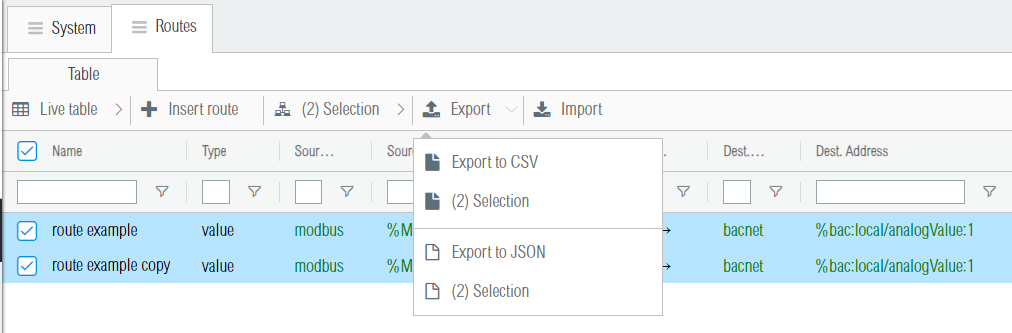
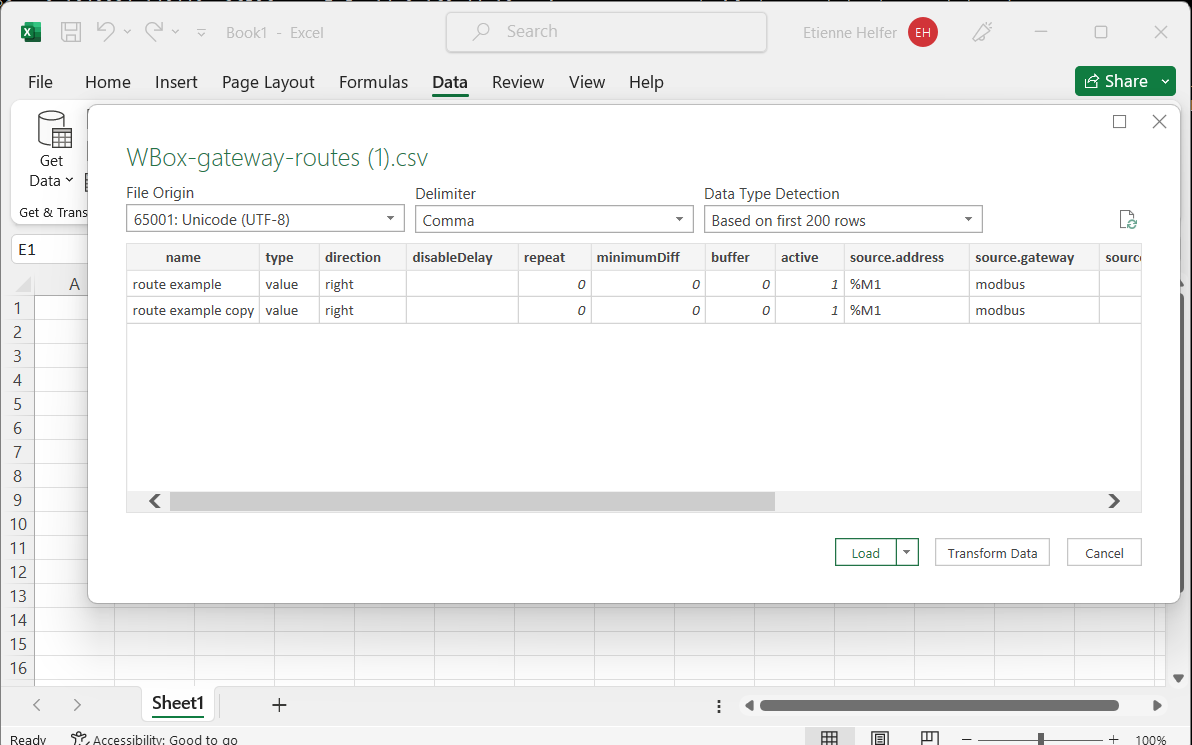
Some technicians update their routing file with Microsoft Excel by importing and editing the CSV file. Once the work is finished, they can export the file from Excel and then import it back into the device. The screenshot below shows the procedure to import the CSV data into Excel.
The figure below is the JSON file generated when exporting the routes. This file format can be used for backups or by programmers to process the data in custom scripts.
[
  {
    "name": "route example",
    "type": "value",
    "direction": "right",
    "trigger": ["value", "status", "refresh", "gateway"],
    "disableDelay": "",
    "disableDelayMode": "auto",
    "repeat": 0,
    "minimumDiff": 0,
    "retry": "always",
    "buffer": 0,
    "active": true,
    "source": {
      "address": "%M1",
      "gateway": "modbus"
    },
    "destination": {
      "address": "%bac:local/analogValue:1",
      "gateway": "bacnet"
    },
    "id": "cf408b70-4e3d-454c-a16b-6d7b4a7c2fd8",
    "index": 0
  },
  {
    "name": "route example copy",
    "type": "value",
    "direction": "right",
    "disableDelay": "",
    "repeat": 0,
    "minimumDiff": 0,
    "buffer": 0,
    "active": true,
    "source": {
      "address": "%M1",
      "gateway": "modbus"
    },
    "destination": {
      "address": "%bac:local/analogValue:1",
      "gateway": "bacnet"
    },
    "id": "519fc9b8-b483-4d6b-b7de-8ef1e7edcaa5",
    "index": 1
  }
]
¶ 1.4 Listening to a route
To see why a route did or did not write, right-click it and choose Listen. The method, symptom by symptom, is on Troubleshooting routes. With several routes selected, choose Selection (n) > Listen routes. From an address of a gateway tab, right-click and choose Trace routes (n) to listen to all the routes that use this address. The trace only runs while the window is open, and the window keeps the last 1000 lines.
Each line is one step of an execution, with the columns Time, Event, Route, Source, Destination, Value and Detail. The toolbar filters the lines by event, by route or by text, and can pause or clear the list.
| Event | Meaning | See |
|---|---|---|
source |
The value, after the Source value / Destination value transformation, enters the write pipeline. Detail gives the trigger (value, status, refresh, gateway). No source line at all: the source does not emit, the trigger is unticked (trigger-skip), the routing function threw (exception) or returned nothing, the route is inactive, or it matches no address. |
|
trigger-skip |
This trigger is unticked in the route. | 2.3 |
exception |
The routing function threw an error; Detail gives the message. | 2.6 |
not-routable |
The value is null, undefined, NaN or infinite. |
2.6 |
echo-drop |
Bidirectional route: echo of the route's own write, nothing to change on the other side. | 2.7 |
gateway-disconnected |
The destination gateway is not connected and the route has no buffer. | 2.16 |
disabled |
Held by the disableDelay window. | 2.12 |
force |
The function set options.force: the window was closed. |
2.6.1 |
min-diff |
Filtered by minimumDiff, or identical to the last written value. Detail gives the difference and the threshold. | 2.14 |
no-write |
Nothing to write, on purpose: empty destination address, or the function asked to skip the write. | 2.9 |
buffered, buffer-full |
Queued in the route buffer; the buffer is full. | 2.16 |
congestion |
Queued because the maximum number of concurrent writes is reached. | 3.2 |
write |
Sent to the destination driver. | |
written |
The driver confirmed the write. | |
write-error |
The driver returned an error, given in Detail. | 2.15 |
retry, retry-giveup |
A retry is scheduled (Detail: attempt and delay); the route stopped retrying. | 2.15 |
¶ 2. Routes Parameters
Routes have several parameters described in this section. Main parameters are the source address, destination address, and direction of the routing. Source addresses listen to data-points change of values, and send those to the corresponding destination address. Routing can be performed from source to destination (default behaviour), reversed (destination to source), or bidirectional. Other parameters can be useful to transform the value before routing it, or to configure hysteresis to limit the traffic induced by frequent value updates.
¶ 2.1 Name
A name can be configured for each route. It is an optional parameter that is used as a description. It has no functional implications (except that it prefixes the route logs, which makes debugging easier).
¶ 2.2 Type
There are 2 types of data that can be routed from a source address:
- The source address value: usual value point. For Modbus for example it could be the integer value contained in a register.
- The source address status: each address has also a status, indicating if its data-point value is available or not. The status is often used to trigger alarms if there is a communication issue. Main statuses are
a.online: means the source value is up to date and readable.
b.offline: means the driver process is not running, hence the source value is not up to date and readable.
c.pending: means the driver process is starting, so the address is not ready yet.
d. Other: driver depending error messages. Custom status are implemented depending each communication protocol. As an example, the Modbus protocol exposes Modbus specific error codes like!timeout,!ILLEGAL_DATA_VALUE,!ILLEGAL FUNCTION, etc…
Based on the value, and status, there are 5 types of possible routes:
- value : normal routes, the values are routed from one address to another. It is possible to change the direction of the routing.
- status : status routes are routing a source address status, to a destination address value. This is useful to detect communication issues on an address, and trigger some events / alarms by writing a value to another protocol / device. As an example you could listen a Modbus status address, and if there is an error, send an alarm on Bacnet, or write a Bacnet object. Because the status is always read-only, the routing cannot be reversed or bidirectional: it is always routing a source status to a destination value. A detailed use case is described at section 4.2.
- value/status : in this case, both the source address value and source address status are triggering the route. Like for status routes, the direction of the routing cannot be changed. It is always routing from source to destination. The routed object encapsulates both the value and the status.
{
        "value" : 33,
    "status" : "online"
}
- gateway status : this special type of route needs no source address. It is executed when the state of the source gateway changes to
connecting,connectedordisconnected(triggerstatus), and once when the route starts (triggerrefresh). When the route matches a single gateway, the routed value is the state, as a string. When the Source Gateway field matches several gateways (empty field, regular expression or function), the value is an object, so that the function knows which gateway changed:
{ "id" : 170, "name" : "modbus", "status" : "disconnected" }
- intercept : this route does not follow the value of an address. It intercepts the requests received by a driver and lets the route answer them or forward them to another gateway. Only the Modbus driver supports it today. The type is selected in the Type cell of the routing table, and the Trigger column then lists the requests to intercept:
all,read,write, or individual Modbus function codes (readHoldingRegisters,writeSingleRegister, …). See Intercept routes.
¶ 2.3 Trigger
Besides real value changes, a route is also executed by internal events: when the route is initialized, or when a gateway reconnects (see section 3.2 for the complete execution flow). The trigger parameter selects which of these events are allowed to execute the route. It is a set of checkboxes (all enabled by default):
- value : the source address emitted a new value. This is the normal trigger of value routes.
- status : the source address status changed (used by status, value/status, and gateway status routes).
- refresh : initialization executions. When a route starts (creation, save, Refresh route, start of the routing engine, reboot), every source that already has a value is routed once to its destinations, whether or not the destination already holds a value. When the mapping of a running route is recomputed later (address inserted or renamed), the newly matched sources are routed the same way; for the sources that were already mapped, only the destinations that have no value yet are written.
- gateway : reconnection executions. When a gateway involved in the route comes back online, the current source value is re-routed to synchronize the destination.
By unticking refresh and gateway, a route reacts only to real data changes and never re-sends values on startup or reconnections. This is useful when the destination triggers an action (e.g. sending an email or a command) and repeating the last value must be avoided.
Note that the periodic repeat and error retry re-executions (sections 2.11 and 2.15) are internal and not filtered by this parameter.
¶ 2.4 Source Gateway
For each route, it is possible to precise the source gateway. If a device is running multiple gateways of the same protocol (e.g. 4 Modbus masters connecting to 4 different slaves), the system may end up with 4 occurrences of the same address name. In such cases the source gateway can be specified in the route. So if you have 4 Modbus masters, you would be able to select the correct one. (Note that the routes are not always 1-1 mappings. If the source gateway is left empty, all matching addresses trigger the route. For advanced use cases, instead of selecting a single gateway, or all gateways by leaving the field empty, it is also possible to use a regular expression or a JavaScript function to select a subset of matching gateways.) See also Addresses › Name collisions.
¶ 2.5 Source Address
The source address parameter defines the address that triggers the routing by listening new value changes on it. It can either be a single fixed address defined by its address name (simple case), or multiple addresses matching a pattern like a regular expression. All possible types of source address definition are listed below:
- Single address numerical identifier. The address is identified with its internal id. This unique id is generated automatically by the system at address creation. Usually it is advised to use the address name instead.
- Single address name. It is the usual way to design a single address. The address name is unique within its gateway, but if there is multiple gateways running the same protocol, it is possible to have colliding address names. To avoid this situation, the source gateway (section 2.4) can be specified.
- Multiple addresses using a regular expression (Regex) pattern. This permits to have n-1 and n-m mappings. The route is triggered by all source addresses matching the regular expression (it lists all system addresses and test the regular expression against each address name). It permits to route multiple addresses with a single route. The computation of the destination address mapping is done using the pattern defined by the JavaScript string replace method (see use case at section 4.1). Write the expression between slashes, as in JavaScript:
/^%M30\d\d$/. A text without slashes is always a plain address name. - JavaScript function pattern. With the online code editor, it is possible for programmers/advanced users to define a function that filters which addresses are triggering the route or not. Here is an example of a source address function:
function isSource(adrName, adrId, adr, info){
    // first argument is the name of the address,
  // second argument is the numerical id of the address,
  // third argument is the full address object.
  // last argument is additional info about the route and its context.
  // returns to accept an address, or false to reject it.
  if(adrName.startsWith("%M300")){
  	// accepts all modbus register starting with "%M300"
    // it could include %M300, %M3000, %M3001, %M30000, etc...
    return true
  }else{
  	// rejects the address: it will never trigger the route.
    return false
  }
}
-
List of addresses. A JavaScript array of names, ids, regular expressions or functions, for example
["%M1", "%M2", /^%M30\d$/]. The route is triggered by every address matched by at least one element. -
Named addresses. A JavaScript object, for example
{ supply : "%M1", back : "%M2" }. The route is triggered by each of these addresses, and the routing function finds them by name inoptions.sources(an array when a name matches addresses on several gateways: set the source gateway). This is the usual way to compute one destination from several sources:
function deltaT(newValue, src, dst, options){
  var s = options.sources   // { supply : <address object>, back : <address object> }
  if(!s.supply || !s.back || s.supply.value == null || s.back.value == null) return  // a value is missing: nothing is routed
  return s.supply.value - s.back.value
}
A name can also be the alias of an address or the name of a view.
If the source address is left empty (the cell shows all), every address of the source gateway triggers the route. If the source gateway is empty too, every address of the device does. The interface asks for a confirmation before emptying the field.
¶ 2.6 Source Value
The source value field has 2 main use cases that can be combined together:
- Conditional routing by filtering values that should not be routed.
- Transformation of the value before writing it to the destination address.
The source value is only used when the routing direction is from source to destination (see section 2.7). Note that reversed routing (from destination to source) uses the opposite parameter Destination Value (section 2.10).
If the field is left empty, then the original value is simply routed without alterations. When defined, it can take the following forms:
- Constant : the source address value is replaced (overwritten) by a constant fixed value. This constant can be a binary, a numerical value, a string, or a
JSONobject. - Address : the source address value is replaced by the present value of another address (such as
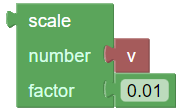
%M3or%bac:local/analogValue:2). - Blockly diagram : the Blockly page describes how to use block diagrams to design routing functions without having programming language skills, and the Routing blocks reference lists the built-in blocks. The diagram below simply divides the routed value by 100 (unit conversions).
- JavaScript function : in this case the source is a function that takes as parameter the routed value, process it, and returns the new transformed value. If the function returns nothing, the routing is aborted (conditional routing). Here is below a function that doesn’t route values smaller or equal to 0, and multiple by 2 values greater than 0 (it means that a source value of 2 becomes 4 at the destination, and so on).
function functionXYZ(newValue, sourceAddress, destinationAddress, options){
    // first argument is the new value being routed,
  // second argument is the source address object,
  // third argument is the destination address object,
  // last argument contains additional info about the route and its context.

  if(newValue > 0){
    // if the routed value is greater than 0
    return newValue * 2 //returns the routed value multiplied by 2.
  }else{
    // if the routed value is smaller or equal to 0
    return null // returns nothing => cancels the route execution.
  }
}
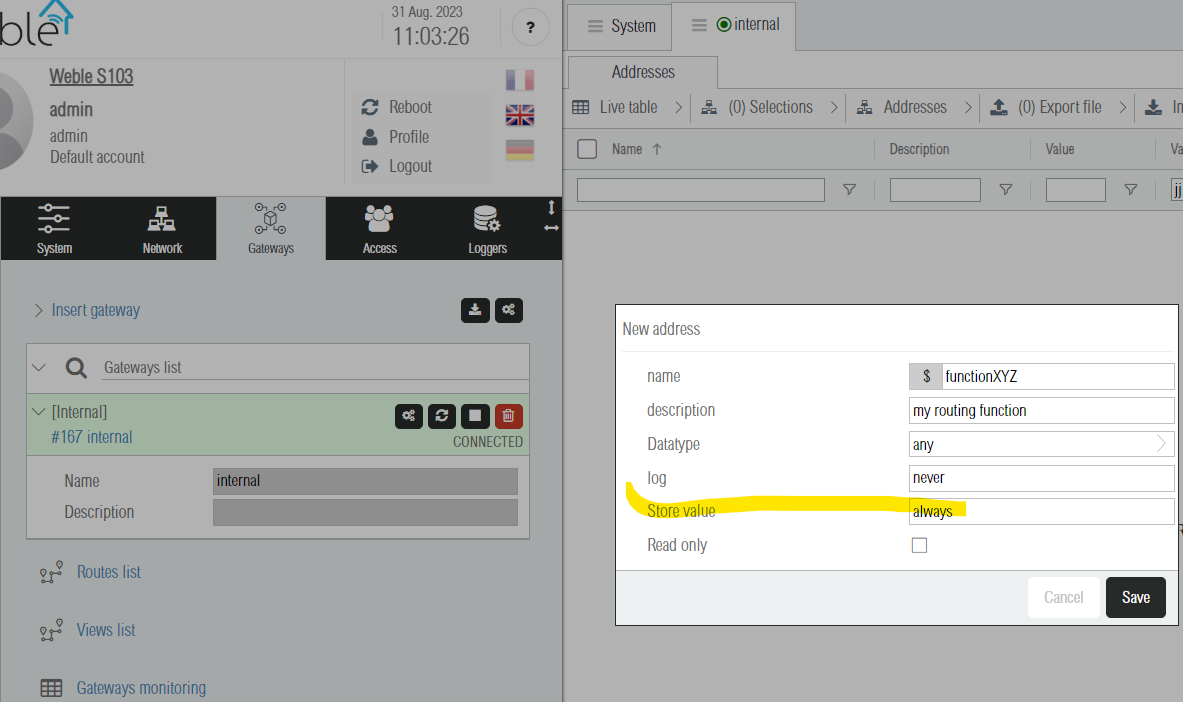
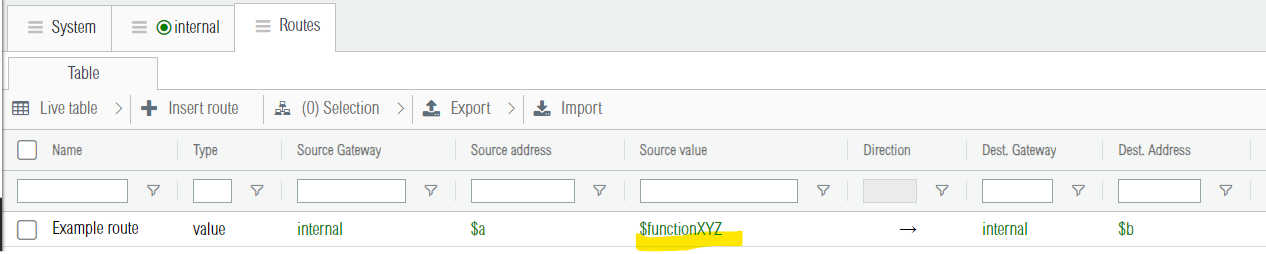
Note that functions can be stored in a gateway of type internal in addresses starting with $ such as $functionXYZ. An internal address that holds a function keeps it across reboots automatically, whatever its Store Value parameter. Once the function is stored inside the address, it can be used in multiple routes by writing the name of the address ($functionXYZ) in the route source value parameter.
¶ 2.6.1 The options argument
The fourth argument received by a routing function (named options in the examples) exposes the execution context and some runtime controls:
| Property | Description |
|---|---|
options.trigger |
The event that triggered this execution: value, status, refresh, or gateway (see section 2.3). |
options.direction |
right when routing from source to destination, left for the reversed direction. |
options.route |
The route object (read-only): name, id, parameters. |
options.sources |
The source address(es) matched by the route. |
options.context |
An empty object persisted between all executions of the route. Useful to keep state (counters, previous values, timers). |
options.functionContext |
Same as context but private to this function (useful when a shared $function is used by several routes). |
options.disabled |
true while the source → destination pair is inside a disableDelay window (section 2.12). The function is still executed during the window; only the delivery is held. Returning nothing while options.disabled is true cancels the value waiting to be replayed at the end of the window: if(options.disabled) return turns the window into a pure cooldown, like Disable Delay mode = noreplay. Leave this line out if the destination must receive the latest value when the window ends. |
options.clearDisableDelay() |
Immediately ends the disableDelay window of the pair and discards a pending replay value. |
options.onWrite(cb) |
Registers a callback cb(err, status) that follows the value emitted by this execution. waiting (possibly several times) means the value is held: disableDelay window, buffer or congestion queue. Then exactly one final status: written – the driver answered, err is null on success and contains the driver error when the write failed – or dropped, disabled, min-diff, buffer-full, gateway-disconnected, echo-drop: the value was not sent, and err repeats the status. Register the callback before returning. Retries are not notified again. |
options.log() / options.error() |
Console functions prefixed with the route name — recommended for debugging, also inside asynchronous callbacks. |
options.lastWriteDate |
Timestamp of the last successful write to this destination. |
options.lastWrittenValue |
Last value written to this destination. |
options.echo / options.echoValue |
Read-only. echo is true when this execution comes from the echo of the route's own write. echoValue is the current value of the target. A result equal to it is not written. |
options.force |
Set options.force = 1 in the function to make this write unconditional: it skips the echo check and minimumDiff, and closes an open disableDelay window. It applies to the current execution only. |
options.reprod / options.reprodCount |
Defined when the execution is an internal re-execution: repeat for the periodic repeat (section 2.11), or error: … for a retry after a failed write (section 2.15). reprodCount is the attempt counter. |
function transformWithFeedback(newValue, src, dst, options){
  options.onWrite(function(err, status){
    if(status == "waiting") return   // held: a final status follows
    if(status == "written"){
      if(err) options.error("write failed on " + dst.name, err)
    }else{
      options.log("not written:", status)   // filtered by the route, not an error
    }
  })
  return newValue * 2
}
¶ 2.6.2 Asynchronous functions
If the function declares an additional argument named callback (or cb), it becomes asynchronous: the routing engine waits until the callback is invoked with callback(err, value) instead of using the returned value (30 seconds at most, then the execution is cancelled with a timeout error). This permits to fetch data or perform I/O before routing.
function asyncTransform(newValue, src, dst, options, callback){
  // the route waits for the callback (30 s at most).
  setTimeout(function(){
    callback(null, newValue + 1)
  }, 100)
}
¶ 2.6.3 Chaining transformations
The source value can also contain an array of transformations (functions and/or Blockly blocks). They are executed in order: the output of one transformation is the input of the next one. If any of them returns nothing, the routing is cancelled.
¶ 2.6.4 What a function may return
| Returned value | Effect |
|---|---|
A value, including 0, false or an empty string |
Routed to the destination. |
Nothing, null, undefined, NaN or an infinite number |
The execution is cancelled: nothing is written, the disableDelay window is not opened and a value waiting for replay is cancelled. |
this._NO_DRIVER_WRITE |
Nothing is written, but the execution counts: the disableDelay window is opened (or the execution becomes the replay candidate) and the repeat timer keeps running. Use a classic function, not an arrow function, to reach this. |
{ "__sequence__" : [v1, v2, v3], "__sequence_delay__" : 500 } |
The values are written one after the other to the destination, with the optional delay in milliseconds between two writes. Not compatible with the buffer parameter. |
The route parameter nullMode changes the second line: with "nullMode" : "noDriverWrite", a function that returns nothing behaves as if it had returned this._NO_DRIVER_WRITE. The default is "cancel". This parameter has no column in the routing table; set it in a JSON export or through the API.
A routing function that throws cancels the execution and sets the route status to !source.value: <message> (red dot in the routing table) until the next successful execution.
Security. Routing functions, block scripts and retry functions are JavaScript code executed on the gateway by the routing engine, with the rights of the gateway software (network, files, every gateway and address). The routing table is only shown to administrators. Import route files (
.csv,.json,.js) and block files only from a source you trust: the functions they contain run on the gateway as soon as the routes are saved.
¶ 2.7 Direction
When the route type (section 2.2) is value, you can choose the route direction. The default direction is from source to destination. The following directions are possible:
- right (→). This is the default, normal routing from source to destination.
- left (←). This is the reversed routing from destination to source.
- bidirectional (↔). This is bidirectional routing. Values are routed in both ways. This routing mode, depending on the protocols / situations, can generate ping pong loops. To avoid the loops, the Disable Delay (section 2.12) and Minimum Difference (section 2.14) parameters are useful.
- bidirectional initialize with source (⇄). Bidirectional but guarantees to route from source to destination for the first route execution.
- bidirectional initialize with destination (⇆). Bidirectional but guarantees to route from destination to source for the first route execution.
The direction is forced to right (→) for gateway status and intercept routes. For status and value/status routes the interface still lets you choose a direction, but only right is meaningful: a status is read-only, and with left the status of the destination address would be written to the source address.
¶ 2.8 Destination Gateway
Same as Source Gateway (section 2.4), but applied to the destination address gateway. As an example, it is useful when routing Modbus register %M100 of a given Modbus gateway modbusGwA, to Modbus register %M100 of another Modbus gateway modbusGwB. In this scenario the source and destination addresses share the same name (%M100), so specifying which gateway is the source or destination is important. Here the source gateway would be defined in the route as modbusGwA, and the destination gateway as modbusGwB.
¶ 2.9 Destination Address
The destination address is the data-point to which the routed value is written/sent. It can either be a single fixed address defined by its address name (simple case), or multiple addresses matching a pattern. All possible types of destination address definition are listed below:
- address numerical identifier : the address is identified by its internal id. This unique id is generated automatically by the system at address creation. Usually it is advised to use the address name instead.
- address name : the address is identified by its textual label. The address name is unique within its own gateway. If there is multiple gateways running on the same protocol, it is possible to have colliding addresses names. If multiple addresses have the same name, the correct destination gateway (section 2.8) should be specified in the route. If the destination address does not exist yet, it is created automatically at the first routing (provided that a driver recognizes the address name pattern).
- addresses names computed by the replace pattern : this option needs to have the source address to be defined as a regular expression. The computation of the destination address mapping is done using the pattern defined by the JavaScript string replace method. (See use case section 4.1).
- JavaScript function : it is possible for programmers to define a function that maps a given source address to a destination. The function returns the identifier of the destination address (or an array of identifiers if the source is mapped to multiple destinations). See examples below.
function sourceToDestination(srcName, srcId, src, info){
    // first argument is the source address name,
  // second argument is the source address numerical id,
  // third argument is the full source address object,
  // last argument contains additional info about the route and its context.

  if(srcName == "%M100"){
    	return "%M200" // maps source %M100 to destination %M200.
  }else{
   		return "%M0" // maps all other sources to destination %M0.
  }
}
// same mapping as the example above, implemented with a nested function.
function sourceToDestination2(srcName, srcId, src, info){
  // Instead of returning the destination address identifier, it is possible
  // to return a boolean function that is tested against every existing address.
  return function booleanCheck(destName, destId, dest){
    return srcName == "%M100" ? destName == "%M200" : destName == "%M0"
  }
}
Destination function with a regular-expression source. When the source address is a regular expression, the destination function is not called with
(srcName, srcId, src, info). It is given to the JavaScriptString.replacemethod: it receives(match, group1, group2, …, offset, fullName)and its result replaces only the matched part of the source name. Anchor the expression with^and$so that the result is the complete destination name, for example with the source address/^%M1-(\d+)$/:function(match, register){ return "%M2-" + (parseInt(register) + 1000) }turns%M1-5into%M2-1005.
If the destination address is empty, the route runs its functions but writes nothing and creates no address.
¶ 2.10 Destination Value
The destination value parameter is equivalent to the source value (section 2.6) parameter, but used only when the route is executed in the reversed direction, from destination to source. When routing in the normal direction from source to destination, the source value parameter is used instead. Note that the destination value parameter can only apply if the route direction (section 2.7) is left (←) or bidirectional.
¶ 2.11 Repeat
The repeat parameter permits to regularly re-trigger / re-execute automatically the route when the source value does not change regularly. It guarantees that the destination address is written at least every x milliseconds. The parameter accepts two forms:
- A duration in milliseconds : the route is re-executed x milliseconds after the last successful write (the timer is re-armed after every write, so a normal value change also resets it).
- A cron expression (e.g.
*/15 * * * *) : the route is re-executed on a fixed schedule (here every 15 minutes). This is useful when the destination must be written at precise times rather than on a sliding delay.
On each repeat execution, the current source value is re-read and re-transformed (the source value function runs again, with options.reprod == "repeat"), then written to the destination. Repeat executions bypass the minimum difference check (section 2.14), so the periodic write is guaranteed even if the value did not change.
Note that if there is a communication failure on the destination gateway, the protocol driver process is restarted and retries to establish the connection. Once the gateway is connected, routes are automatically refreshed and executed. So it is not necessary to configure the repeat parameter for this use case.
¶ 2.12 Disable Delay
Once a route is triggered and executed, the routing of the concerned source → destination pair is deactivated during a silence window of x milliseconds. The mechanism works as follows:
- A value is routed: the destination is written and the silence window opens for the pair.
- New source values arriving during the window are not written. The latest one is retained as the replay candidate (each new value replaces the previous candidate).
- When the window ends, the retained value (if any) is routed in turn — so the destination ends up with the latest value — and a new silence window opens.
With a disable delay of 10 seconds and a source updating every 100 milliseconds, the destination is therefore written at most once every 10 seconds, with the most recent value. This permits to limit excessive traffic (CPU & network usage) and prevent potential routing loops in bidirectional routes.
The silence window applies to every write of the route, whatever triggered it (value, status, refresh, gateway, and the repeat re-executions): any write opens the window, and any value arriving while it is open is held as the replay candidate. A repeat execution held by the window keeps its timer running, so when both parameters are set the destination is written at the slower of the two rates. Saving or refreshing a route restarts it and clears its window. A routing function can bypass the window for one execution with options.force = 1 (section 2.6.1). The end-of-window behaviour can be changed with the Disable Delay mode parameter (next section). Routing functions can also observe and control the window with options.disabled and options.clearDisableDelay() (section 2.6.1).
¶ 2.13 Disable Delay Mode
This parameter controls what happens to the values received while the disableDelay silence window is open:
- auto (default) : the latest retained value is replayed at the end of the window — except for bidirectional routes configured with a disable delay of 250 ms or less, where the replay is skipped (short windows on bidirectional routes are typically pure anti-loop protections, and replaying would re-feed the loop).
- replay : the latest retained value is always replayed at the end of the window.
- noreplay : values received during the window are simply discarded. The destination only gets the values that arrive while no window is open.
¶ 2.14 Minimum Difference
The minimum diff parameter permits to define a hysteresis threshold for routing numerical values. This concept is the same as the BACnet change-of-value (COV) increment. Assuming that the minimum difference is set to 0.1, then the source value must vary by an increment superior to 0.1 to be routed to destination. Small routed value variations are ignored. Using this parameter can be a good strategy to decrease the CPU and network usage.
Additional behaviours (these rules apply when the parameter is greater than 0, and on bidirectional routes; with 0 on a one-way route, every value emitted by the source is written, even if it is unchanged):
- The comparison is done against the last value written by the route to this destination.
- For
JSONobjects containing a numericalvalueproperty (e.g. value/status routes), the threshold applies to thevalueproperty; the other properties are compared for equality. - For non numerical values (strings, objects), the value is only routed when it differs from the last written value.
- Repeat re-executions and initialization / reconnection executions (refresh / gateway) bypass the check, so the destination is always synchronized after a restart.
- On bidirectional routes, a minimal difference check is always active (even when the parameter is 0) to prevent ping-pong loops.
¶ 2.15 Retry
When the write to the destination driver fails (protocol error, device timeout, bus error, ...), the route can automatically retry the write. The retry parameter takes one of the following values:
- always (default) : the route retries until the write succeeds.
- never : failed writes are not retried. The next route execution (new value, repeat, reconnection) is the only way the destination gets written again.
- A number N : the route retries at most N times, then gives up.
- A function
retry(err, info), set by import or through the API: it returnsfalseto give up,trueto retry with the default backoff, or a delay in milliseconds (minimum 100).infocontainserr,attempt,sid,did,value,origin,route,context,lastWriteDate,loganderror. The function must be synchronous.
The retries use an exponential backoff: the first retry happens about 1 second after the failure, then the delay doubles at every consecutive failure (2 s, 4 s, 8 s, ...) up to a maximum of 10 minutes (30 seconds while the destination address has never had a value). The counter and the delay are reset as soon as a write succeeds.
Each retry re-reads and re-transforms the current source value (like a repeat execution, with options.reprod containing the error). Failed writes appear as write-error in the route listener (section 1.4). If the retry function throws, the default retry policy applies.
The retry parameter covers write failures while the destination gateway is connected (e.g. a Modbus slave that responds with an error). When the destination gateway is disconnected, no write is attempted: the destination is re-synchronized automatically at reconnection, or the values can be preserved with the buffer parameter (next section).
¶ 2.16 Buffer
The buffer parameter is hidden by default. By specifying a buffer size x, the route keeps a FIFO queue of the last x values per destination, and guarantees that they are written in order: a value is sent only after the previous write has been acknowledged by the destination driver.
The buffer changes the behaviour on communication issues:
- If a write fails, the value stays at the head of the queue and is retried with the exponential backoff (limited by the retry parameter, section 2.15) without losing the queued values behind it.
- If the destination gateway disconnects, the queued values are preserved and flushed in order as soon as the gateway reconnects.
- When the buffer is full, the most recently queued value is replaced by the new incoming one (the oldest values, already waiting, are preserved) and a buffer full outcome is reported.
Use a buffer when the destination must receive every value in sequence (e.g. counters, event streams, commands), rather than only the latest state. For plain state synchronization, the default behaviour (no buffer) is usually preferable: after a reconnection the destination simply receives the current source value.
¶ 2.17 Active
The active checkbox enables or disables the route. An inactive route keeps its configuration and its mapping but never executes. Routes can also be activated/deactivated in bulk from the routing table selection menu. The whole routing engine can also be stopped and started globally (section 2.18).
¶ 2.18 Global routing controls
The [Routes] entry of the gateways list (the entry that opens the routing table) controls the whole routing engine:
- its label shows enable or disable, and its STOP / START button stops or starts all the routes at once. The state is kept across reboots. While the routing is stopped no value is routed, whatever the Active parameter of each route.
- its settings button gives access to Maximum concurrent writes (40 by default): the number of route writes that can be pending at the same time, all routes included. Above this number the writes wait in a queue (event
congestionin the route listener). - when unfolded it shows Current writes and Writes per second. An orange triangle on the entry means that the maximum is often reached: lower the traffic (minimumDiff, disableDelay) or raise the maximum.
¶ 3. How The Routing Engine Works
This chapter describes the internal mechanics of the routing engine. Understanding the two phases — the mapping construction and the execution pipeline — helps to configure the parameters of chapter 2 and to debug complex routing scenarios.
¶ 3.1 Route Mapping Construction
A route never searches its destinations at execution time. Instead, every route maintains a precomputed source → destination mapping, which is (re)built when the route or the address space changes:
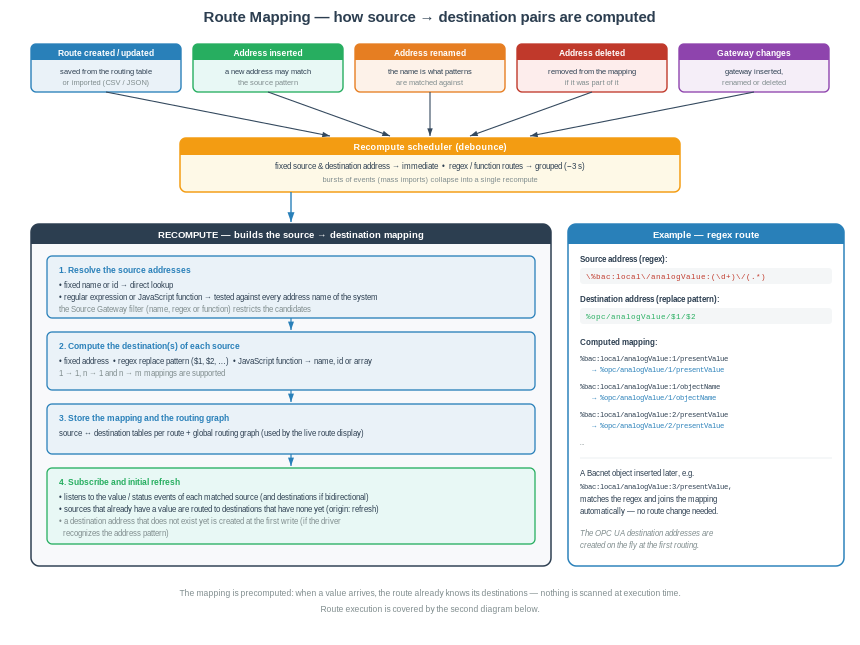
The recompute is triggered by: saving the route, inserting a new address, renaming an address, deleting an address, or gateway level changes (a gateway inserted, renamed, or deleted). A scheduler batches these events:
- Routes with a fixed source and destination address recompute immediately — the operation is cheap (direct lookups) and such routes only listen to the events of their own addresses.
- Routes using regular expressions or JavaScript functions must re-test every address name of the system, so their recomputes are grouped (about 3 seconds after the last event). A burst of events — for example a mass import creating hundreds of addresses — collapses into a single recompute.
The recompute itself performs four steps:
- Resolve the sources — fixed names/ids are looked up directly; regular expressions and functions are tested against every address name, restricted by the source gateway filter when defined.
- Compute the destinations of each source — a fixed address, the regex replace pattern (
$1,$2, ...), or the destination function. This is where n → m mappings are expanded. - Store the mapping — the source ↔ destination tables of the route, plus a global routing graph shared by all routes (this graph feeds the live route activity display of the interface).
- Subscribe and refresh — the route subscribes to the value/status events of each matched source (and of the destinations for bidirectional routes). When the route starts, every source that already has a value is routed once to its destinations, whether or not they already hold a value; on a later recompute, the newly matched sources are routed the same way and the sources already mapped are routed only to destinations that have no value yet (refresh executions, see section 2.3).
Consequences worth knowing:
- An address inserted after the route creation joins the mapping automatically if it matches the source pattern — mass imports are routed without touching the route.
- A destination address that does not exist yet is created on the fly at the first routed write (when a driver recognizes its name pattern), which is how the regex example of section 4.1 builds the whole OPC UA tree automatically.
¶ 3.2 Route Execution Pipeline
When a source event occurs, the route executes the following pipeline for each mapped source → destination pair:
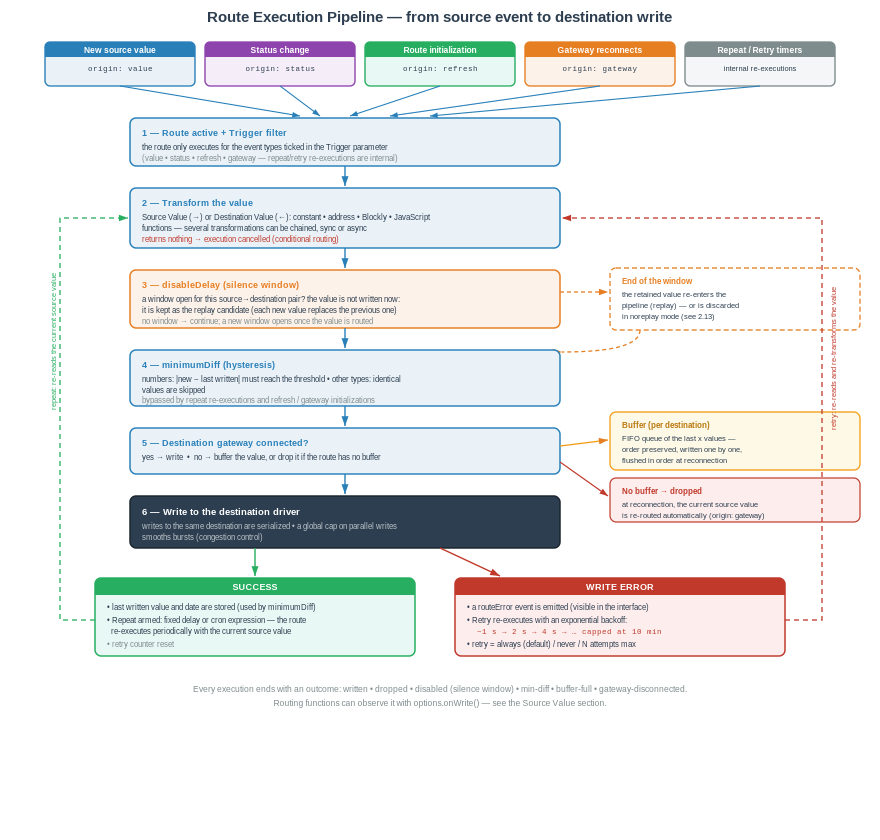
- Trigger filter — the route must be active, and the event type (
value,status,refresh,gateway) must be enabled in the trigger parameter (section 2.3). - Transformation — the source value (normal direction) or destination value (reversed direction) is applied: constant, address, Blockly diagram, or JavaScript function(s). If a function returns nothing, the execution is cancelled (conditional routing).
- Echo check (bidirectional routes) — the echo of the route's own write is not written back when it would not change the target.
- Destination availability — if the destination gateway is disconnected, the value is queued in the buffer when one is configured (section 2.16), or dropped otherwise (the destination will be re-synchronized by a gateway execution at reconnection).
- disableDelay window — if a silence window is open for the pair, the value is retained as the replay candidate and the execution stops here; the retained value re-enters the pipeline when the window ends (sections 2.12 and 2.13).
- minimumDiff — the value is compared with the last written value; too small variations (or identical values) are dropped (section 2.14).
- Write — the value is written through the destination driver. Writes to the same destination address are serialized (order is guaranteed), and a global cap on parallel writes smooths large bursts (congestion control).
- Outcome — on success, the last written value/date are stored and the repeat timer is armed if configured (section 2.11). On failure, the retry mechanism re-executes with an exponential backoff (section 2.15). Both repeat and retry re-enter the pipeline at the transformation step, with the current source value.
Every execution ends with a final outcome — written, dropped (cancelled or not routable), disabled (silence window), min-diff, buffer-full, gateway-disconnected, or echo-drop — which routing functions can observe with options.onWrite() (section 2.6.1).
¶ 4. Advanced Routing Examples
This chapter focuses on advanced routing examples. Note that simple routes can be easily configured using the web interface by drag & dropping an address on another, as shown in chapter 1.
¶ 4.1 Regular Expression Route
This section demonstrates how to route multiple Bacnet objects to OPC UA with a single route. To achieve it, a regular expression is used. Regular expression is a simple language/parser which permits to describe, capture, and replace patterns in any string of characters. In this use case it is used to identify matching source addresses, and transform each matching source address to the proper destination address. For a comprehensive description, please refer to Javascript regular expressions.
The following paragraph shows how to configure the route to map all Bacnet analog values properties to an OPC UA tree structure.
Route configuration:
- Source address regex :
/^%bac:local\/analogValue:(\d+)\/(.*)$/. Type the expression with its/ … /delimiters, as a JavaScript regular expression literal. The cell then shows a[ regex ]label and the Count column shows how many addresses the route links (sources and destinations). Without the delimiters the text is taken as a plain address name: the route is saved without any error but matches nothing (orange dot No match found, Count = 0). The regex has 2 capturing groups.(\d+)captures the BACnet object instance number (1, 2, … 10, 11, …) and(.*)the property name (presentValue, objectName, description, …).^and$anchor the expression to the whole address name. The capture groups can be used to determine the corresponding destination address. The below address names are matching the regex. A change of value in any of the matching addresses will trigger the route. The figure below shows some addresses that matches the regular expression.
%bac:local/analogValue:1/presentValue
%bac:local/analogValue:1/objectName
%bac:local/analogValue:1/description
%bac:local/analogValue:1/…
%bac:local/analogValue:2/…
%bac:local/analogValue:3/…
- Destination address string (replace pattern) :
%opc/analogValue/$1/$2
The prefix%opcof the destination address indicates that it is an OPC address. The$1pattern refers to the first capturing of the source address regex, which is the bacnet object instance number. The$2pattern refers to the second capturing group, which is the bacnet property name. Each destination address is computed by the route using the JavaScript String replace function. The figure below shows some mapping examples.
%bac:local/analogValue:1/presentValue   -> %opc/analogValue/1/presentValue
%bac:local/analogValue:1/objectName     -> %opc/analogValue/1/objectName
%bac:local/analogValue:2/presentValue   -> %opc/analogValue/2/presentValue
%bac:local/analogValue:[instance]/[prop] -> %opc/analogValue/[instance]/[prop]
¶ 4.2 Status Route For Alerts
This section demonstrates how to create a route able to detect communication issues on a Modbus register and to trigger an email alert (SMTP driver). For the other triggers and delivery channels (SMS, push, alarms module), see Alarms and notifications.
For this use case we will have to use a route of type status (section 2.2). The status is interesting to trigger alerts when a given address is not responding or in faulty state. There exists 3 main address statuses: offline, pending, and online. The Modbus driver also emits Modbus specific errors such as !timeout, !ILLEGAL_FUNCTION, !ILLEGAL_DATA_VALUE, ... .These specific errors can be used to detect configuration or communication issues and they start with the exclamation mark !.
Now let’s assume that the gateway device is acting as a Modbus RTU master. The master is gathering multiple values from different Modbus slaves. Each Modbus slave has a slave id. This id can be specified in the Modbus master address: %M1-100 represents the holding register number 100 of the slave with id 1. %M2-100 represents the same register number, but on the slave 2. If one of the slaves has a problem, its addresses status will emit the error. The route receives the status changes, checks if it is an error, and eventually sends an email alert stating that the concerned Modbus slave is not responding.
The route configuration for such use case is the following:
- Type. The route type must be specified to status.
- Direction. The direction is right (→).
- Source Address. For simplicity, a single
%M1-100Modbus register address (Modbus slave 1) is used. Note that a regex could be used to have a single route covering all the slave statuses. - Destination Address. A single email address (SMTP driver) alert@weble.ch is configured.
- Source Value. The function returns the email text to be sent when the status indicates an error. If the status is normal, nothing is returned by the function and no email is sent.
function statusToEmail(status, src){
 	if(status == "online" || status == "pending" || status == "offline"){
    //those are normal statuses sent when the modbus master is (re)starting.
    return; // returns nothing => cancels the route execution.
  }else{
   	//there is a modbus communication issue such as timeout
    return "Modbus communication problem with address " + src.name + "\n"+
      		 "Error : " + status
  }
}
¶ 4.3 Bacnet Object to MQTT JSON
The following example will demonstrate how to route a full Bacnet object with some of its properties into MQTT JSON messages. MQTT messaging protocol is lightweight and often used in IoT applications, like Amazon IoT cloud, Google IoT cloud, and other companies services.
The route will convert a Bacnet analogValue object presentValue, objectName, and units, to the following JSON format:
{
    "properties" : {
        "objectName" : "BTU DELTA TEMP",
        "unit"			 : "degreesCelsius"
  },
  "value" : 3,
  "timestamp" : "2023-10-28 18:49:39"
}
Note that a timestamp is added to the JSON. It corresponds to the date & time of the routing (when the analogValue object presentValue changes and triggers the route).
Route configuration:
- Source Address :
%bac:local/analogValue:1is the source address. It is a single local Bacnet object (the bacnet device is the weble gateway itself) of type analogValue. The value emitted on this address is the bacnet presentValue. - Destination Address :
%mqtt:analogValue_1is the single destination MQTT topic. (The MQTT address datatype must be configured as json for serialization.) - Source Value. The transform function is triggered whenever the Bacnet object present-value changes. The object name and units are stored in its children:
%bac:local/analogValue:1/objectName, and%bac:local/analogValue:1/units. These properties can be accessed in the route using our gateways API. The source value transform function is bound to the API (it means that the JavaScript “this” keyword refers to the API object).
function bacnetToJson(value, sourceAddress, destinationAddress){
  // value here is the bacnet object presentValue
  var gwId = sourceAddress.gateway_id //get the bacnet gateway id.
  var boa  = sourceAddress.name //e.g. %bac:local/analogValue:1

  // get the bacnet object properties, those are stored in children
  // addresses. Those can be fetched using the gateway api (this).
  // https://wiki.weble.ch/en/iot/api/peers/gateways
  var objectName = this.getAddress({
    gateway_id:gwId,
    name : boa + "/objectName"
  }).value

  var objectUnit = this.getAddress({
    gateway_id:gwId,
    name : boa + "/units"
  }).value


  return {
   	 "properties" : {
      	"objectName" : objectName,
        "unit" : objectUnit
     },
    "value" : value,
    "timestamp" : new Date().toLocaleString() //adds a timestamp
  }
}
¶ 5. See also
- Troubleshooting routes
- Intercept routes
- Route functions (Blockly) and Routing blocks reference
- Gateways API:
thisin the routing functions, and the routes from a program. - Examples: Airthings MQTT to BACnet, BACnet VAV regulation, Counter to instantaneous, Email gateway status alerts, Modbus watchdog counter, BACnet proxy (example route function on BACnet events).
- Alarms and notifications and Addresses.