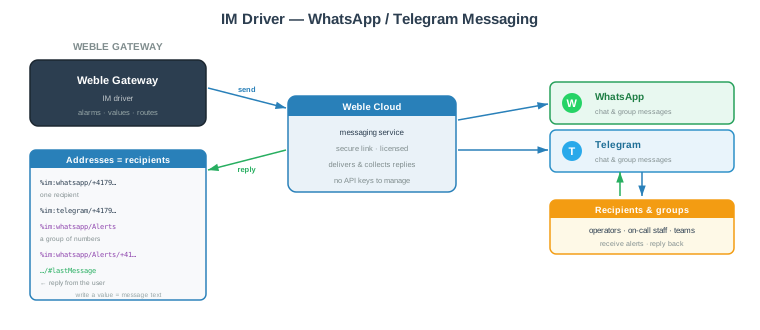
The IM driver sends WhatsApp and Telegram messages — alarms and notifications — to individual numbers or to groups, and can receive replies back from the recipients into the gateway. It turns any gateway value into an instant-messaging notification: a route writes the message text to an IM address, and the recipient gets it on WhatsApp or Telegram.
Messaging is handled through the Weble cloud messaging service: the gateway connects to it over a secure link, and the service delivers to WhatsApp / Telegram and relays replies back. You do not have to create or manage any WhatsApp Business or Telegram bot credentials on the gateway.
Typical uses:
- Push a critical alarm to the on-call technician's phone.
- Notify a group of operators when a threshold is crossed.
- Let a recipient reply (e.g. ack, ok, a set-point) and route that answer back into the automation.
This driver requires the Weble cloud messaging service to be enabled for your gateway (licensed) and the gateway to have internet access. Contact Weble to activate WhatsApp / Telegram messaging.
¶ 1. Getting started
¶ 1.1 Create the gateway
- Create a new gateway and select the IM driver.
- Give it a Name, choose the Default lang of the messages (
fr/de/en) and the default Notifications (see chapter 2). - Start the gateway. It connects to the Weble cloud messaging service and is ready to send.
¶ 1.2 Add a recipient
Add an address to describe who receives the message. Every address starts with the provider — whatsapp or telegram — followed by a phone number (in international format) or a group name:
%im:whatsapp/+41791234567— one WhatsApp recipient.%im:telegram/+41791234567— one Telegram recipient.
The address form lets you pick the Type (WhatsApp / Telegram), tick Group to create a group, and enter the Phone number — the %im:… name is built for you.
¶ 1.3 Send a message
The message text is the value written to the address. From a route, a logic, or the API:
// send a WhatsApp message to one recipient
gateways.writeValue('%im:whatsapp/+41791234567', 'Pump 3 stopped — please check.')
The recipient receives the text on WhatsApp. If they are allowed to reply (see Allow reply), their answer appears on the …/#lastMessage address.
¶ 2. Gateway parameters
The gateway holds the defaults inherited by every recipient that does not override them.
| Label | JSON Key | Description |
|---|---|---|
| Name | name | A descriptive name for this IM gateway instance. |
| Cluster ID | cluster | Cluster identifier. Use 0 for single-gateway setups. |
| Description | description | Optional description. |
| Default lang | json.lang | Language of the sent messages: fr, de or en. Default: en. |
| Notifications | json.notifs | Which service notifications recipients receive by default. Any combination of confirmReceive, shutdown, disconnect, connect. Default: confirmReceive. |
Notifications control automatic service messages sent into the conversation:
| Value | Meaning |
|---|---|
confirmReceive |
Post a confirmation in the conversation when the gateway has received a message from the recipient. |
connect |
Notify when the gateway connects (comes online). |
disconnect |
Notify when the gateway disconnects. |
shutdown |
Notify when the gateway is shut down. |
¶ 2.1 Gateway JSON example
{
  "lang": "en",
  "notifs": ["confirmReceive"]
}
¶ 3. Addresses
¶ 3.1 Address format
An IM address names a provider and a recipient. The recipient is either a single phone number or a named group:
%im:<provider>/<number> or %im:<provider>/<group>[/<number>]
<provider>—whatsapportelegram.<number>— the recipient's phone number in international format (e.g.+41791234567).<group>— a free-text group name (anything that is not a phone number).
This yields three address shapes:
| Address | Meaning |
|---|---|
%im:whatsapp/+41791234567 |
A single recipient — a direct one-to-one conversation. |
%im:whatsapp/Alerts |
A group named Alerts. Writing to it messages every member. |
%im:whatsapp/Alerts/+41791234567 |
A member of the Alerts group. |
Addresses are shown as a tree grouped by provider → group → number, so a group and its members appear nested together.
To send a message, write to a single recipient or to a group. Group members receive the message through their group — writing directly to a member address does not send.
¶ 3.2 Reply addresses
For every recipient the driver maintains two automatic child addresses that hold the last message received from that recipient:
| Address suffix | Content |
|---|---|
/#lastMessage |
The text of the last reply received from the recipient. |
/#lastMessageObject |
The full object of the last reply (sender, body, identifiers…). |
Route …/#lastMessage to react to what recipients answer — for example to acknowledge an alarm or read back a set-point. These addresses are managed by the driver and are not editable.
¶ 3.3 Recipient parameters
Each recipient (or group) address carries its own options. Any option left on inherit takes the value of its group, and otherwise of the gateway.
| Label | JSON Key | Description |
|---|---|---|
| Name | name | The recipient or group (built from Type / Group / Phone number). |
| Description | description | Optional description. |
| Individual | json.individual | For a group: send individually to each number (one conversation per number) instead of one shared group conversation. Default: true. |
| Language | json.lang | Language of the messages sent to this recipient: fr / de / en / inherit. Default: inherit. |
| Notifications | json.notifs | Service notifications for this recipient (confirmReceive, shutdown, disconnect, connect) or inherit. Default: inherit. |
| Allow reply | json.allowReply | Allow replies from the recipient(s): yes / no / inherit. If no, the gateway receives no messages from them. Default: inherit. |
| Log | log | Logging mode: never, on update, always, or a fixed duration in ms. |
Inheritance —
inheritmeans use the group's setting, otherwise the gateway's. Set a value once on the gateway and every recipient follows it; override it on a group to change a whole group; override it on a single recipient for a one-off.
¶ 3.4 Address properties
| Property | Value |
|---|---|
| Readable | Last reply only — reading returns the last received message, it does not poll |
| Writable | Yes — writing a value sends the message (recipients and groups) |
| Routable | Yes — as destination (send) and as source (/#lastMessage replies) |
| Loggable | Yes |
¶ 4. Sending and receiving
¶ 4.1 Sending
Writing a value to a recipient or group address sends it as a message; the written value is the message body.
- To one recipient — write to
%im:whatsapp/+41791234567. A direct conversation is used. - To a group — write to
%im:whatsapp/Alerts. Every phone number under the group receives the message.- With Individual on (default), each member gets the message in their own one-to-one conversation.
- With Individual off, a single shared group conversation is created (the group name is its title) and reused for later messages.
If a recipient address does not exist yet, a route that targets it creates it on the fly.
¶ 4.2 Receiving replies
When Allow reply is enabled, messages sent back by a recipient flow into the gateway:
- The recipient's address value becomes the received message.
…/#lastMessagegets the message text and…/#lastMessageObjectthe full object.- If confirmReceive is enabled, the gateway posts a confirmation back into the conversation.
Route …/#lastMessage to turn a reply into an action — acknowledge an alarm, capture a value, trigger a logic.
¶ 4.3 Example — alarm with acknowledgement
- Alarm → WhatsApp. A route writes the alarm text to
%im:whatsapp/Oncall(a group), notifying every member. - Acknowledgement. A second route uses
%im:whatsapp/Oncall/+41791234567/#lastMessageas its source; when the technician replies ack, a routing function clears the alarm and (through confirmReceive) the technician sees a confirmation in the chat.
¶ 5. How it works
- On start, the driver opens a secure connection to the Weble cloud messaging service and authenticates the gateway (licensed access).
- It synchronises its recipients and groups with the service, so the service knows who may be messaged and who may reply.
- Sending — a value written to an address is forwarded to the service, which delivers it to the recipient over WhatsApp or Telegram.
- Receiving — replies (when allowed) and delivery confirmations are pushed back to the gateway and applied to the
/#lastMessage//#lastMessageObjectaddresses. - The connection is kept alive and reconnects automatically; a transient send failure is retried.
Only one gateway may use a given messaging identity at a time. Running a second gateway with the same identity is refused by the service (reported as busy).