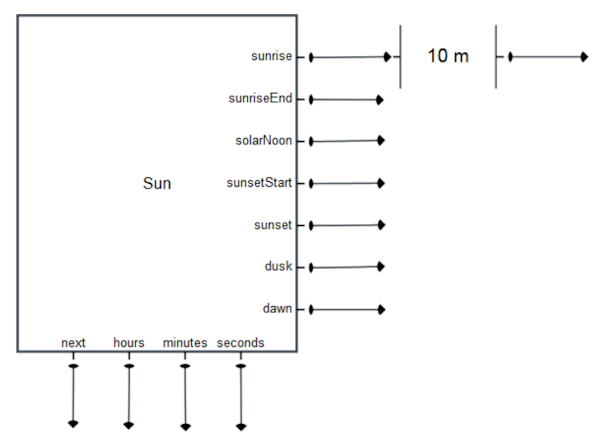
The programmable gate is the gate of the logic module whose behaviour you write in JavaScript. You choose its inputs, outputs and parameters, and its code can read, write and listen to any address of the device. This page is the reference for integrators and developers who write such gates. The other gates are described in the Gates reference.
The code of a programmable gate runs on the device with the rights of the device: it is not a sandbox. Only import gates from a source you trust, and give the right to create or modify circuits only to accounts that you trust with the configuration of the device. See Security.
¶ 1. Overview
Use a programmable gate when the standard gates would need a large, hard-to-read circuit: state machines, regulation loops (PID, PWM), calculations over several addresses, time-based logic, protocol helpers. For a single formula on a few inputs, an Expression gate is simpler.
How it runs:
- Each circuit runs in its own process on the device (circuits grouped in a cluster share one process, see Running, monitoring and troubleshooting circuits). All the gates of the circuit share that process: a long synchronous loop in one gate blocks the whole circuit.
- A gate has a Context code, run once when the circuit starts, and one code per input, run each time a value arrives on that input.
- Everything the gate keeps in memory is lost when the circuit restarts (save of a running circuit, stop and start, reboot of the device).
¶ 2. Creating a gate
Drag Programmable from the Others group of the palette. A new gate has two inputs on the left and one output on the right. In the Edition tab, the buttons around the gate add an input or an output on any of its four sides; the bin icon next to a port removes it.
Click the gate to open its parameters:
General tab
| Parameter | Default | Effect |
|---|---|---|
| Gate label | empty | Text displayed on the gate. |
| Gate active | yes | An inactive gate sends nothing on its outputs. Its timers and listeners keep running, and writes made through Gateways still happen. |
| Edition mode | yes | Shows the Advanced tab and the tools to add, edit, move and remove parameters. Set it to no on a finished gate: users then only see and change the parameter values. |
| (gate parameters) | The parameters you created with Edit parameters, see Gate parameters. |
Advanced tab
| Parameter | Default | Effect |
|---|---|---|
| Gate name | empty | Name shown in the header of the gate console and used as the file name on export. |
| Edit executed code at start | Opens the code editor on the Context code. | |
| Edit parameters | Creates and edits the gate parameters. | |
| Inputs label | in_ |
Prefix of the names given to new inputs (in_a, in_b…). Cannot be empty. |
| Outputs label | out_ |
Prefix of the names given to new outputs (out_a…). Cannot be empty. |
| Import gate | Loads a .bloc file: the ports, code and parameters of the gate are replaced by those of the file. |
|
| Export gate | Downloads the gate as a .bloc file (<Gate name>.bloc), to reuse it in another circuit or on another device. |
Click a port to rename it, move it to another side of the gate or set its initial value; for an input, you can also open its code. A port name must be a valid JavaScript identifier (letters, digits and _, not starting with a digit, not a reserved word) and unique on the gate, because it becomes a variable in the code.
¶ 3. Code editor
Double-click the gate (or use Edit executed code at start) to open the code editor. It has one tab per code:
- Context: run once, when the circuit starts. Declare the variables, helper functions, timers and address listeners here. They are visible from the input codes.
- One tab per input, named after the input: run each time a value arrives on that input, provided the value is defined.
The editor highlights syntax errors and proposes completions. Click Save in the editor, then save the circuit: a running circuit is restarted with the new code.
console.log(), console.info(), console.warn() and console.error() write to the console of the gate (console icon above the gate), visible while you edit, debug or watch the current status. They do not go to the logs of the device.
¶ 4. Inputs and outputs
¶ 4.1 Reading inputs
| Expression | Value |
|---|---|
inputs.<label> or inputs[i] |
The input object (by name, or by position from 0). |
inputs.<label>.value |
Current value of the input. |
<label> |
Shortcut for inputs.<label>.value. |
inputs.<label>.oldValue |
Previous value. |
inputs.<label>.name |
Name of the input. |
inputs.<label>.consumed |
true when the value has been consumed. |
inputs.<label>.linktype |
Type of the connected link, e.g. imp for a consumable link. |
inputs.<label>.consume() |
Consumes the value. Returns true if it was not consumed yet. |
inputs.allready |
true when every input holds a value. |
inputs.length |
Number of inputs. inputs also offers map, forEach, filter, some, every, reduce… |
Rules:
- The code of an input runs only when the value received is defined.
- When a value arrives and every input holds a value, all inputs are consumed automatically after the code has run.
- A value received through a consumable link stays on the input until it is consumed. After acting on it, call
inputs.<label>.consume(), otherwise it is still there the next time the code runs. See Links. - To wait until every input has a value, wrap the code in
if (inputs.allready) { ... }.
¶ 4.2 Sending on outputs
| Expression | Effect |
|---|---|
<label>(v) |
Sends v on the output named <label>. |
outputs.<label>.exec(v) |
Same, through the output object. |
outputs[i].exec(v) |
Same, by position from 0. |
<label>(a, b) |
Sends the array [a, b]. |
outputs.<label>.value |
Value waiting to be sent, or the last value sent. |
outputs.<label>is an object, not a function: writeoutputs.out_a.exec(1)orout_a(1), notoutputs.out_a(1). Assigning a value (outputs.out_a = 1) sends nothing.
The value leaves the gate once the current code has finished (asynchronous sending): the gates connected downstream run after your code, not in the middle of it.
¶ 4.3 Events (advanced)
Inputs and outputs are event emitters:
inputs.<label>.on(event, function(input){ ... })withexec(a value arrived),change(the value changed) orconsume(the value was consumed);inputs.on('allready', function(values){ ... })when every input holds a value, andinputs.on('allconsume', ...)after the automatic consumption;outputs.<label>.on('exec', function(output){ ... })after a value was sent.
¶ 5. Gate parameters
Parameters let you reuse the same gate with different settings (threshold, address, period…) without touching the code. Create them with Advanced > Edit parameters:
| Field | Effect |
|---|---|
| Parameter key | Name used in the code. Must be a valid JavaScript identifier and not a reserved word. |
| Parameter label | Text displayed in the General tab. |
| Field type | text, number (with minimum, maximum and default value), list (choices, single or multiple), address (address selector, with the address types offered), boolean (with its default state). |
In the code, the value of the parameter threshold is available in three ways: threshold, parameters.threshold and Gate.parameters.threshold. The value is read when the circuit starts; changing it means saving the circuit, which restarts it.
Do not give a parameter the name of an input, of an output, or of a name used by the gate itself (
inputs,outputs,Gateways,Global,Date,Math…): the parameter would hide it. If you compute with a number parameter, convert it withNumber(...)to be safe.
¶ 6. Using the device API
| Name | Use |
|---|---|
Gateways (also Addresses) |
Read, write and listen to any address of the device. |
Loggers |
Access to the loggers, see the loggers API. |
Main Gateways calls (all asynchronous, with a callback):
// write a value
Gateways.writeValue('$setpoint', 21.5, function(err){
  if (err) console.error('write failed', err)
})
// ask the driver (may send a request on the bus)
Gateways.readValue('1/2/3', function(err, value){ ... })
// last value stored on the device, without bus traffic
Gateways.getLastValue('%M1-10', function(err, value, valueString, date){ ... })
// listen to every new value of an address
Gateways.on('newValue %M1-10', function(value, valueString, date){ ... })
Addresses are written as in the address table (1/2/3, %M1-10, $name), or as an alias. The complete list of calls and events (for example routeWrite, emitted each time a route writes a value) is in the gateways API.
A gate that works only through Gateways needs no input or output: put the code in the Context tab.
¶ 7. Shared state and timers
¶ 7.1 Global
Global is an object shared by all the programmable gates of the same circuit: Global.lastAlarm = Date.now() in one gate can be read in another. Variables declared in a gate are private to that gate.
Global and all variables are emptied when the circuit restarts. To keep a value across restarts, write it to an internal address ($name, see the Internal driver); enable Store value on that address if the value must also survive a reboot of the device.
¶ 7.2 Timers
setTimeout, setInterval, clearTimeout and clearInterval work as in JavaScript, with two differences:
- they return a timer object, not a number; pass that object to
clearTimeout/clearInterval; - delays longer than 24 days are supported.
The timer object offers:
| Method | Effect |
|---|---|
clear() |
Cancels the timer. |
pause() |
Suspends it, keeping the time left. |
resume() |
Restarts it after a pause. |
next() |
Milliseconds left before it fires. |
reset(ms) |
Restarts it with a new delay of ms milliseconds. |
setImmediate and clearImmediate are also available.
Timers and address listeners run until the circuit stops. Deactivating the gate does not stop them, and nothing cleans them up for you: keep the timer object if you need to cancel it.
¶ 8. Available modules
require(name) accepts only the following modules; any other name throws an error.
| Kind | Modules |
|---|---|
| Node.js built-in | assert, buffer, crypto, dgram, dns, domain, events, http, https, net, os, path, stream, string_decoder, tty, url, util, zlib |
| Bundled libraries | suncalc (sun position and times), later (schedules), express and body-parser (small HTTP server), date-holidays (public holidays), ftp (FTP client) |
| Device | peers (API of the device) |
The file system (fs) and system commands (child_process) are not available. Also available without require: Math, Date, Buffer, querystring.
¶ 9. Errors and limits
- Syntax errors are detected when the circuit starts and displayed on the gate. A syntax error in one programmable gate prevents the whole circuit from starting: no gate runs until it is fixed.
returnat the top level of an input code is reported as a syntax error. Wrap the code inif (...) { ... }instead.- Recent syntax is rejected by the syntax check: optional chaining
a?.b,??,catch {without parameter.let,const, arrow functions, classes, spread andasync/awaitare accepted. - Run-time errors (exceptions) are displayed on the gate with the name of the input (or
initfor the Context code) and the line and column. - A circuit whose process stops because of an error is restarted automatically, see Running, monitoring and troubleshooting circuits.
¶ 10. Examples
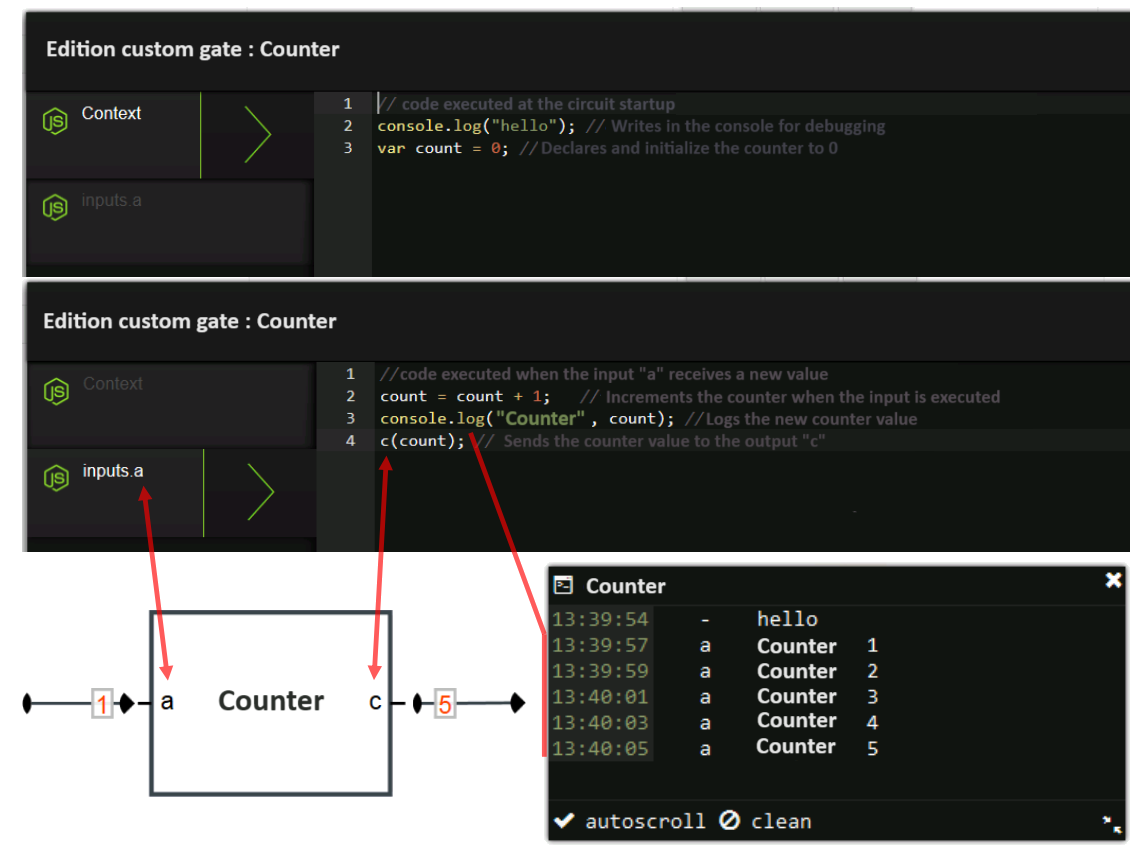
¶ 10.1 Counter
One input pulse, one output count. Each value received on pulse increments the counter.
Context:
var n = 0
Input pulse:
n = n + 1
count(n)
The figure below shows the same idea built in the editor, with the code of the input a.
¶ 10.2 Threshold with hysteresis
One input temp, one output heat, two number parameters low and high (e.g. 19 and 21). The output sends 1 when the temperature falls to low or below, 0 when it rises to high or above, and nothing in between.
Context:
var state = null
Input temp:
var t = Number(temp)
if (t <= Number(low) && state !== 1) {
  state = 1
  heat(1)
} else if (t >= Number(high) && state !== 0) {
  state = 0
  heat(0)
}
¶ 10.3 Average of several probes (no input)
A gate with one output average and no input. It listens to three addresses and sends their average every minute. Connect the output to a Write gate, or replace average(...) with Gateways.writeValue(...).
Context:
var PROBES = ['$t_office1', '$t_office2', '$t_office3']
var last = {}

PROBES.forEach(function(adr){
  Gateways.getLastValue(adr, function(err, value){
    if (!err && typeof value == 'number') last[adr] = value
  })
  Gateways.on('newValue ' + adr, function(value){
    last[adr] = value
  })
})

setInterval(function(){
  var values = PROBES.map(function(a){ return last[a] })
                     .filter(function(v){ return typeof v == 'number' })
  if (!values.length) return
  var sum = values.reduce(function(a, b){ return a + b }, 0)
  average(Math.round(sum / values.length * 10) / 10)
}, 60000)
¶ 10.4 Stand-alone gate: listen to one address, write another
No input, no output. Each new value of the Modbus holding register 10 of slave 1 is divided by 10 and written to an internal address.
Context:
Gateways.on('newValue %M1-10', function(value){
  Gateways.writeValue('$level_percent', value / 10, function(err){
    if (err) console.error('write failed:', err)
  })
})
¶ 10.5 Activity watchdog
Two outputs: running and alert. Connect alert to a Write gate whose address is an e-mail address (an SMTP client gateway is needed, see Logic circuits). The gate sends an alert every hour as long as no route writes to the gateway MCR. The full story is in the article Routing watchdog.
Context:
var GATEWAY = "MCR"          // name of the monitored gateway
var DELAY = 60 * 60 * 1000   // alert after 1 hour without any route write
var watchedIds = {}
var watchdog = null

function resetWatchdog(){
  clearInterval(watchdog)
  watchdog = setInterval(function(){
    alert("No route executed on the " + GATEWAY + " gateway for 1 hour")
  }, DELAY)
}

Gateways.getAddressesByGateway(GATEWAY, function(err, ads){
  if (err) {
    alert("Watchdog: cannot load the addresses of " + GATEWAY + ": " + err)
    return
  }
  ads.forEach(function(ad){ watchedIds[ad.id] = true })
  Gateways.on('addressInsertedGw ' + GATEWAY, function(ad){ watchedIds[ad.id] = true })
  Gateways.on('routeWrite', function(routeId, sourceId, destId){
    if (watchedIds[destId]) resetWatchdog()
  })
  resetWatchdog()
  running(1)
})
¶ 10.6 Regulation and sun gates
The figures below show more complete gates: a PID regulator, a PWM (pulse width modulation) gate for an on/off valve, and a "Sun" gate that sends an impulse at sunrise, sunset and the other solar events of a place given by two parameters, latitude and longitude.
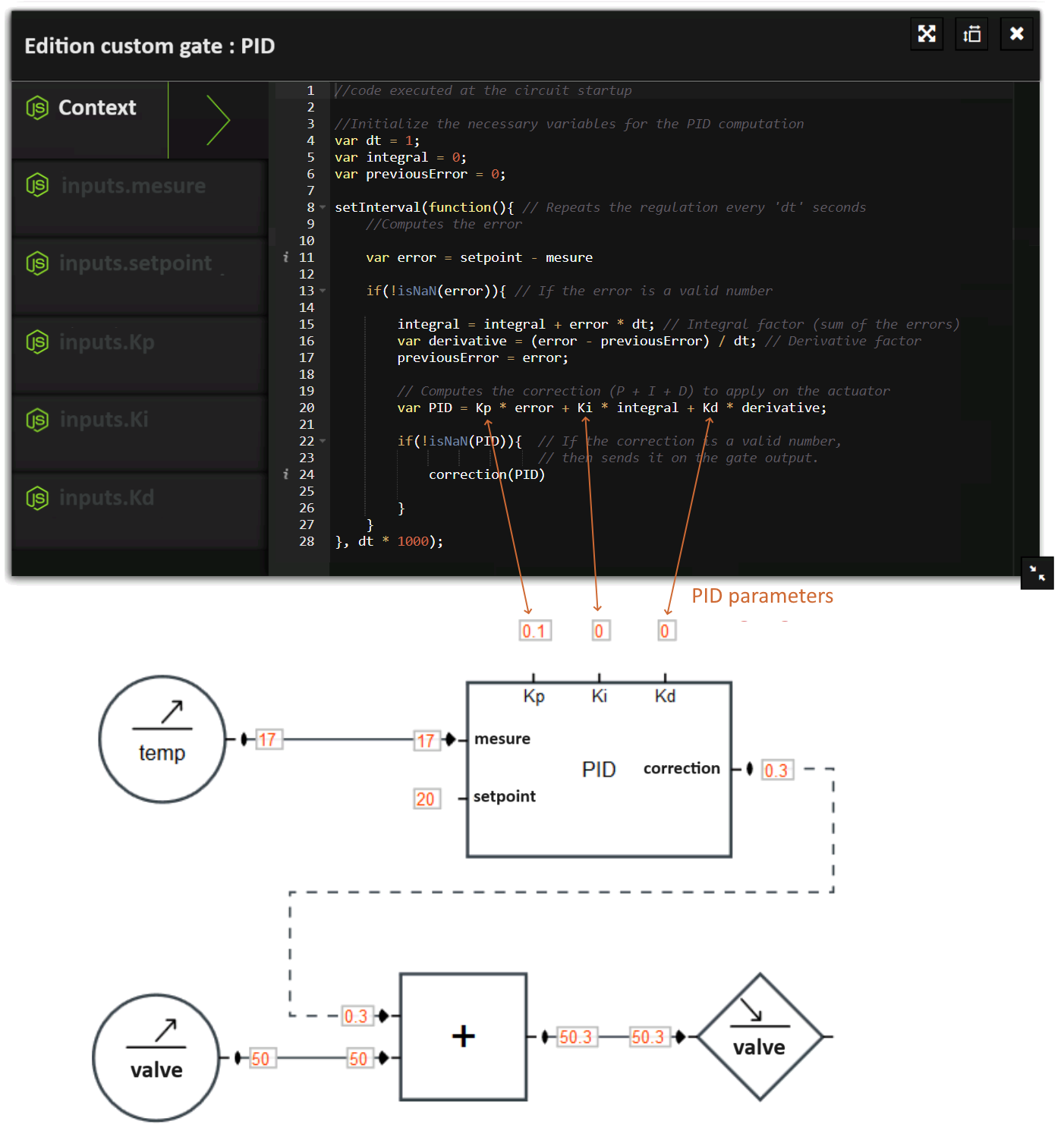
PID regulator: the gate adjusts the valve opening so that the room temperature (17 °C) approaches the setpoint (20 °C).
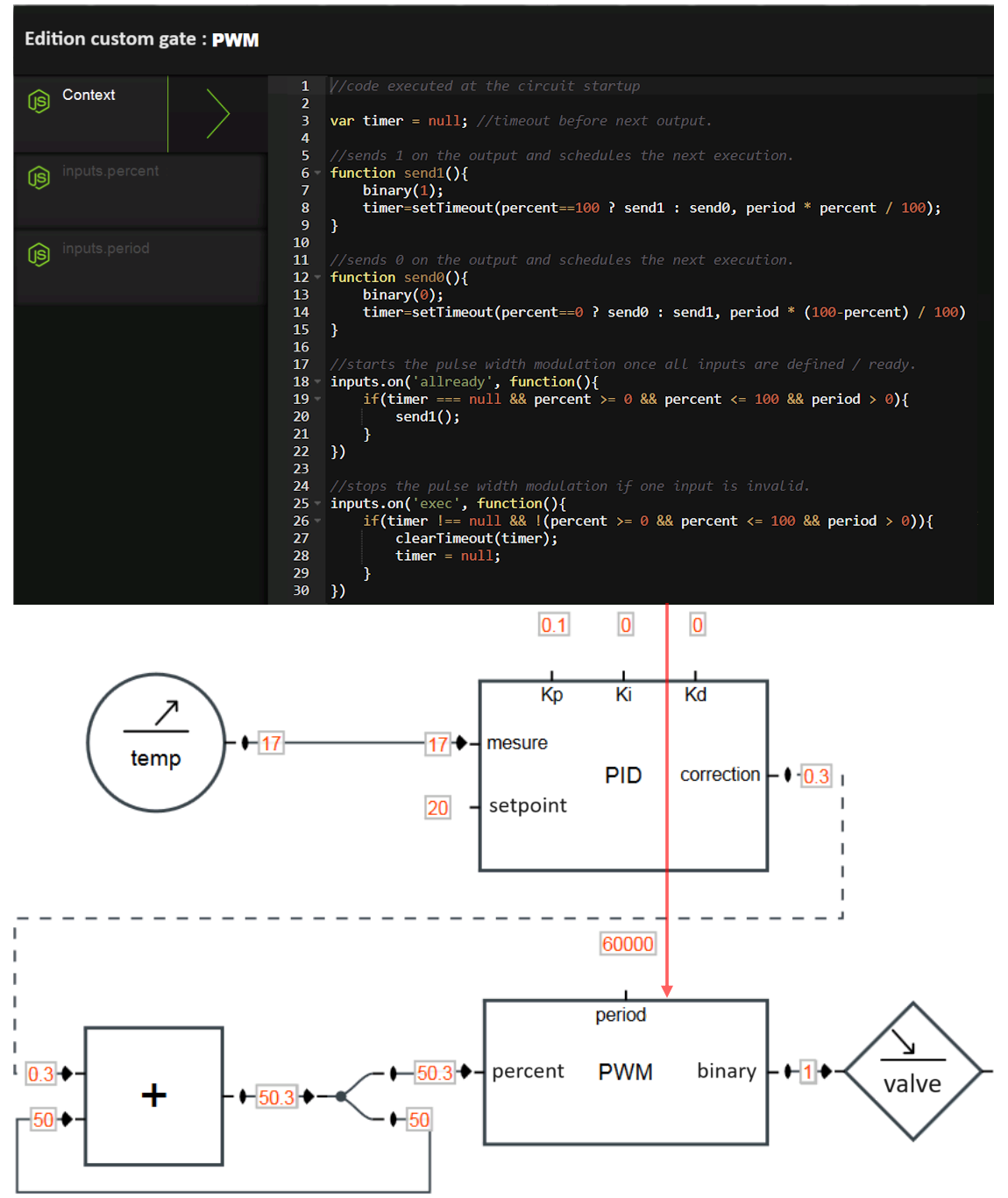
PWM gate: opens (1) and closes (0) a valve over a period (60 s), for the given percentage of the time (50.3 %).
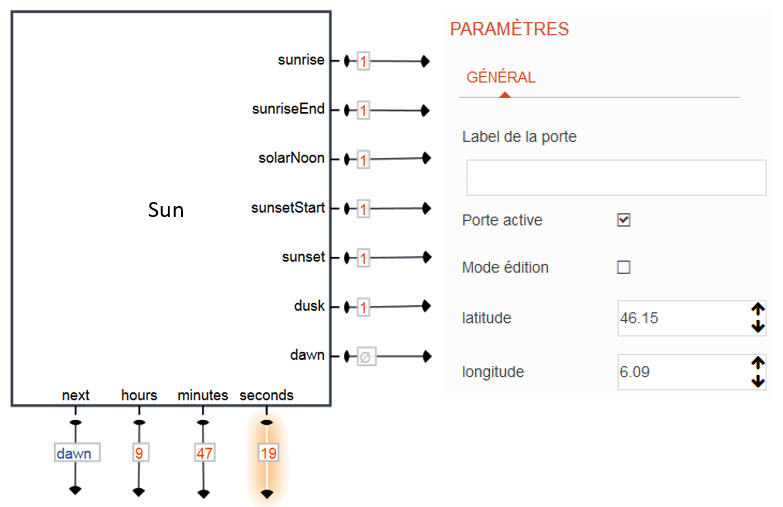
Sun gate: the right outputs fire at each solar event; the bottom outputs give the next event and the time left. Parameters: latitude and longitude (here Geneva).
The Context code of the Sun gate uses the suncalc module. Its right outputs are named after the suncalc events (sunrise, sunset, solarNoon…); its bottom outputs are next, hours, minutes and seconds.
var suncalc = require('suncalc'); //https://github.com/mourner/suncalc
var nextTimer = null;
//schedules execution of next event (sunrise/sunset/...)
function scheduleNextEvent(startTs){
    var now = Date.now();
    //compute events timestamps based on latitude and longitude parameters
    var res = suncalc.getTimes(startTs ? startTs : now,latitude,longitude);
    var keys = outputs.filter(function(o){return o.position == 'right'}).
                                map(function(o){return o.name});
    var tss = keys.map(function(k){return res[k].getTime()});
    var tsMin = tss.map(function(ts){return ts < now ? Number.MAX_VALUE :ts}).
                                reduce(function(a,b){return Math.min(a,b)});

    if(tsMin !== Number.MAX_VALUE){ //timestamp of the next event found
        var indexMin = tss.indexOf(tsMin);
        var output = outputs[keys[indexMin]];

        nextTimer = setTimeout(function(){ //executed when the event happens
            output.exec(1); //send an impulsion to the correct output.
            scheduleNextEvent();
        },tsMin-now);

        next(keys[indexMin]); //indicates the next event(sunrise/sunset/...)
    }
    else{ //all the events (sunrise/sunset/..) are past for today
        scheduleNextEvent(now+1000*60*60*24); //find tomorrow next event
    }
}
//countdown until next event (sunrise/sunset/...)
function countdown(){
    var tsl = Math.round(nextTimer.next()/1000); // total seconds left
    var s = tsl % 60; // seconds left
    var m = Math.floor(tsl/60) % 60; //minutes left
    var h = Math.floor(tsl/3600); // hours left
    seconds(s); //outputs the seconds left
    if(this.m != m){ //outputs the minutes left (when it changes)
        this.m = m;
        minutes(m);
    }
    if(this.h != h){ //outputs the hours left (when it changes)
        this.h = h;
        hours(h);
    }
}
scheduleNextEvent(); //start at initialization
countdown(); //update coutdown at initialization
setInterval(countdown,1000); // update countdown every seconds
nextTimer.next() uses the timer object described in Timers. The calculation does not take the relief into account; to shift an event, add a Delay gate on the output (figure below) or add the offset in the code.