
The HTTP/HTTPS driver provides a versatile HTTP server and client implementation for the Weble universal gateway. It receives and sends HTTP requests and receives WebSocket messages, making it ideal for REST API integrations, webhook receivers, real-time data streaming, and custom web-based visualizations.
The driver supports two main modes:
- Server mode: creates an HTTP server that listens for incoming requests (GET, POST, PUT, DELETE, PATCH) and WebSocket connections. It can also serve static files (HTML, CSS, JS) for building custom dashboards and visualizations, with optional FTP/SFTP servers for file management.
- Client mode: sends HTTP requests to external APIs and services, with support for polling, custom headers, and multiple authentication methods (Basic, OAuth2).

¶ 1. Getting started
¶ 1.1 Server mode
Create a new gateway with the HTTP driver, set the Type to server and choose the Port. Use a free port such as 8080 for a standalone server. The default value 80 is normally the port of the gateway web interface: in that case the gateway is not reached on a port of its own but through the web interface, under a Root path that is then mandatory (see 2.5).
Once the gateway is started, every incoming request feeds three addresses. For POST /sensors/temperature:
| Address | Content |
|---|---|
%http-post:#/sensors/temperature |
Read-only. What was received: the body; or the query parameters if there is no body; or {query, body, url} if there are both. |
%http-post:#lastQuery |
Read-only. The last POST request received on any path: {query, body, url}. |
%http-post:/sensors/temperature |
The answer. Its value is returned as the response body (as JSON if it is an object). Write to it the value you want to return, by hand, with a route or with a logic, and set Store value to keep it after a restart. Until a value has been written, the response body is the text undefined. |
The body is interpreted: a number becomes a number, valid JSON becomes an object, anything else stays text. The status is 200, or 401 when Basic authorization is set and the credentials are missing or wrong.
When the URL has a query string, the answer address includes it (%http-post:/sensors/temperature?unit=C) and an extra read-only address with the query string (%http-post:#/sensors/temperature?unit=C) is fed too.
This makes it easy to build simple REST APIs where external devices or services push data into the gateway.
¶ 1.2 Client mode
Set the Type to client and enter the base URL of the remote API. Each address is one request: %http-get:/api/data sends a GET to the base URL followed by /api/data. An address can also hold a complete URL (%http-get:https://other.example.com/status), which is then used as is.
The request is sent each time a value is written to the address and, if Polling is set, periodically. The response is not stored in the address you created, but in a read-only twin whose path starts with #:
| Address | Content |
|---|---|
%http-get:/api/data |
What you write to it: the request body, or {headers, query, body} (section 3.3). Its status shows the result of the last request: online, or ! followed by the error. |
%http-get:#/api/data |
Created automatically. The last response, parsed as JSON when possible. This is the address to use in routes, logs and logic. |
%http-get:#lastQuery |
Created automatically. The last response received by any GET address of this gateway: { "url": ..., "query": ..., "body": <response> }. |
The query string is not part of the twin's name: %http-get:/api/data?unit=C answers in %http-get:#/api/data, and the value is then { "query": {"unit": "C"}, "body": <response>, "url": ... }.
¶ 1.3 WebSocket support
The HTTP server also supports WebSocket connections. Clients can connect via WebSocket to any path on the server. Each WebSocket path creates a set of addresses for managing connections and messages:
%http-ws:/path— the base WebSocket address%http-ws:/path/message— receives incoming messages from connected clients%http-ws:/path/clients— lists currently connected clients%http-ws:activeClients— lists all active WebSocket clients across all paths
¶ 2. Gateway parameters
¶ 2.1 General parameters
| Label | JSON Key | Description |
|---|---|---|
| Name | name | A descriptive name for this HTTP gateway instance. |
| Cluster ID | cluster | Cluster identifier (integer). Use 0 for single-gateway setups. |
| Description | description | Optional description for this gateway. |
| Type | type | Operating mode: server (HTTP server listening for requests) or client (HTTP client sending requests to a remote API). |
| Port | port | Server only. TCP port of the HTTP server. Default: 80. If it is the HTTP or HTTPS port of the gateway web interface, the gateway is served by the web interface under the Root path, which must then be filled in. With an empty Root path the gateway does not start (invalid rootPath in its log). |
| URL | url | Client only. Base URL of the remote API endpoint (e.g. https://api.example.com). |
¶ 2.2 Client authentication
These parameters are only visible when the Type is set to client.
| Label | JSON Key | Description |
|---|---|---|
| Auth. Method | authentificationMethod | Authentication method: none, Bearer basic (HTTP Basic Auth), or oAuth2. |
| Username | username | Username for HTTP Basic authentication. Shown with Bearer basic, and with oAuth2 when the grant type is password. |
| Password | password | Password for HTTP Basic authentication. Shown with Bearer basic, and with oAuth2 when the grant type is password. |
¶ OAuth2 parameters
These parameters are visible when the authentication method is set to oAuth2.
| Label | JSON Key | Description |
|---|---|---|
| oAuth2 url | oAuth2_host | URL of the OAuth2 token endpoint (e.g. https://auth.example.com/oauth/token). Mandatory. https:// is assumed when no scheme is given. |
| Client_id | oAuth2_client_id | The OAuth2 client identifier. |
| Client_secret | oAuth2_client_password | The OAuth2 client secret. |
| Scope | oAuth2_scope | The OAuth2 scope to request (optional). |
| Grant type | oAuth2_grant_type | client_credentials or password. With password, Username and Password are sent with the token request. |
| Request type | oAuth2_request_type | How the token request is sent: POST/x-www-form-urlencoded or POST/body (JSON). |
The token is requested when the gateway starts and renewed 100 seconds before it expires (expires_in). It is sent with every request as Authorization: <token_type> <access_token>, unless a header named Authorization is defined in Headers. If the token endpoint does not answer with status 200, the gateway stops (invalid oAuth response in its log) and restarts.
¶ 2.3 Client request parameters
| Label | JSON Key | Description |
|---|---|---|
| Headers | headers | Client only. Custom HTTP headers to include with every request. Each header is a key/value pair (e.g. Content-Type: application/json). |
| Idle timeout | idleTimeout | Client only. Pause in milliseconds after each polled request. Polled requests are always sent one after the other; 0 means no pause. |
In client mode, values are not kept across restarts: a body or
{headers, query, body}object written to an address must be written again after the gateway restarts.
¶ 2.4 Server parameters
These parameters are only visible when the Type is set to server.
| Label | JSON Key | Description |
|---|---|---|
| Basic authorization | authorizations | List of users (Username / Password) accepted with HTTP Basic authentication on incoming requests. Empty: no authentication. It applies to the request addresses (%http-get:, %http-post:...). |
| Require Weble Session | requireWebleSession | Only effective when the gateway shares the port of the gateway web interface (see Port): requests under the Root path are then refused, and redirected to the login page, unless the browser is logged in to the gateway. It has no effect when the driver listens on its own port. |
| Restrict to existing path | restrictToAddressPath | If enabled, WebSocket connections are only accepted on paths that already have a corresponding address. |
| Websocket inactivity timeout | websocketInactivityTimeout | Time in milliseconds before an inactive WebSocket connection is automatically closed. Set to 0 to disable. This field is also shown in client mode. |
¶ 2.5 Static file server parameters
When the Type is server, an optional static file server can be enabled.
| Label | JSON Key | Description |
|---|---|---|
| Serv static file | staticFileServer | Enable serving static files from the gateway's data directory. |
| Root path | rootPath | Used only when Port is a port of the gateway web interface: URL prefix under which the gateway is reachable (e.g. /myapp). Mandatory in that case, and different from /. The prefix is part of the address names: a POST to /myapp/sensors/temp feeds %http-post:#/myapp/sensors/temp. Only GET, POST, PUT and DELETE requests and WebSocket connections are relayed. Ignored on a dedicated port. |
| FTP Enable | ftpEnable | Enable an FTP server for uploading/managing static files. |
| FTP Port | ftpPort | FTP server port. Default: 2121. |
| SFTP Enable | sftpEnable | Enable an SFTP server for secure file transfers. |
| SFTP Port | sftpPort | SFTP server port. Default: 2323. |
¶ 2.6 Gateway JSON examples
Server mode:
{
  "type": "server",
  "port": 8080,
  "authorizations": [],
  "headers": [],
  "staticFileServer": false,
  "ftpEnable": false,
  "sftpEnable": false,
  "ftpPort": 2121,
  "sftpPort": 2323,
  "rootPath": "",
  "requireWebleSession": false,
  "restrictToAddressPath": false,
  "websocketInactivityTimeout": 0
}
Client mode with OAuth2:
{
  "type": "client",
  "url": "https://api.example.com",
  "idleTimeout": 0,
  "authentificationMethod": "oAuth2",
  "oAuth2_host": "https://auth.example.com/oauth/token",
  "oAuth2_client_id": "my_client_id",
  "oAuth2_client_password": "my_client_secret",
  "oAuth2_scope": "read write",
  "oAuth2_grant_type": "client_credentials",
  "oAuth2_request_type": "POST/body",
  "headers": [
    { "key": "Accept", "value": "application/json" }
  ]
}
Client mode with Basic Auth:
{
  "type": "client",
  "url": "https://api.example.com",
  "idleTimeout": 100,
  "authentificationMethod": "Bearer basic",
  "username": "myuser",
  "password": "mypassword",
  "headers": []
}
¶ 3. Addresses
¶ 3.1 Address format
HTTP addresses use the prefix %http-<method>: followed by the URL path:
%http-get:/api/sensors— GET request to /api/sensors%http-post:/data/upload— POST request to /data/upload%http-put:/config— PUT request to /config%http-delete:/items/42— DELETE request%http-patch:/users/1— PATCH request%http-ws:/realtime— WebSocket connection path%http-file:/index.html— a file or folder of the static file directory (server mode)
The supported address schemas are: GET, POST, PUT, DELETE, PATCH, WS (WebSocket), and FILE. Each schema is shown as a separate tab in the gateway's address grid. The FILE schema is not requested manually — it is populated automatically from the static file directory (see section 5.3).
¶ Auto-generated addresses (#)
In both modes the driver creates read-only addresses prefixed with #: in server mode for each request received, in client mode for each response received (see 1.2):
%http-post:#/sensors/temp— stores the last received POST body on/sensors/temp%http-get:#lastQuery— stores the last received GET request (URL, query parameters, body)
¶ 3.2 Address parameters
¶ Client mode
| Label | JSON Key | Description |
|---|---|---|
| Polling | polling | Period of the request: a number of milliseconds (e.g. 60000) or a cron expression (e.g. */5 * * * *). Empty or 0: the request is only sent when a value is written to the address. Each response refreshes the # twin of the address. |
| Description | description | Optional description for this address. |
| Log | log | Logging mode: never, on update, always, or a duration in milliseconds. |
¶ Server mode
| Label | JSON Key | Description |
|---|---|---|
| Store value | remanent | Value persistence: never (value lost on restart), always (value persisted to disk), or a duration in milliseconds. |
| Description | description | Optional description for this address. |
| Log | log | Logging mode: never, on update, always, or a duration in milliseconds. |
¶ WebSocket address parameters (server mode)
| Label | JSON Key | Description |
|---|---|---|
| Message filter | messageFilter | Filter incoming WebSocket messages by key/value pairs (e.g. type=temperature). Multiple filters can be comma-separated. Only matching messages are stored. |
| Child key | messageKey | Extract a nested value from the message payload using dot notation (e.g. data.value). |
| Only payload | messageOnlyPayload | If enabled, stores only the message payload instead of the full message object (which includes client identity). |
| Store value | remanent | Value persistence mode. |
| Log | log | Logging mode. |
¶ 3.3 Writing values
When writing a value to an HTTP client address, the value is sent as the HTTP request body. The value can be structured to include additional request options:
{
  "headers": { "X-Custom-Header": "value" },
  "query": { "param1": "value1" },
  "body": { "temperature": 22.5 }
}
- headers: additional HTTP headers for this specific request (merged with gateway headers).
- query: URL query parameters appended to the request URL.
- body: the actual request body. If omitted, the entire value is sent as the body.
¶ 4. WebSocket details
The WebSocket server only receives. Writing a value to a
%http-ws:address does not send anything to the connected clients. To push live values to a browser, host your page with the static file server and useapi.js(section 5).
¶ 4.1 Server-side WebSocket addresses
When a WebSocket client connects to the server, the following addresses are automatically managed:
| Address | Description |
|---|---|
%http-ws:activeClients |
Array of all active WebSocket client identifiers across all paths. |
%http-ws:/path |
Base address for a WebSocket path. |
%http-ws:/path/message |
Last received message from any client on this path. |
%http-ws:/path/clients |
Array of client identifiers connected to this specific path. |
Each connected client is assigned an identifier in the format %http-ws:/path/#<index> (see 4.2).
¶ 4.2 Message format
Incoming WebSocket messages are wrapped in an object:
{
  "payload": "<the actual message content>",
  "client": "%http-ws:/path/#0"
}
- Message filter (e.g.
type=temperature,unit=C): a message is kept only if every listed key of its JSON payload has the given value; the others are ignored. When no Child key is set, the message is also copied to a child address created automatically and named after the filter (%http-ws:/path/message/type=temperature&unit=C), which can have its own settings. - Child key (e.g.
data.value): only that part of the payload is kept. A message without this key is ignored. - Only payload: store the payload alone instead of
{payload, client}.
Messages are parsed as JSON when possible. The client identifier #<index> is the position of the connection in the list when it was opened: do not use it as a permanent identifier.
¶ 5. Static file server and custom visualization
¶ 5.1 Overview
When the Serv static file option is enabled in server mode, the HTTP driver serves static files (HTML, CSS, JavaScript, images, etc.) from the gateway's data directory. This turns the gateway into a lightweight web server capable of hosting custom dashboards, visualizations, or single-page applications that interact with the gateway's data through the API driver.
On first startup, if the data directory is empty, a default template web application is automatically copied to get you started.
Enable Serv static file in the gateway parameters. To also allow uploading files over the network, enable FTP and/or SFTP and set their ports.
To reserve a dashboard for logged-in users, set Port to the port of the gateway web interface, give a Root path and tick Require Weble Session. When the driver listens on its own port, restrict access to that port with a firewall or by network.
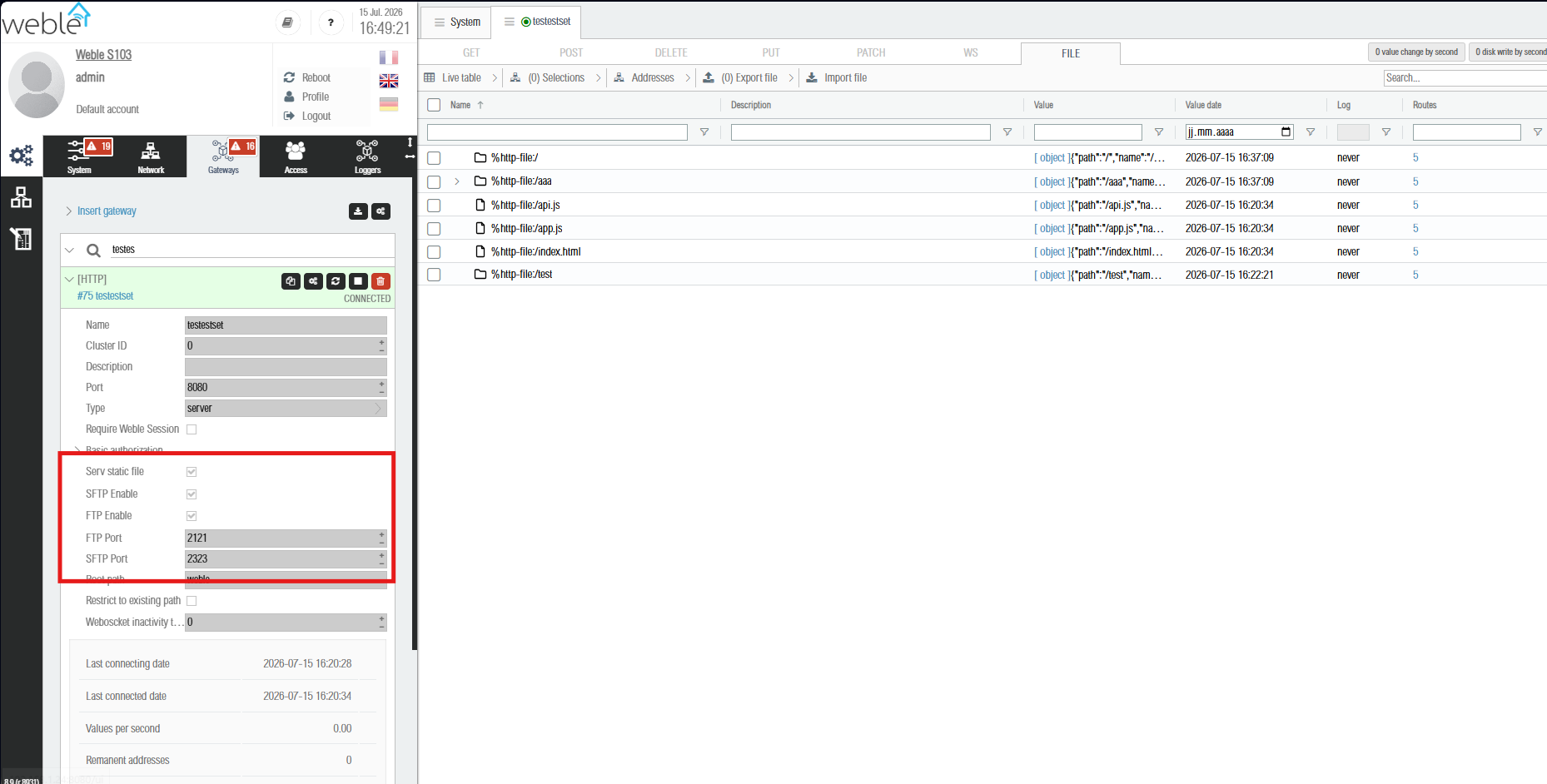
Static file server enabled, with FTP and SFTP. Click the image to view it full size.
¶ 5.2 How it works
The static file server:
- Serves files from the gateway's data directory (
/data/<gateway_id>/). - Supports
index.htmlas the default file for directory requests. - Sends
ETagandCache-Controlheaders. A file that has just changed is served withno-cache; the allowed cache time then grows with the age of the file, up to one hour. After replacing a file that had not changed for a long time, reload the page without cache if the old version still appears. - Supports all common file types: HTML, CSS, JS, JSON, images (PNG, JPG, SVG, WebP), fonts, PDF, video, and more.
- Blocks access to hidden files (dotfiles) for security.
When the gateway is configured to use the same port as the Weble web server, the driver integrates seamlessly — the static files are served under the Root path prefix (e.g. /myapp/), and the Weble authentication session can be required via the Require Weble Session option.
¶ 5.3 Browsing and managing files from the interface
The static file directory of a server-mode gateway is exposed directly in the address grid under the FILE tab. Each file and folder becomes a read-only %http-file: address, presented as a tree with folder and file icons. The tree is kept in sync with the directory automatically: files added, renamed or removed — whether from the interface, over FTP/SFTP, or by the running web application — appear and disappear on their own.
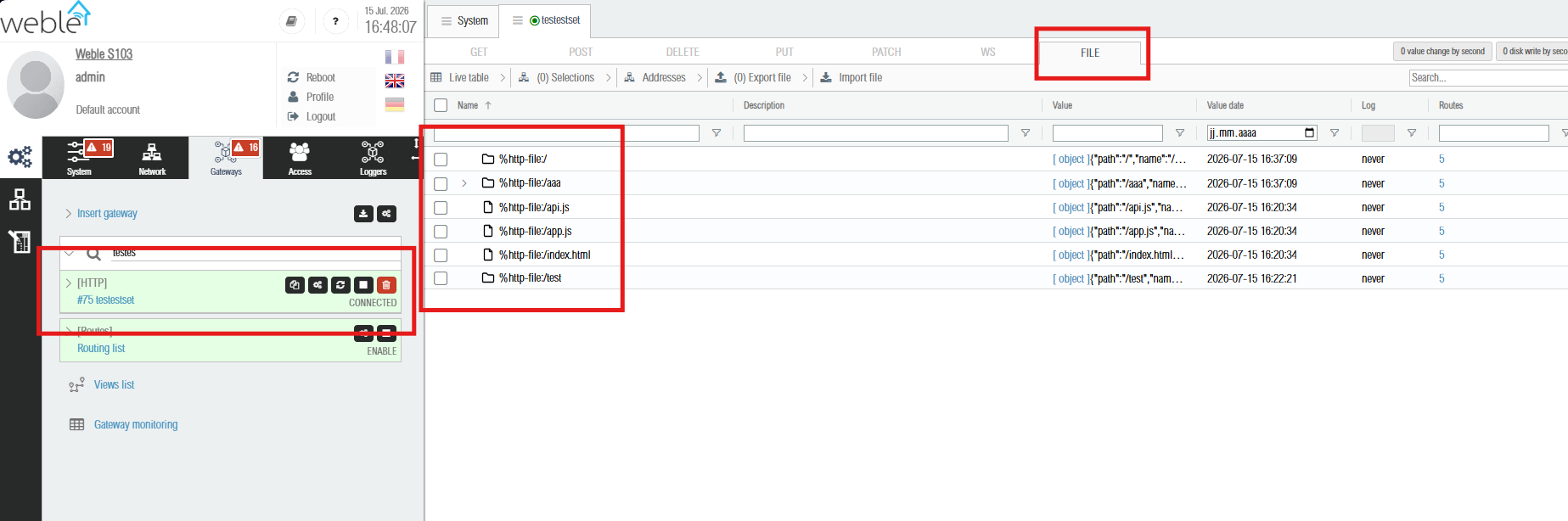
The FILE tab showing the static file directory as a tree of %http-file: addresses. Click the image to view it full size.
Each %http-file: address holds a descriptor of the entry as its value:
{
  "path": "/api.js",
  "name": "api.js",
  "directory": false,
  "date": "2026-07-15T14:20:34.000Z",
  "size": 1024
}
- path — path of the entry, relative to the gateway's data directory.
- name — file or folder name (the root folder is
/). - directory —
truefor a folder,falsefor a file. - date — last modification date.
- size — file size in bytes (files only). Folders instead expose a
filesarray of their children and acount.
¶ Interface actions
Right-click an entry in the FILE tab to open its context menu:
| Action | Available on | Description |
|---|---|---|
| Upload | folders | Pick a local file and upload it into the selected folder. |
| Create directory | folders | Create a new sub-folder inside the selected folder. |
| Rename | any entry except the root | Rename the file or folder. |
| Remove | any entry except the root | Delete the file, or a folder and all its content (recursive). |
| Download / Download (zip) | any entry | Download the file. A folder is downloaded as a .zip archive built by the gateway. |
Uploads are limited to 100 MB per file. An existing file with the same name is only replaced once the transfer is complete.
All paths are confined to the gateway's own data directory.
¶ File management over FTP/SFTP
Files can also be managed over the network by enabling the FTP and/or SFTP server options on the gateway:
- FTP Enable — starts an FTP server (default port
2121) serving the gateway's data directory. - SFTP Enable — starts an SFTP server (default port
2323) for secure file transfers.
Connect with any FTP/SFTP client (e.g. FileZilla, WinSCP) to upload your custom HTML/CSS/JS files. Log in with a gateway account that has the Administrator right (same user name and password as for the web interface, accounts of Administration → System → Accounts); other accounts are refused.
Prefer SFTP, and do not expose the FTP port outside your local network.
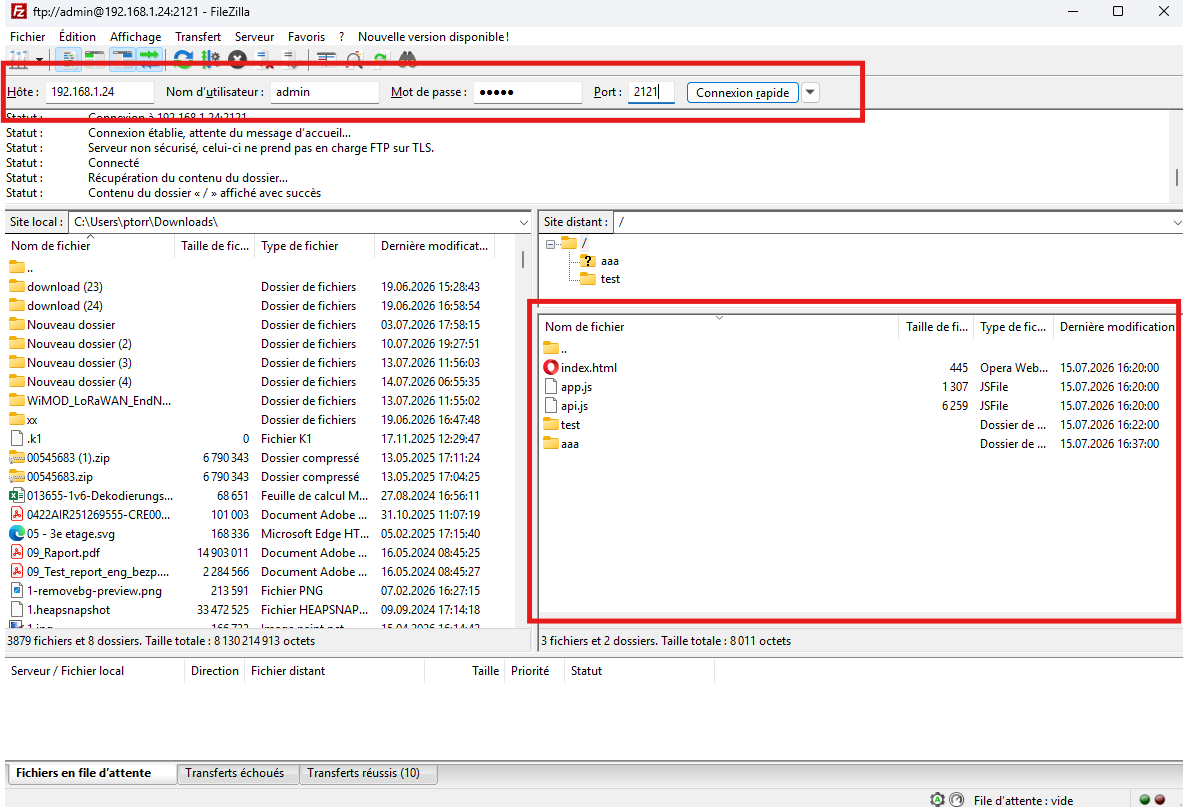
Point the client at the gateway's IP address on the FTP or SFTP port. The remote directory shows the same files as the FILE tab (index.html, api.js, app.js and any folders you create).
FTP — connect on port 2121:
SFTP — connect on port 2323 (sftp:// prefix):
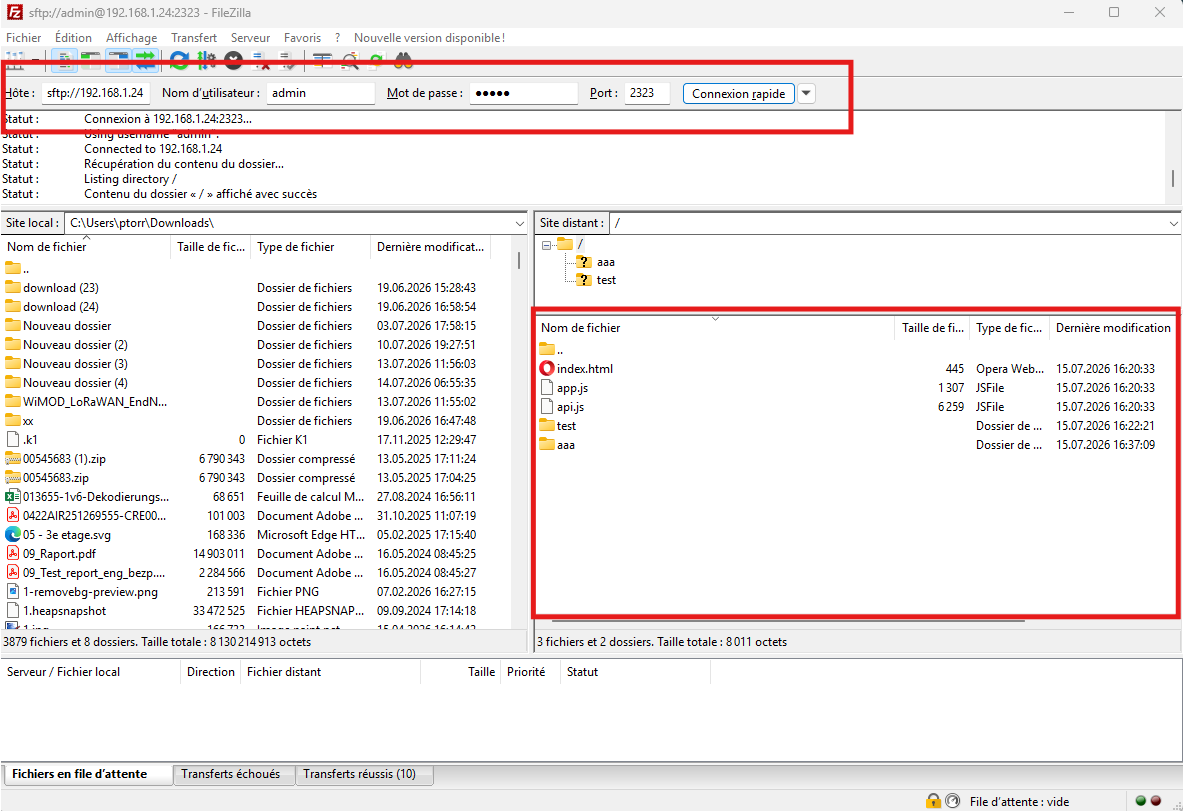
Click either screenshot to view it full size.
¶ Programmatic file management (peers API)
The same operations are available programmatically through the peers API, with gateways.callGatewayMethod and the target gateway's id:
// peers is the object returned by auth() / connect() (api.js)
peers('supervision').require('gateways', function(err, gateways) {

  // create a folder "assets" in the root folder, then upload a file into it
  gateways.callGatewayMethod(gatewayId, 'mkdir', ['%http-file:/', 'assets'], function(err) {
    if (err) return console.error(err);
    // arguments: [parentFolderAddress, fileName], then the content as a peers stream
    gateways.callGatewayMethod(gatewayId, 'push', ['%http-file:/assets', 'logo.svg'],
      peers.streamArg(file),               // a File or Blob, a string or a Buffer
      function(err, info) {
        if (err === 'keepalive') return;   // sent every 20 s during a long transfer
        if (err) return console.error(err);
        console.log(info);                 // { name: 'logo.svg', size: 1024 }
      });
  });
});
The other operations follow the same pattern (each call must wait for the previous one to complete):
// download: the content comes back as a stream
gateways.callGatewayMethod(gatewayId, 'readFile', ['%http-file:/assets/logo.svg'],
  function(err, stream, file) {          // file = { name, size }
    if (err) return console.error(err);
    stream.collect('bytes', function(err, bytes) { /* file content */ });
  });

// rename
gateways.callGatewayMethod(gatewayId, 'rename', ['%http-file:/assets/logo.svg', 'brand.svg'], function(err) {});

// remove (recursive for folders)
gateways.callGatewayMethod(gatewayId, 'rm', ['%http-file:/assets/brand.svg'], function(err) {});
| Method | Arguments | Description |
|---|---|---|
mkdir |
[parentAddress, name] |
Create the folder name in the folder addressed by parentAddress. |
push |
[parentAddress, name] + stream |
Upload a file. The content is a peers stream (peers.streamArg(...)) passed after the arguments array. 100 MB at most. A file with the same name is replaced once the transfer is complete. |
readFile |
[address] |
Download a file as a stream. On a folder address, the folder comes back as a .zip archive. |
rename |
[address, newName] |
Rename the file or folder. |
rm |
[address] |
Delete the file or folder (recursive). |
parentAddressmust be an existing%http-file:folder address, andname/newNamemust be a plain entry name (no/,\,.or..). The root%http-file:/cannot be renamed or removed.
¶ 5.4 Default template and API library
On first startup, if the data directory is empty, the driver copies a default web application template containing:
index.html— entry point that loads the app module.api.js— Weble JavaScript API library for connecting to the gateway via WebSocket. Provides functions for authentication, reading/writing values, and listening to real-time updates.app.js— example application that authenticates and listens to all address value changes.
¶ api.js — Weble JavaScript API
The api.js module provides the following functions:
| Function | Description |
|---|---|
connect(options, callback) |
Establishes a WebSocket connection to the gateway. Options: host (default: current origin), username, password. Returns a peers object for accessing all gateway modules. |
auth(options, callback) |
Alias for connect(). First tries session-based authentication, then falls back to username/password. |
listenAddress(name, callback) |
Subscribes to an address and receives real-time value updates. The callback is called with the initial value and then on every change. |
writeValue(address, value, callback) |
Writes a value to a gateway address (by name or ID). |
getPeers() |
Returns the peers object after connection for direct access to gateway modules. |
getGatewaysModule(callback) |
Gives the gateways module of the gateway (callback(err, gateways)), for direct calls such as gateways.getAddress(...) or gateways.callGatewayMethod(...). |
onBodyReady(callback) |
Utility — calls the callback when the DOM is ready. |
¶ Example: listen to a Modbus register
import { auth, listenAddress } from './api.js';

auth({}, function(err, peers) {
  if (err) return alert('Please log in to the gateway first');
  startListening();
});

function startListening() {
  listenAddress('%M1', function(err, address) {
    if (err) return console.error(err);
    document.getElementById('temp').textContent = address.value;
  });
}
¶ Example: write a setpoint
import { writeValue } from './api.js';

writeValue('%bac:local/analogValue:1', 22.5, function(err) {
  if (err) console.error('Write failed:', err);
  else console.log('Setpoint updated');
});
¶ Example: listen to all values
To listen to all new values across all gateways:
import { auth } from './api.js';

auth({}, function(err, peers) {
  if (err) return alert('Please log in to the gateway first');
  onLogin(null, peers);
});

function onLogin(err, peers) {
  if (err) return alert(err);

  peers('supervision').require('gateways', function(err, gateways) {
    gateways.on('newValue', function(id, value, value_string, value_date) {
      console.log(id, value, value_date);
    });
  });
}
¶ 5.5 Building a custom visualization
A typical custom visualization setup:
- Create an HTTP gateway in server mode with Serv static file enabled.
- Choose how to expose it: a dedicated Port (no Root path), or the port of the web interface with a Root path (e.g.
/dashboard). - Enable FTP or SFTP for file management.
- Upload your custom HTML/CSS/JS files via FTP/SFTP.
- In your JavaScript code, import
api.jsto connect, listen to addresses, and write values in real-time.
The static file server also proxies WebSocket connections (including /socket.io), allowing the api.js library to work seamlessly. The /auth path is automatically proxied to the Weble web server for session authentication.
¶ Authentication modes
The auth() function supports two authentication modes:
- Session-based — if the user is already logged into the Weble web interface in the same browser, the session cookie is reused automatically. Call
auth({}, callback)with empty options. - Username/Password — provide explicit credentials:
auth({ username: 'myuser', password: 'mypassword' }, callback). Do not put a real password in a page served to browsers: anyone who can open the page can read it. Use a dedicated account with limited rights, or the session-based mode.
Access the dashboard at http://<gateway-ip>:<port>/ (or http://<gateway-ip>/<rootPath>/ if using the Weble web server port).
¶ 6. Developer reference
| Property | Value |
|---|---|
| Address regex | See below |
| Readable | No (acceptsRead = false). In client mode, writing to an address sends the request; the response is written to %http-<method>:#<path> and to %http-<method>:#lastQuery. |
| Writable | Yes for all addresses matching the regex. |
| Remanent | Server mode: depends on json.remanent. Client mode: never. Addresses starting with # after the method prefix are read-only auto-generated addresses. |
Address regex:
^%http-(post|get|put|delete|patch|ws|file):(.*)$
¶ Write value format
Simple value — sent as HTTP body (auto Content-Type: application/json if object):
writeValue('%http-post:/api/data', { temperature: 22.5 })
Structured value — separate headers, query parameters, and body:
writeValue('%http-post:/api/data', {
  headers: { 'X-Custom': 'value' },
  query: { param1: 'value1' },
  body: { temperature: 22.5 }
})
¶ WebSocket message format
Incoming WebSocket messages are received on %http-ws:<path>/message as:
{ "payload": "<message content>", "client": "%http-ws:/path/#0" }
¶ Auto-generated addresses
Both modes auto-create read-only addresses prefixed with # (requests received in server mode, responses received in client mode):
%http-get:#/path— last GET request data (with query params and body)%http-post:#lastQuery— last POST request received
¶ 7. Troubleshooting
| Symptom | Cause and fix |
|---|---|
The gateway does not start, its log shows invalid rootPath |
Port is the port of the gateway web interface and Root path is empty. Fill in a Root path or choose another port. |
The gateway does not start, its log shows missing license |
The gateway has no HTTP licence. |
Requests are answered 401 Invalid user |
Basic authorization is set and the request has no, or wrong, credentials. |
The response body is undefined (server mode) |
The answer address (%http-<method>:<path>, without #) has no value yet. Write one to it. |
| A polled address stays empty (client mode) | The response is in the # twin of the address. If the status of the address starts with !, the request failed; it is sent again at the next polling. |
| FTP or SFTP login refused | Wrong user name or password, or the account does not have the Administrator right. |