An HTTP gateway in server mode can host your own web pages: a dashboard, a small operator interface or a single-page application. The gateway serves the files of its own folder, and the pages read and write gateway values in real time through the api.js library supplied with it.
This page is for developers who build such a page. The HTTP server and client functions of the driver (REST, webhooks, WebSocket) are described on the HTTP driver page.
¶ 1. Two ways to serve the page
Create an HTTP gateway, set Type to server and tick Serv static file (see HTTP driver, 2.5). Then choose how the page is reached:
| Under the web interface address (recommended) | On a dedicated port | |
|---|---|---|
| Port | The port of the gateway web interface (80 on a gateway) |
A free port, e.g. 8085 |
| Root path | Mandatory, e.g. dashboard |
Leave empty (ignored) |
| Require Weble Session | Tick it to reserve the page to users logged in on the gateway | Not applied |
| Page address | http(s)://<gateway>/dashboard/ |
http://<gateway>:8085/ |
| Who can read the files | Logged-in users only (with Require Weble Session) | Anyone who can reach the port |
On a dedicated port, every file of the folder can be downloaded by anyone who reaches that port. Do not store anything confidential there, and restrict access to the port with a firewall or by network. To reserve a page to logged-in users, use the web interface port with a Root path and Require Weble Session.
Gateway JSON for the recommended setup:
{
  "type": "server",
  "port": 80,
  "rootPath": "dashboard",
  "staticFileServer": true,
  "requireWebleSession": true
}
The static file server:
- serves
index.htmlas the default file of a folder; - serves all common file types (HTML, CSS, JS, JSON, images, fonts, PDF, video…);
- refuses hidden files (names starting with
.); - on a dedicated port, relays
/authand the live connection (/socket.io) to the gateway web server, so thatapi.jsworks the same way in both setups.
Use relative URLs in your pages (./app.js, not /app.js) so that they also work under a Root path.
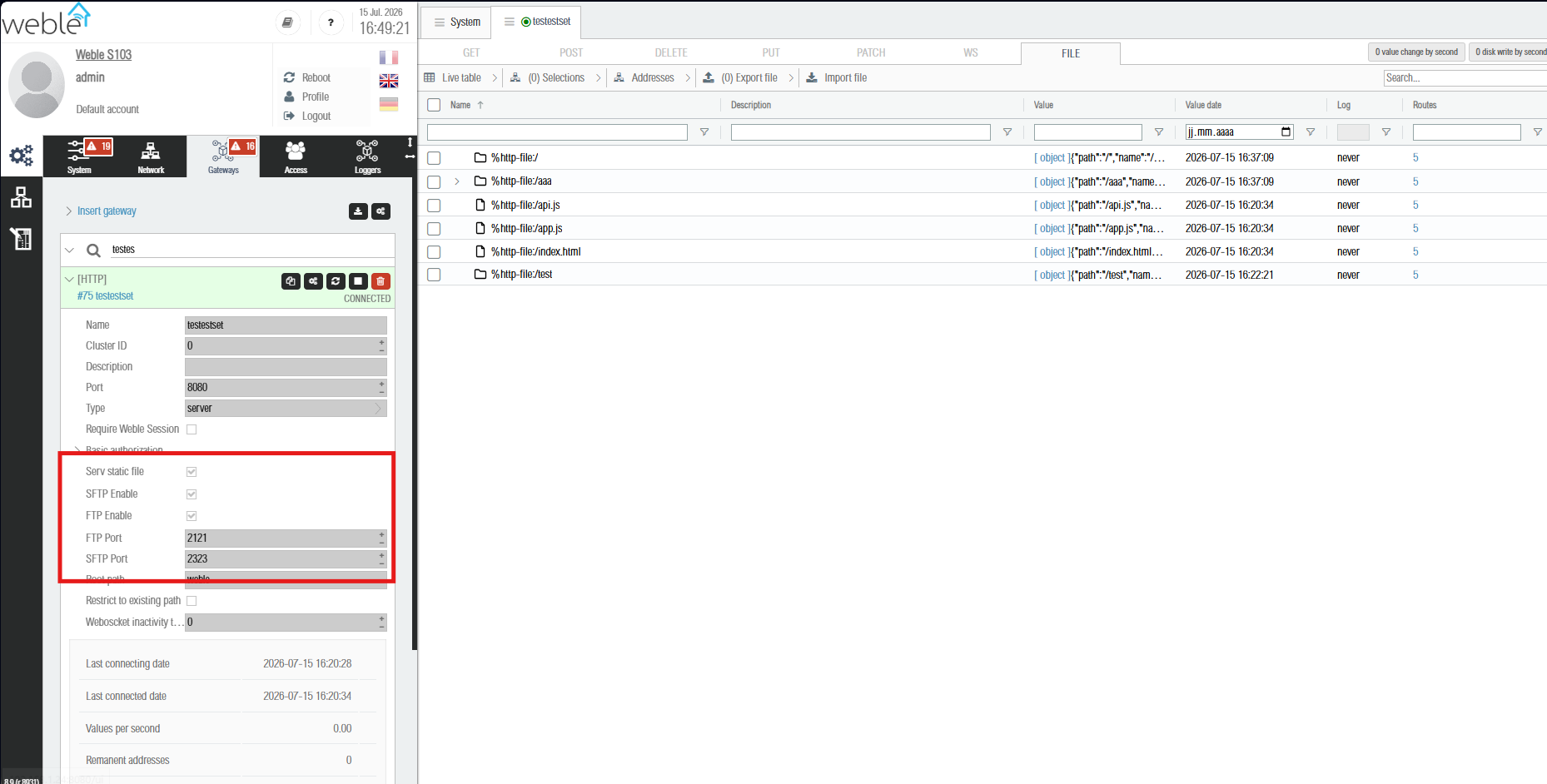
Static file server enabled, with FTP and SFTP. Click the image to view it full size.
¶ 2. The file folder
Each HTTP gateway has its own folder on the gateway (/data/<gateway_id>/). All file operations are confined to it.
¶ 2.1 Starter template
On the first start, if the folder is empty, the driver copies a small template:
index.html— entry point that loadsapp.jsas a module;api.js— the Weble JavaScript library (see 5). Keep it as is and import it;app.js— an example that logs in with the browser session and lists every new value received.
¶ 2.2 The FILE tab
The folder is shown in the address grid of the gateway, under the FILE tab, as a tree of read-only %http-file: addresses. The root folder is %http-file:/. The tree follows the folder automatically: files added, renamed or removed from the interface, over FTP/SFTP or through the API appear and disappear on their own.
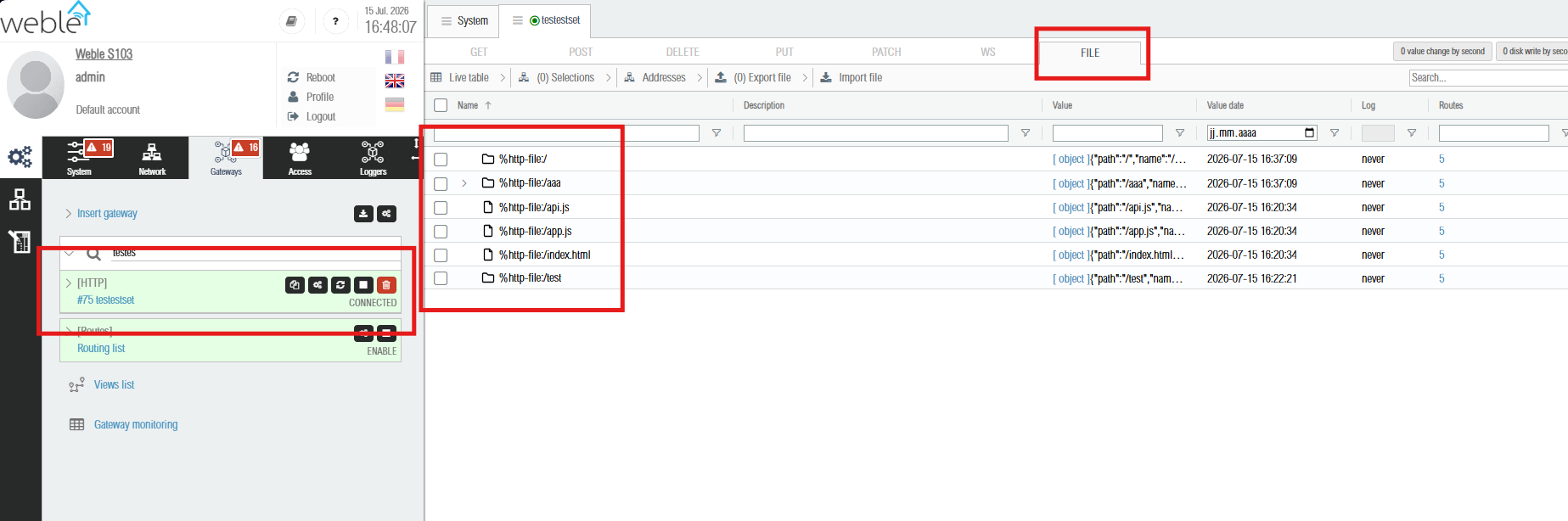
The FILE tab showing the folder as a tree of %http-file: addresses. Click the image to view it full size.
The value of each %http-file: address describes the entry:
{
  "path": "/api.js",
  "name": "api.js",
  "directory": false,
  "date": "2026-07-15T14:20:34.000Z",
  "size": 1024
}
- path — path of the entry, relative to the gateway folder.
- name — file or folder name (the root folder is
/). - directory —
truefor a folder,falsefor a file. - date — last modification date.
- size — file size in bytes (files only). Folders expose instead a
filesarray of their children and acount.
Right-click an entry to open its context menu:
| Action | Available on | Description |
|---|---|---|
| Upload | folders | Pick a local file and upload it into the folder. |
| Create directory | folders | Create a sub-folder. |
| Rename | any entry except the root | Rename the file or folder. |
| Remove | any entry except the root | Delete the file, or the folder and all its content. |
| Download / Download (zip) | any entry | Download the file. A folder is downloaded as a .zip archive built by the gateway. |
Uploads are limited to 100 MB per file. An existing file with the same name is replaced only once the transfer is complete, so a failed transfer leaves the old file untouched.
¶ 3. FTP and SFTP
To upload files with a desktop client (FileZilla, WinSCP…), enable the file servers in the gateway parameters:
| Label | JSON Key | Default |
|---|---|---|
| FTP Enable | ftpEnable | off |
| FTP Port | ftpPort | 2121 |
| SFTP Enable | sftpEnable | off |
| SFTP Port | sftpPort | 2323 |
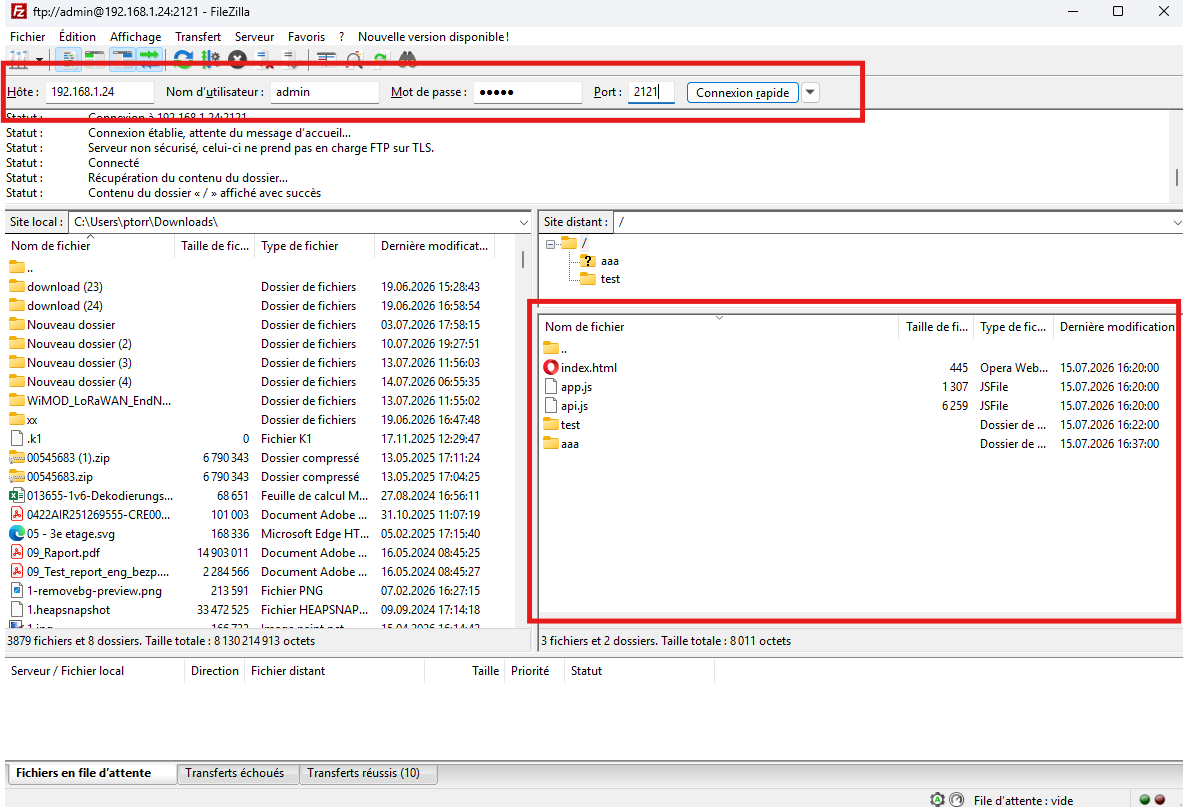
Both servers show the gateway folder, with the same content as the FILE tab. Log in with a gateway account that has the Administrator right (same user name and password as for the web interface, accounts of Administration → System → Accounts); other accounts are refused.
Prefer SFTP: FTP sends the password in clear text. Do not expose the FTP port outside your local network.
FTP — connect on port 2121:
SFTP — connect on port 2323 (sftp:// prefix):
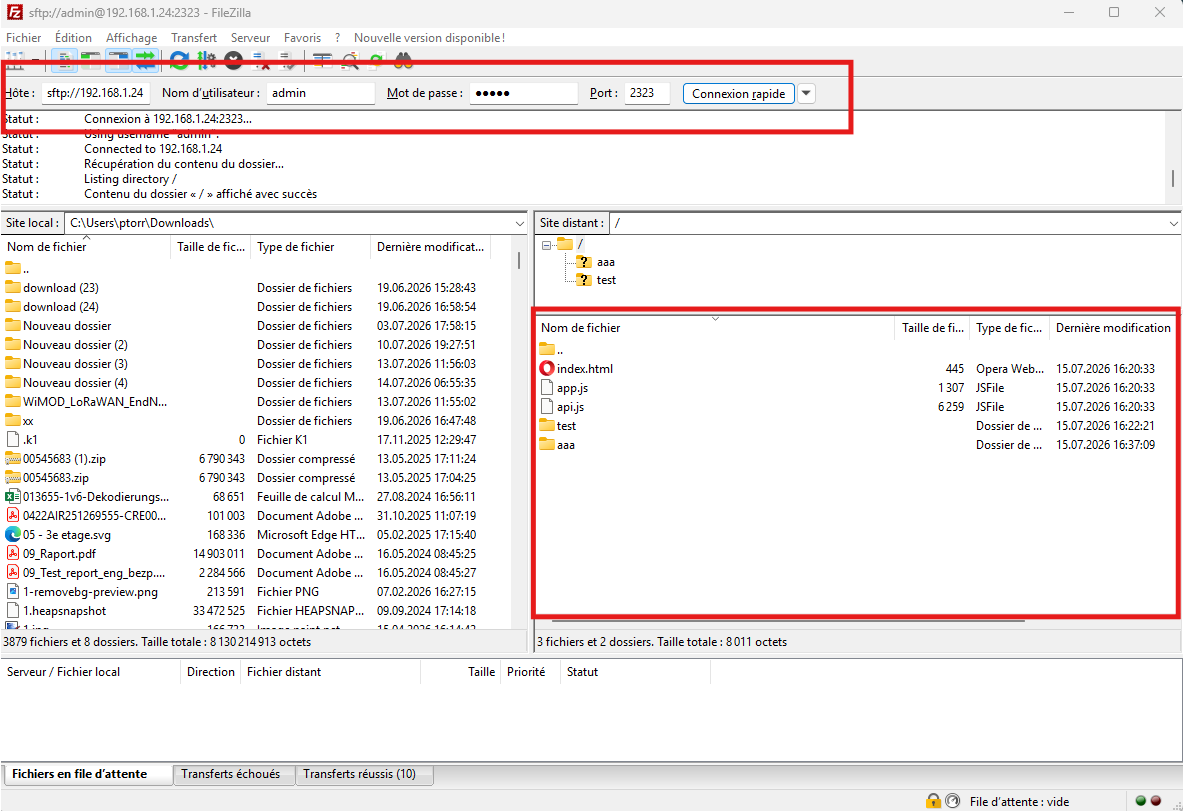
Click either screenshot to view it full size.
¶ 4. Managing files through the API
The operations of the FILE tab are also available through the peers API, with gateways.callGatewayMethod and the id of the HTTP gateway.
| Method | Arguments | Description |
|---|---|---|
mkdir |
[parentAddress, name] |
Create the folder name in the folder parentAddress. |
push |
[parentAddress, name] + stream |
Upload a file. The content is a peers stream (peers.streamArg(...)) passed after the arguments array. 100 MB at most. A file with the same name is replaced once the transfer is complete. Returns {name, size}. |
readFile |
[address] |
Download a file as a stream. On a folder address, the folder comes back as a .zip archive. |
rename |
[address, newName] |
Rename the file or folder. |
rm |
[address] |
Delete the file or folder (recursive). |
parentAddressmust be an existing%http-file:folder address, andname/newNamea plain entry name (no/,\,.or..). To write into a sub-folder, create it withmkdirfirst, then use its address as parent. The root%http-file:/cannot be renamed or removed.
Create a folder, then upload a file into it:
// peers is the object returned by auth() / connect() (api.js)
peers('supervision').require('gateways', function(err, gateways) {

  gateways.callGatewayMethod(gatewayId, 'mkdir', ['%http-file:/', 'assets'], function(err) {
    if (err) return console.error(err);
    // arguments: [parentFolderAddress, fileName], then the content as a peers stream
    gateways.callGatewayMethod(gatewayId, 'push', ['%http-file:/assets', 'logo.svg'],
      peers.streamArg(file),               // a File or Blob, a string or a Buffer
      function(err, info) {
        if (err === 'keepalive') return;   // sent every 20 s during a long transfer
        if (err) return console.error(err);
        console.log(info);                 // { name: 'logo.svg', size: 1024 }
      });
  });
});
The other operations follow the same pattern. Wait for each call to complete before sending the next one:
// download: the content comes back as a stream
gateways.callGatewayMethod(gatewayId, 'readFile', ['%http-file:/assets/logo.svg'],
  function(err, stream, file) {          // file = { name, size }
    if (err) return console.error(err);
    stream.collect('bytes', function(err, bytes) { /* file content */ });
  });

// rename
gateways.callGatewayMethod(gatewayId, 'rename', ['%http-file:/assets/logo.svg', 'brand.svg'], function(err) {});

// remove (recursive for folders)
gateways.callGatewayMethod(gatewayId, 'rm', ['%http-file:/assets/brand.svg'], function(err) {});
To list the content of a folder, read the value of its %http-file: address (files array), not readFile.
Errors returned by these methods:
| Error | Meaning |
|---|---|
Address not found |
The address does not exist: wrong path, folder not created yet, or gateway not started. |
Invalid name … |
The name contains a path separator. Create the sub-folder with mkdir and use its address as parent. |
content must be a peers stream (peers.streamArg) |
The content was not passed as a stream after the arguments array. |
… is not a file |
readFile was called on something that is neither a file nor a folder. |
¶ 5. api.js
api.js is an ES module. Import it from your page script:
<!doctype html>
<html>
<head><meta charset="utf-8"><meta name="viewport" content="width=device-width,initial-scale=1"><title>Dashboard</title></head>
<body><div id="app">…</div><script type="module" src="./app.js"></script></body>
</html>
| Function | Description |
|---|---|
onBodyReady(callback) |
Calls callback once the page is loaded. |
auth(options, callback) |
Logs in and opens the live connection to the gateway. {} reuses the session of the user logged in on the gateway web interface; {username, password} logs in with an account (see 6). callback(err, peers). |
connect(options, callback) |
Same as auth. options.host defaults to the origin of the page. |
listenAddress(name, callback) |
Subscribes to an address (by name or id). callback(err, address) is called once with the current value, then on every change; read address.value and address.value_date. |
writeValue(address, value, callback) |
Writes a value to an address (by name or id). callback(err). |
getPeers() |
Returns the peers object once logged in, for direct access to the gateway modules. |
getGatewaysModule(callback) |
Gives the gateways module (callback(err, gateways)), for direct calls such as gateways.callGatewayMethod(...). |
apiLogin(auth, callback) |
Low-level login request used by connect. You normally do not call it. |
¶ 5.1 Show a value and keep it up to date
import { onBodyReady, auth, listenAddress } from './api.js';

onBodyReady(function() {
  auth({}, function(err) {
    if (err) {
      document.getElementById('app').textContent = 'Please log in to the gateway first.';
      return;
    }
    listenAddress('%M1', function(err, address) {
      if (err) return console.error(err);
      document.getElementById('app').textContent = address.value;
    });
  });
});
¶ 5.2 Write a setpoint
import { writeValue } from './api.js';

writeValue('%bac:local/analogValue:1', 22.5, function(err) {
  if (err) console.error('Write failed:', err);
  else console.log('Setpoint updated');
});
¶ 5.3 Listen to all values
import { auth } from './api.js';

auth({}, function(err, peers) {
  if (err) return alert('Please log in to the gateway first');
  peers('supervision').require('gateways', function(err, gateways) {
    gateways.on('newValue', function(id, value, value_string, value_date) {
      console.log(id, value, value_date);
    });
  });
});
¶ 6. Authentication
The page acts with the rights of the user who is logged in: the role of that account applies to every read and write.
- Session (recommended) — if the user is already logged in on the gateway web interface in the same browser,
auth({}, callback)reuses that session. Combine it with Require Weble Session so that the page itself is only served to logged-in users. - User name and password —
auth({ username: 'myuser', password: 'mypassword' }, callback). Use it only with credentials typed by the user in a login form of your page.
Never write a real password in a file of the page: anyone who can open the page can read it. If a page must log in on its own, use a dedicated account with the smallest rights it needs.
¶ 7. Browser cache and troubleshooting
The server sends ETag and Cache-Control headers. A file that has just changed is served with no-cache; the allowed cache time then grows with the age of the file, up to one hour. After replacing a file that had not changed for a long time, reload the page without cache (Ctrl+F5) if the old version still appears.
| Symptom | Cause and fix |
|---|---|
The gateway does not start, its log shows invalid rootPath |
Port is the port of the web interface and Root path is empty. Fill in a Root path or choose another port. |
| The page shows "Please log in to the gateway first" | auth({}) found no session. Log in on the gateway web interface in the same browser, then reload the page. |
| The page loads but scripts or styles are missing under a Root path | The page uses absolute URLs (/app.js). Use relative URLs (./app.js). |
| The old version of a file still appears | Browser cache: reload without cache. |
| The FILE tab is empty | The gateway is not of Type server, or it is not started. |
| FTP or SFTP login refused | Wrong user name or password, or the account does not have the Administrator right. |
push answers Address not found |
The parent folder does not exist yet: create it with mkdir, or wait for the gateway to start. |
¶ See also
- HTTP driver — server and client modes, gateway parameters.
- API driver — external access to the gateway API.
- peers API — the
gatewaysmodule and its methods.