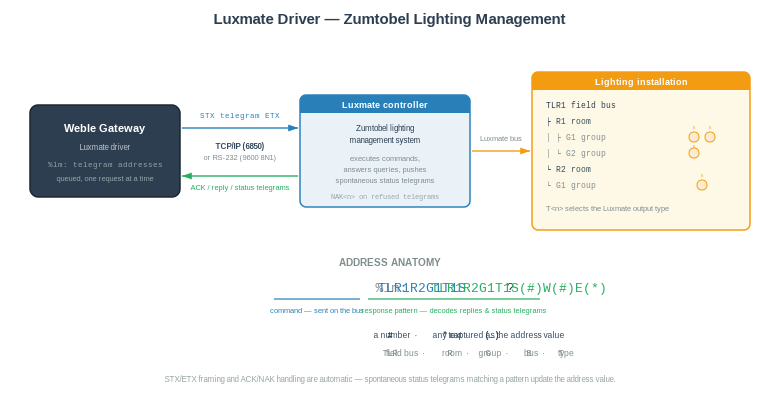
The Luxmate driver connects the gateway to a Zumtobel Luxmate lighting-management system. Luxmate is a professional lighting-control platform used in commercial buildings: luminaires are organised in rooms and groups on a Luxmate field bus, driven by a central Luxmate controller.
The driver talks to the Luxmate controller over TCP/IP or an RS-232 serial link using the Luxmate ASCII telegram protocol. Each gateway address holds a Luxmate telegram: commands are sent on the bus, and replies — as well as spontaneous status telegrams — are decoded back into address values. This makes the lighting system available to routes, logics, views, logging, and the cloud.
Addresses use the prefix
%lm:followed by a Luxmate telegram. The driver frames every telegram automatically (STX…ETX) and handles theACK/NAKprotocol answers — you only write the telegram text.
¶ 1. Getting started
¶ 1.1 Gateway configuration
Create a new gateway and select the Luxmate driver (category Building Automation). Choose the connection Type:
- ip — TCP connection to the Luxmate controller. Configure Host and Port (default
6850). - serial — RS-232 connection. Select the serial port (field labelled Connection type in the form), the Baudrate (default
9600) and the Parity (8 data bits, 1 stop bit).
The default Luxmate address fields (field bus, room, group, bus, type) are only used by Send default address, which announces this address on the bus each time the driver starts; they are not applied to your addresses.
¶ 1.2 Inserting addresses
Insert addresses with the %lm: prefix followed by the Luxmate telegram — see Addresses for the format. Two built-in shortcuts are available out of the box: %lm:time (controller date & time) and %lm:version (controller version).
¶ 2. Gateway parameters
¶ 2.1 Connection parameters
| Label | JSON Key | Description |
|---|---|---|
| Name | name | A descriptive name. |
| Cluster ID | cluster | Cluster identifier. |
| Description | description | Optional description. |
| Type | type | Connection type: ip (TCP/IP) or serial (RS-232). |
| Host | host | IP only. IP address of the Luxmate controller. Default: 192.168.1.99. |
| Port | port | IP only. TCP port. Default: 6850. |
| Connection type | serialPort | Serial only. The serial interface connected to the Luxmate system. The field is labelled Connection type in the form; it is the serial port selector (USB serial adapters are listed by name). |
| Serial Baudrate | baudRate | Serial only. Baudrate, 300 to 256000. Default: 9600. |
| Parity | parity | Serial only. Parity: none, even, or odd. Default: none. |
| Inactivity Timeout (ms) | inactivityTimeout | Serial only. Watchdog: restarts the connection when nothing is received for this duration. 0 = disabled. |
The serial line uses 8 data bits and 1 stop bit. Another framing can only be set in the gateway JSON (dataBits, stopBit).
In IP mode, if no data is exchanged for 120 s the driver stops with socket timeout and is restarted by the gateway; addresses with Startup are then transmitted again. On an installation that stays silent for long periods, add one polled query as a keep-alive, for example %lm:time with Polling = 60000.
¶ 2.2 Default Luxmate address
The Luxmate protocol identifies an output with a field bus / room / group / bus / type tuple, written TLR<t> R<r> G<g> B<b> T<y> in telegrams. These parameters are used for the start-up telegram of Send default address only; they are not applied to your addresses:
| Label | JSON Key | Description |
|---|---|---|
| DefaultFieldBus | defaultFieldBus | Default field-bus (TLR) number. Default: 1. |
| DefaultRoom | defaultRoom | Default room (R) number. Default: 1. |
| DefaultGroup | defaultGroup | Default group (G) number. Default: 0. |
| DefaultBus | defaultBus | Default bus (B) number. Default: 0. |
| DefaultType | defaultType | Default Luxmate output type (T). Default: 1. |
| Send default address | applyDefaultAtStart | If enabled, the default address telegram (TLR<t>R<r>G<g>B<b>T<y>!!) is sent on the bus when the gateway starts. |
¶ 2.3 Gateway JSON example
{
    "type": "ip",
    "host": "192.168.1.99",
    "port": 6850,
    "defaultFieldBus": 1,
    "defaultRoom": 1,
    "defaultGroup": 0,
    "defaultBus": 0,
    "defaultType": 1,
    "applyDefaultAtStart": false
}
Serial variant:
{
    "type": "serial",
    "serialPort": "/dev/ttyUSB0",
    "baudRate": 9600,
    "parity": "none",
    "inactivityTimeout": 0
}
¶ 3. Addresses
¶ 3.1 Address format
An address is a Luxmate telegram, optionally followed by a response pattern:
%lm:<command>
%lm:<command>?<response pattern>
- The command is the Luxmate telegram sent on the bus (the
STX/ETXframing is added automatically). - The optional
?separates the response pattern used to recognise and decode the controller's reply. When?is present but the pattern is left empty, it defaults to(*)(capture the whole reply). - The
?is part of the telegram: for a query, the driver transmits the command followed by?. For example%lm:TIME?TIME(*)sendsTIME?. Do not add a second?.
Both parts can contain placeholders:
| Placeholder | Meaning |
|---|---|
# |
A number (one or more digits). |
* |
Any text. |
(…) |
Capture — the enclosed part of the reply becomes the address value. |
The address value is built from the captures of the response pattern:
- No capture group — a matching reply sets the value to
1. - One capture group — the captured text becomes the value (numeric strings are converted to numbers).
- Several capture groups — the value is an array of the captured parts.
¶ 3.2 Command addresses (write)
An address without a response pattern is a command: writing to it sends the telegram on the bus. The written value fills the placeholders of the command in order (write an array to fill several placeholders); after the controller acknowledges (ACK), the address takes the written value.
%lm:TLR1R2G1T1D%#
Writing 50 to this address sends TLR1R2G1T1D%50 — the # placeholder is replaced by the written value.
The available command telegrams (dimming
DM/D+/D-/D%/DS, scene calls, status queries…) depend on your Luxmate controller and installation — refer to the Zumtobel Luxmate bus documentation for the exact telegram set. The examples on this page are illustrative.
¶ 3.3 Query addresses (read)
An address with a response pattern is a query — it is read-only. Reading it sends the command part on the bus and decodes the reply with the pattern; the captured parts become the address value. Combined with polling, this keeps the value refreshed periodically.
%lm:TLR1R2G1T1S?TLR1R2G1T1S(#)W(#)E(*)
This queries a status and captures three parts — the value becomes an array, e.g. [2, 255, "00000"].
If the command part of a query still contains unfilled placeholders, the address is passive: nothing is sent, it only listens to the bus (see below).
¶ 3.4 Spontaneous telegrams
Every telegram received from the controller is matched against the response patterns of all addresses. When the installation pushes spontaneous status telegrams (automatic changes, manual actions…), any address whose pattern matches is updated immediately — even with polling disabled. A passive address is the natural way to capture them:
%lm:TLR2R91G50T2S(#)W(#)E(*)
Leave Polling at
0and Startup disabled on passive addresses. They are updated by the bus itself; with polling enabled the driver would try to transmit their pattern as a command.
¶ 3.5 Built-in aliases
Two convenience addresses expand to full telegrams automatically:
| Address | Expands to | Value |
|---|---|---|
%lm:time |
TIME?TIME(*) |
The controller date & time, decoded to a date value (raw reply format hhmmssddmmyyyy). |
%lm:version |
VERSION?V(#.#)L(*)BMS(*) |
The controller version, returned as a string such as V<version>L<level>BMS<build>. |
¶ 3.6 Address parameters
| Label | JSON Key | Description |
|---|---|---|
| Name | name | The Luxmate telegram (%lm:<command>[?<response pattern>]). |
| Polling | polling | Interval in milliseconds (minimum 100) at which the driver transmits the address again. For a query this refreshes the value. For a command this re-sends the last value of the address, or 1 if the address has no value yet. 0 = disabled. After a failure, the next attempt waits at least 11 s. |
| Startup | startup | If enabled, the telegram is transmitted once each time the address is loaded: when the gateway starts, and again when the address is created or edited. A command is sent with its last value, or 1 if it has none. |
| Description | description | Optional description. |
| Log | log | Logging mode: never, on update, always, or a fixed interval. |
Enable Polling or Startup on a command address only if re-sending its value is harmless. On a dimming command that has no stored value yet, the driver sends level
1.
Address JSON example:
{
    "polling": 60000,
    "startup": true
}
¶ 4. Communication details
- Telegrams are framed with
STX…ETXand theACK/NAKhandshake is handled transparently. - Requests are queued and serialized — one telegram at a time on the bus, with a 3 s response timeout each.
- Writes are prioritized: a write jumps ahead of pending background polling queries.
- A refused telegram is answered with a
NAKcode and surfaced as a read/write error — see NAK error codes.
¶ 5. NAK error codes
When the controller refuses a telegram, it answers with a NAK code. The driver translates it into an explicit error:
| Code | Meaning |
|---|---|
NAK1 |
Unknown room (local) number |
NAK2 |
Unknown group number |
NAK3 |
Unknown bus number |
NAK4 |
Unknown Luxmate type, or type not allowed |
NAK5 |
Unknown TLR (field-bus) number |
NAK6 |
Unauthorized data (e.g. an invalid time value) |
NAK8 |
Unknown command |
NAK10 |
Joker / name error — no Luxmate output was found |
NAK11 |
The name does not exist |
NAK12 |
Bus error (short-circuit) |
NAK13 |
Controller in initialisation state |
NAK14 |
State confirmation impossible |
¶ 6. See also
- DALI — DALI lighting lines.
- Serial ports and USB adapters — serial interfaces and USB adapters.
- Gateways — create, start and monitor a gateway.
- Routes — send the values of this driver to another protocol.
- Driver reference table — driver keys and address prefixes.